Picture this: you’re a plumber running Google Ads, spending a solid chunk of your monthly budget on campaigns. The phone rings regularly. Jobs get booked. Business seems decent. But when your marketing agency asks which campaigns are driving those calls, you have no idea. Was it the “emergency plumber” keyword? The brand campaign? That new ad you launched last month? You genuinely cannot say.
This isn’t a rare situation. It’s the default reality for thousands of local and service businesses running paid advertising without call tracking in place. They’re making budget decisions based on clicks and impressions while the actual revenue-generating events, the phone calls, go completely unattributed.
Call tracking for ad campaigns is the missing link. It’s the technology that connects your ad spend directly to your phone-based revenue, giving you a clear, data-backed answer to the question every business owner should be asking: which of my ads are actually making me money? This guide breaks down exactly how it works, what data it surfaces, how to set it up correctly, and how to use that information to make smarter decisions with every marketing dollar you spend.
Phone Calls Are Your Highest-Intent Leads
Think about the last time you picked up the phone to call a business. You weren’t browsing casually or vaguely curious. You had a specific need, you were ready to act, and you wanted to talk to someone now. That’s the mindset of almost every person who calls a local service business after clicking an ad.
For industries like home services, legal, healthcare, pest control, and HVAC, phone calls aren’t just one conversion type among many. They’re often the primary conversion. A homeowner dealing with a burst pipe isn’t filling out a contact form and waiting 24 hours for a response. They’re calling immediately, and they’re calling whoever picks up first. This is why PPC advertising for service businesses requires a fundamentally different approach to conversion tracking.
Yet the majority of advertisers in these industries set up Google Ads campaigns and only configure tracking for form submissions and online bookings. Clicks get measured. Form fills get counted. But phone calls? They disappear into a black hole with no attribution attached.
The result is a serious distortion of campaign performance. A keyword driving 15 phone calls a week might show zero conversions in your dashboard because nobody set up call tracking. The campaign looks like it’s failing. You pause it or cut the budget. You’ve just eliminated your best source of leads based on incomplete data.
This is one of the core reasons local business owners feel like their marketing campaigns are not driving sales. The marketing may actually be performing well, but without visibility into phone-based conversions, the data tells an incomplete and often misleading story.
There’s also a downstream effect on automated bidding. Google’s Smart Bidding algorithms optimize toward the conversion signals you feed them. If you’re only feeding them form fills, the algorithm optimizes for form fills, even if phone calls represent the majority of your actual revenue. The entire campaign strategy gets tilted in the wrong direction.
Fixing this starts with acknowledging that phone calls are a first-class conversion action, not an afterthought. Once you treat them that way, the entire picture of your campaign performance changes.
How Call Tracking for Ad Campaigns Actually Works
The technology behind call tracking is more straightforward than most people expect. The core mechanism is called Dynamic Number Insertion, or DNI. Here’s the basic idea: instead of displaying your real business phone number on your website, a small JavaScript snippet swaps in a unique tracking number based on how the visitor arrived at your page.
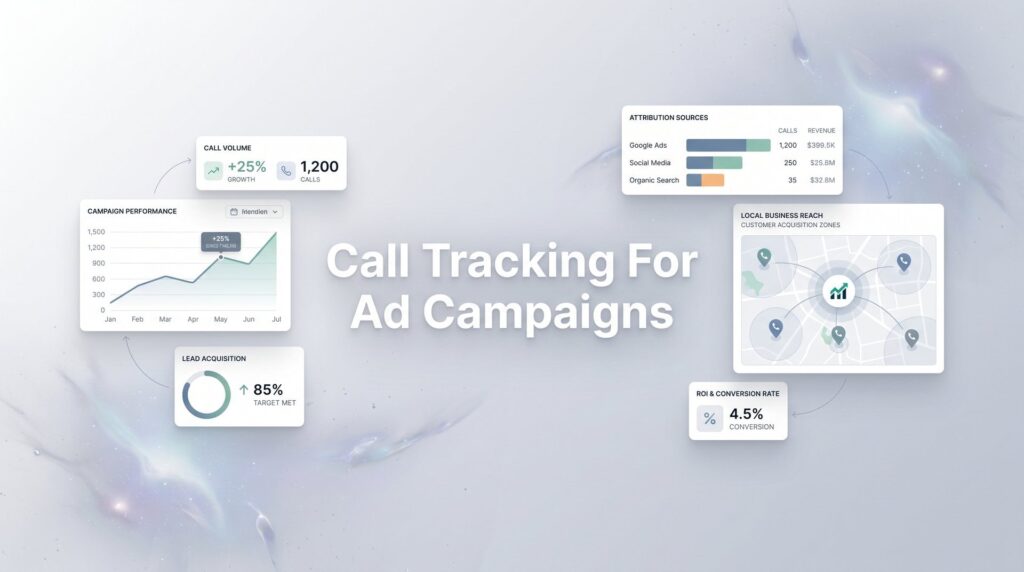
The flow looks like this. A potential customer searches for “emergency electrician near me,” clicks your Google Ad, and lands on your service page. The DNI script detects that this visitor came from a specific campaign, ad group, or keyword. It replaces the displayed phone number with a unique tracking number assigned to that traffic source. The visitor calls that number, the call routes seamlessly to your real business line, and the call tracking platform logs everything: the source, the keyword, the campaign, the call duration, the caller’s number, their location, and whether they’re a new or returning caller.
You never miss a call. The customer has no idea they dialed a tracking number. But you now have a complete record of exactly which ad drove that phone call. For a deeper dive into the implementation process, our guide on call tracking for local businesses walks through every step in detail.
There are a few different levels of tracking granularity worth understanding:
Campaign-level tracking: One unique number is assigned per traffic source or campaign. This tells you whether a call came from Google Ads vs. Facebook vs. organic search, but doesn’t drill down to the keyword level. It’s a good starting point but limited for optimization.
Session-level tracking: A unique number is assigned to each individual visitor session. This is the most granular option, allowing you to tie a specific call back to the exact keyword, ad, and even the device the caller used. It requires a larger pool of tracking numbers but provides the richest data.
Offline source tracking: Static tracking numbers assigned to print ads, direct mail, radio spots, or billboards. These don’t use DNI but let you measure which offline channels are generating calls alongside your digital campaigns.
Popular platforms for implementing this include CallRail, CallTrackingMetrics, and WhatConverts. Google Ads also offers its own native call tracking through Google forwarding numbers, which can be configured as call extensions or website call conversions directly within the platform. For most businesses running paid campaigns, a combination of a dedicated call tracking platform and Google’s native tracking provides the most complete coverage.
The setup requires placing a JavaScript snippet on your website, configuring which numbers map to which sources, and connecting the platform to your Google Ads account so call data flows back as conversion events. Done correctly, it’s invisible to callers and invaluable to you.
The Data That Changes Everything
Once call tracking is live, the data you gain access to fundamentally changes how you manage your campaigns. This isn’t just about knowing a call happened. It’s about understanding the full context of every call and using that context to make better decisions.
Keyword-level attribution is where things get genuinely powerful. You can see exactly which search terms are generating phone calls, not just clicks. A keyword like “24-hour plumber” might drive a fraction of your traffic but generate the majority of your phone calls. Without call tracking, that keyword looks like a moderate performer. With it, you can see it’s your single best revenue driver and invest accordingly.
Call quality metrics go beyond simply counting calls. Duration is one of the most important signals. A 90-second call where someone asked for your hours and hung up is very different from a 7-minute call where a customer described a project and asked about availability. Most call tracking platforms let you set minimum duration thresholds, typically 60 to 90 seconds, so that short, low-intent calls don’t get counted as qualified leads. This keeps your conversion data clean and meaningful.
Call recordings take quality assessment even further. You can listen to actual calls to understand what customers are asking about, how your staff is handling inquiries, whether callers are converting to appointments, and what objections are coming up repeatedly. This information is gold for refining ad copy, improving landing page messaging, and training your team. Building a solid marketing dashboard and reporting framework around this data ensures nothing gets lost.
Caller location data helps you assess geographic targeting. If a significant portion of your calls are coming from zip codes outside your service area, that’s a targeting problem you can fix. If one neighborhood is generating a disproportionate share of high-quality calls, that’s an opportunity to expand your bid adjustments in that area.
New vs. returning caller identification tells you whether your ads are reaching fresh prospects or repeatedly reaching people who’ve already called. High repeat caller rates can indicate follow-up issues or that your ads are showing too frequently to existing contacts.
Perhaps the most impactful use of this data is feeding it back into Google Ads’ automated bidding. When Smart Bidding algorithms receive call conversion signals alongside your other conversion data, they can optimize specifically for the actions that drive real revenue. Target CPA and Maximize Conversions strategies become dramatically more effective because they’re working with a complete picture of what a successful outcome actually looks like for your business.
Setting Up Call Tracking Without Wrecking Your Campaigns
Getting call tracking implemented correctly matters. A sloppy setup can create data gaps, mess with your local SEO, or give you misleading numbers. Here’s how to do it right.
Step 1: Choose your call tracking platform. For most local businesses running Google Ads, starting with Google’s native call tracking is a logical first move. It’s free, integrates directly with your Google Ads account, and covers the basics. If you need call recordings, more granular attribution, or CRM integration, a dedicated platform like CallRail or WhatConverts adds significant capability.
Step 2: Install the DNI script. Place the JavaScript snippet in the header of your website. This is what enables dynamic number swapping. Most platforms provide clear installation instructions, and if your site runs on WordPress or a similar CMS, there’s usually a plugin or tag manager integration that simplifies the process.
Step 3: Configure your conversion actions in Google Ads. Set up call conversions within your Google Ads account and define your minimum call duration threshold. A 60 to 90-second minimum is a common starting point for filtering out accidental dials and very short, low-intent calls. This threshold should be calibrated to your specific business, a legal firm might set it higher than a pizza delivery service. If you’re new to the platform, our paid advertising tutorial covers conversion action setup in more detail.
Step 4: Test thoroughly before going live. Call your own tracking numbers from different devices and traffic sources to confirm the routing works correctly and conversions are being logged. Check that call data is appearing in your Google Ads reports.
Now, the issue that trips up many local businesses: NAP consistency. NAP stands for Name, Address, Phone, and it’s a foundational element of local SEO. Google’s local algorithm uses consistent NAP information across your website, Google Business Profile, and online directories to verify and rank your business. If a call tracking number appears on your website and gets indexed or listed in directories, it can create conflicting signals and potentially hurt your local rankings.
The solution is to use DNI exclusively for paid traffic visitors while displaying your real business number for organic visitors. Most call tracking platforms allow you to configure this so the number swap only activates for sessions originating from paid sources. You should also ensure your tracking numbers are not indexed by search engines and are not submitted to any business directories. Your Google Business Profile should always display your real, primary business number. Understanding the risks of bad tracking attribution makes it clear why getting this right from the start is so critical.
Turning Call Data Into Smarter Ad Spend Decisions
Collecting call data is only valuable if you use it to make better decisions. This is where call tracking moves from a technical implementation to a genuine business intelligence tool.
The first and most important calculation you can now make is your true cost per lead. Before call tracking, many businesses calculate cost per lead using only online conversions, which dramatically understates actual performance. When you add call conversions into the equation, your real cost per lead often looks considerably better than you thought. More importantly, you can calculate it accurately by campaign, by ad group, and by keyword. This is the foundation of building profitable PPC campaigns that scale predictably.
Take that a step further and you can calculate cost per acquisition if you track which calls convert to paying customers. Even a rough estimate, based on your close rate from phone calls, gives you a much more honest picture of which campaigns are generating profitable revenue versus which are just generating activity.
Call recordings and quality data enable a different kind of optimization. If you notice that calls from a particular keyword tend to be short, low-quality, and rarely convert, that’s a signal to investigate. Maybe the keyword is attracting the wrong intent. Maybe the ad copy is creating mismatched expectations. Maybe the landing page isn’t pre-qualifying visitors effectively. The recording gives you the raw material to diagnose and fix the problem.
Budget reallocation becomes much more defensible when it’s grounded in call data. Rather than shifting spend based on click-through rates or impression share, you can move budget toward the campaigns and keywords that are generating actual phone calls from qualified prospects. For a structured approach to this process, our guide on how to improve ad campaign performance lays out a step-by-step action plan.
Over time, this creates a compounding advantage. Better data leads to better allocation, which leads to better results, which generates better data. The campaigns get progressively more efficient because every decision is rooted in what’s actually driving business, not what’s generating the most clicks.
From Guesswork to Full Visibility
The transformation that call tracking delivers is straightforward but significant. You go from running campaigns in the dark, spending money and hoping the phone rings, to having a clear, accountable record of every call, its source, its quality, and its contribution to your bottom line.
For service businesses running paid advertising, this isn’t a nice-to-have feature. It’s foundational infrastructure. Without it, you’re making budget decisions with incomplete information, your bidding algorithms are optimizing for the wrong signals, and you have no reliable way to know whether your marketing is actually working. With it, every dollar is traceable, every campaign is accountable, and every optimization decision is backed by real data.
Call tracking for ad campaigns also changes the conversation you can have with your marketing partner. Instead of vague reports about impressions and clicks, you can see exactly which campaigns generated 47 qualified calls last month and which ones generated 3. That level of clarity is what separates businesses that grow their ad spend confidently from those that cut it out of frustration.
At Clicks Geek, proper call tracking and attribution setup is part of every PPC engagement. Our clients always know exactly which campaigns are driving calls, what those calls are worth, and where to invest next. We don’t hand you a dashboard full of clicks and call it a day. We build the full attribution picture so every decision is grounded in actual revenue data.
Tired of spending money on marketing that doesn’t produce real revenue? We build lead systems that turn traffic into qualified leads and measurable sales growth. If you want to see what this would look like for your business, we’ll walk you through how it works and break down what’s realistic in your market.