Improving your click-through rate (CTR) is about making your message so relevant that your ideal customer feels compelled to click. It means writing headlines that grab attention, crafting ad copy that speaks their language, and ensuring your offer is exactly what they need.
Your goal is to win the click before they even see your landing page.
This guide will show you how to improve click through rate across organic search, paid ads, and email marketing with actionable strategies.
What Is a Good Click-Through Rate?
Before diving into tactics, let's set a baseline. What is a "good" click-through rate, and why does it matter so much?
CTR is a direct signal from your audience about how well your message is landing. A high CTR isn't just a vanity metric; it’s a key performance indicator that impacts ad costs, search rankings, and overall campaign success.
If you need a quick refresher, it's worth understanding exactly what is click-through rate is—it’s the percentage of people who see your link (an impression) and decide to click it.
Average CTR Benchmarks
So, what numbers should you aim for? It depends entirely on the channel and your industry. A 3% CTR might be great for one campaign but a failure for another.
For example, the average CTR for search ads is around 3.17%, but for display ads, it drops to just 0.46%.
Context is everything. The travel industry can see CTRs as high as 8.24% on Google Ads. For local businesses, "near me" searches can hit a 4.76% CTR. If you optimize your Quality Score, you could see CTRs above 6%, easily beating industry averages like e-commerce (5.50%).
This chart shows where the clicks are.
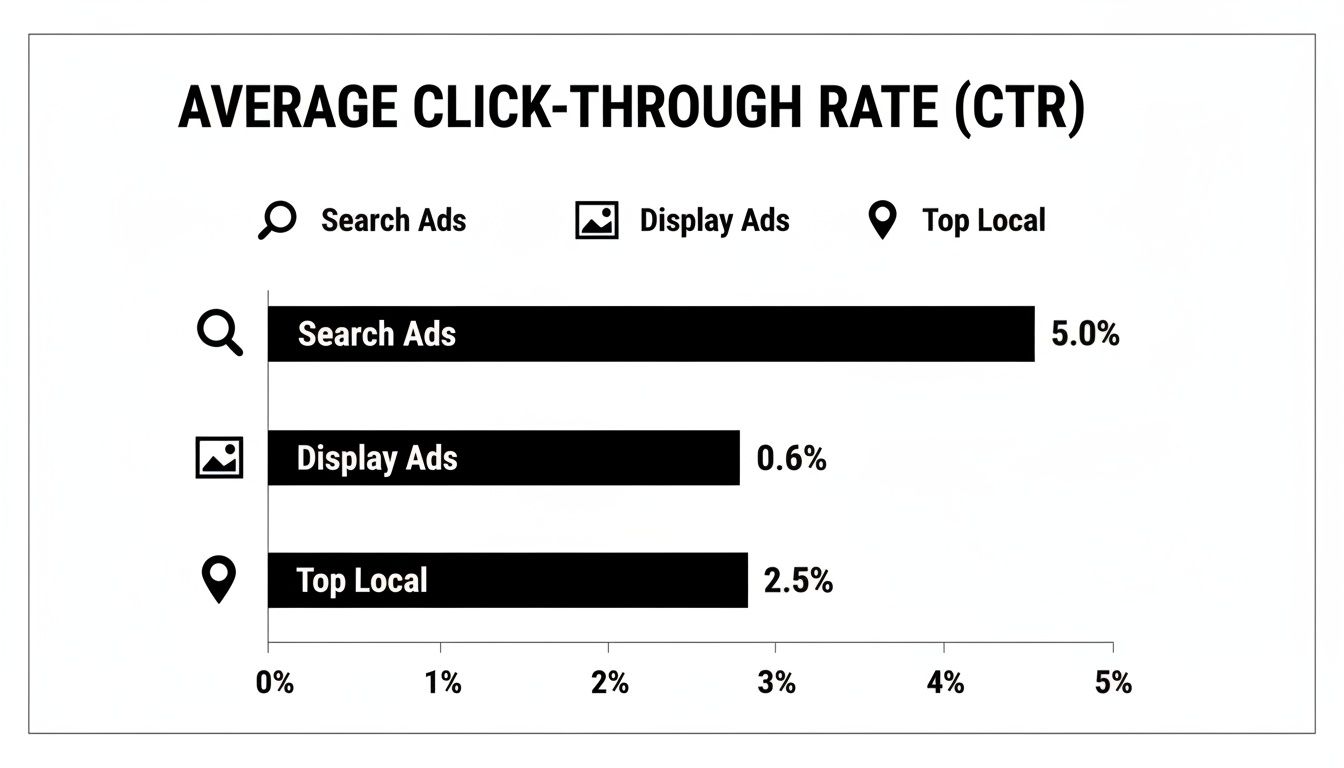
As you can see, user intent changes the game. Search ads and local queries almost always outperform display ads because the user is actively looking for a solution.
Here’s a quick reference for typical CTRs by channel.
Average CTR Benchmarks by Channel
| Channel | Average CTR | Notes |
|---|---|---|
| Paid Search | 3%-6% | Highly dependent on industry, keywords, and Quality Score. |
| Organic SEO | 3%-5% | For a #1 ranking. Drops significantly for lower positions. |
| Email Marketing | 2%-5% | Varies widely based on list quality and industry. |
| Display Ads | 0.5%-1% | Often used for brand awareness rather than direct clicks. |
| Social Media | 1%-2% | Highly dependent on the platform, ad creative, and audience. |
These are just averages. Your goal should be to beat them.
Why a Higher CTR Matters
Improving your CTR has powerful, downstream effects on your entire marketing strategy.
Here’s why it’s so critical:
- Lower Ad Costs: On platforms like Google Ads, a higher CTR contributes to your Quality Score. Google rewards relevance with a lower cost-per-click (CPC). You get more clicks for the same budget.
- Improved Organic Rankings: While Google says CTR isn't a direct ranking factor, a high organic CTR signals that your page is a great answer to a query. This can influence your search visibility over time.
- More Qualified Traffic: A specific, compelling message gets the right clicks. When your ad or search snippet accurately reflects your page's content, visitors are more likely to be interested in your offer, leading to better conversion rates.
In Short: A strong CTR proves your messaging is on point, helping you earn more visibility at a lower cost and driving better overall ROI.
How to Improve Your Organic Search CTR
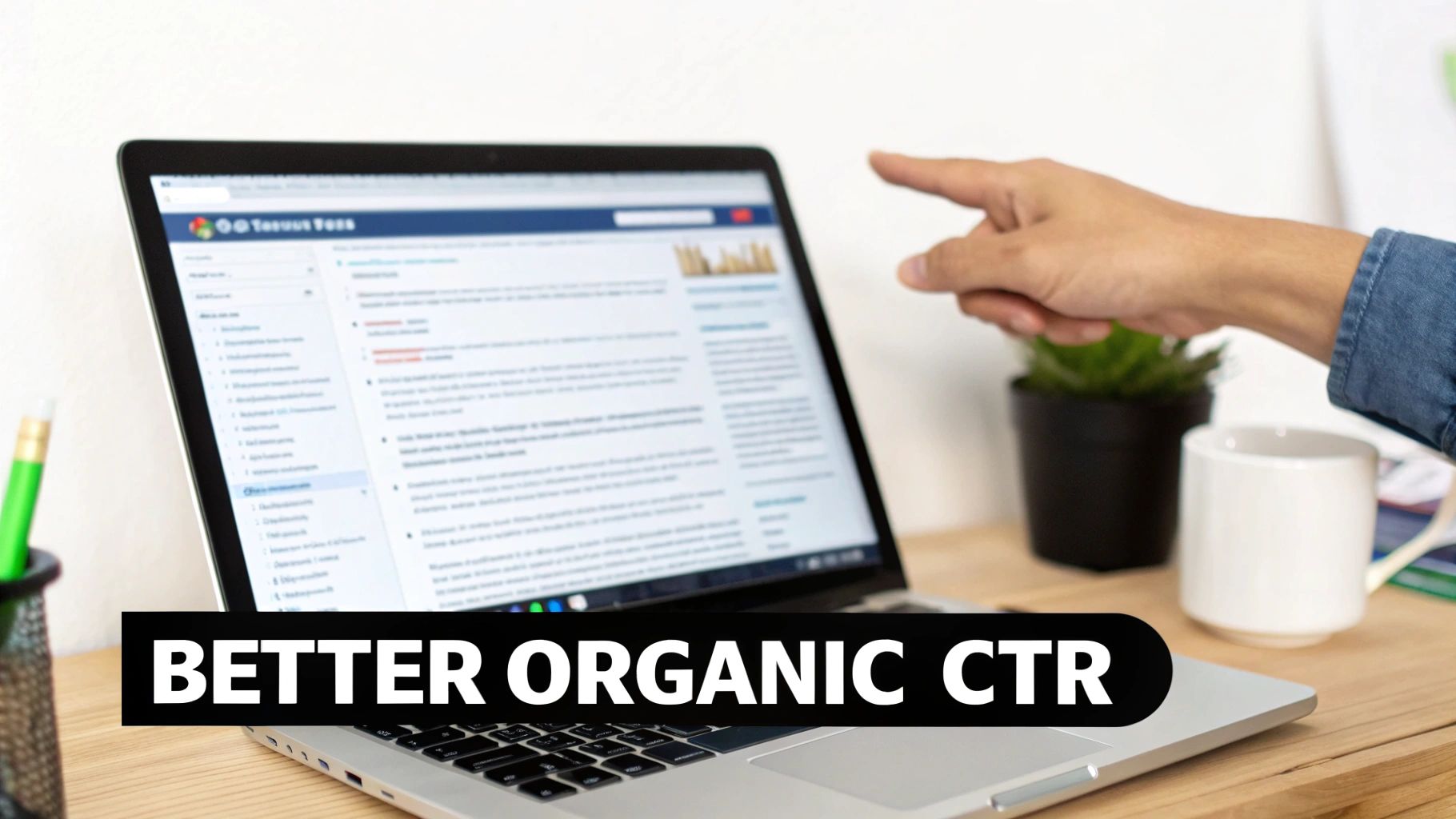
Winning in organic search is about standing out. When a user sees a list of ten blue links, your job is to make yours the one they have to click. It’s not about tricking search engines; it’s about speaking directly to the user.
Small tweaks to your search appearance can lead to a big lift in organic traffic, even if your rankings don't change.
Craft Compelling Title Tags and Meta Descriptions
Your title tag is your headline, and your meta description is the pitch. This is your one shot to grab a searcher's attention. Nailing this is one of the most effective ways to write meta descriptions for SEO that drive real clicks.
Let’s look at an example for a local plumbing company.
The Before version:
- Title: Plumber Anytown | Anytown Plumbing Services
- Description: We are a plumbing company in Anytown. We offer plumbing services. Call us for a quote.
It’s generic and forgettable. It blends in.
Now, let’s rewrite it:
- Title: 5-Star Rated Anytown Plumber | Upfront Pricing [24/7]
- Description: Need a reliable plumber in Anytown? We fix leaky pipes, clogged drains & more. Same-day service & transparent pricing. Get your free estimate now!
This version is packed with value. It uses numbers, brackets, hits on specific pain points, and has a clear call to action.
Key Takeaway: Treat your title and meta description like ad copy. Their only purpose is to earn the click by promising value and building trust.
Use Emotional and Psychological Triggers
People often click based on emotion and curiosity. Use simple psychological cues in your titles to make them more compelling.
- Ask a Question: A question creates curiosity. "Is Your Leaky Faucet Costing You Money?" is more engaging than "Leaky Faucet Repair."
- Use Numbers and Data: Our brains are drawn to numbers. They suggest a clear, organized answer. Odd numbers often perform even better.
- Include Power Words: Words like "Fast," "Guaranteed," "Proven," and "Simple" trigger an emotional response and build confidence.
- Add the Current Year: Including the current year (e.g., "Best SEO Tips for 2024") signals that your content is fresh and up-to-date.
Stand Out with Rich Snippets and Structured Data
Structured data (or schema markup) is code you add to your site to help search engines understand your content better. When Google understands your page, it may reward you with "rich snippets."
Rich snippets are eye-catching search results that include star ratings, FAQs, or images.
These visual upgrades help in two ways:
- They take up more space on the results page.
- They draw the user's eye.
Some of the most effective types of schema for boosting CTR are:
- Review Schema: Adds gold stars to your search result, providing instant social proof.
- FAQ Schema: Adds a dropdown of common questions and answers under your listing, making it bigger and more helpful.
- Local Business Schema: Helps Google display your address, phone number, and hours correctly. Optimizing your Google Business Profile is a huge part of this; for more, see our guide on how to rank your business on Google Maps.
Using structured data increases your chances of earning visual perks that make people want to click your result.
How to Increase CTR in Google Ads
In pay-per-click (PPC) campaigns, your click-through rate is the engine. A high CTR signals to Google that your ads are relevant. Google rewards this with a better Quality Score, which means better ad positions for less money.
Improving your CTR in Google Ads is fundamental to attracting the right traffic and getting more value from your ad spend.
Maximize Ad Real Estate with Extensions
One of the quickest ways to improve CTR is by using ad extensions. They are free upgrades for your ads that add extra, helpful information. This makes your ad physically bigger on the results page, grabbing more attention.
Some of the most impactful extensions are:
- Sitelink Extensions: Direct links to other key pages on your site, like "Services" or "Get a Quote."
- Callout Extensions: Highlight your best features, such as "24/7 Emergency Service" or "Free Consultations."
- Location Extensions: Shows your address and a map, which is essential for local businesses.
- Image Extensions: A relevant image can make your ad stand out in a sea of text.
Using a mix of these extensions can boost your CTR by 10-15%.
Create Granular Ad Groups
Relevance is king in paid search. The closer your ad matches the search query, the more likely someone is to click. This is where tightly themed ad groups are essential.
Avoid stuffing hundreds of keywords into one ad group. Instead, break them down into small, hyper-focused groups.
For example, a plumber should have separate ad groups for "emergency boiler repair," "clogged drain cleaning," and "sump pump installation." This allows you to write specific ad copy for each search.
Pro Tip: Mirror the search query in your headline. If someone searches "24-hour plumber in Brooklyn," an ad with that exact headline will almost always outperform a generic one.
Use Negative Keywords to Weed Out Bad Clicks
Negative keywords prevent your ads from showing for irrelevant searches. This stops you from wasting money on clicks that will never convert and protects your CTR.
For example, if you sell high-end "leather wallets," you don't want clicks from people searching for "cheap leather wallets." By adding "cheap" as a negative keyword, you ensure your budget is spent on qualified buyers.
Regularly check your "Search Terms" report in Google Ads to find new negative keywords. For more on this, our guide on optimizing your Google Ads campaign for success goes into greater detail.
Target High-Intent, Long-Tail Keywords
Broad keywords often attract users who are just browsing. The real value is in long-tail keywords—longer, more specific phrases that signal a user is closer to making a decision.
A person searching for "boots" is browsing. Someone searching for "waterproof leather work boots size 10" knows exactly what they want.
Targeting these specific phrases means less competition and a more qualified visitor. The CTR is naturally higher because your ad is the perfect answer to their specific question.
A/B Test Your Ad Copy Constantly
Never assume you know what will work best. The only way to know for sure is to test. A/B testing means running two or more versions of an ad to see which one performs better.
Always have at least two ad variations active in every ad group. Here are a few ideas to test:
- Headlines: Test a question vs. a statement ("Need a Plumber?" vs. "Fast Plumbing Service").
- Descriptions: Focus on different benefits (e.g., speed vs. price).
- Calls to Action (CTAs): Compare different commands ("Get Your Free Quote" vs. "Schedule Service Online").
- Urgency: See if adding "Limited Time Offer" or "Call Now" improves performance.
Let the data guide you. Pause the losing ad and create a new challenger to test against your champion. This continuous cycle of refinement is how you achieve a great CTR.
Getting More Clicks from Email and Social Media
Let's shift to channels where you have a direct line to your audience: email and social media. The goal is the same—get the click—but the execution is different. You're fighting for attention in a crowded inbox or a busy social feed, so your approach must be direct and relevant.
Writing Emails That Get Opened
Your email subject line is everything. If it doesn't spark curiosity or promise value, your email won't get opened.
Here are a few tactics that work:
- Create FOMO: Phrases like "Last Chance" or "Ending Tonight" tap into the fear of missing out and encourage immediate action.
- Get Personal: Use a subscriber's name or reference a past purchase to show you're paying attention.
- Ask a Question: A subject line like, "Is your website making this common mistake?" creates an open loop that readers will want to close.
- Keep It Short: Many emails are read on mobile. Aim for under 50 characters so your message doesn't get cut off.
Once the email is open, your call-to-action (CTA) must be clear. Avoid vague text like "Click Here." Instead, use action-oriented text like "Get Your Free Quote Now" or "Read the Full Case Study."
Use Segmentation and Personalization
Sending the same message to your entire email list leads to mediocre results. The magic happens when you segment your list into smaller groups based on their behavior or interests.
The average email marketing CTR is around 2.5%. But sending personalized emails to segmented lists can boost clicks by 14%. It's also critical to optimize for mobile, since over 50% of emails are opened on phones. Sending emails mid-week around 10 AM can also help, sometimes hitting a 3.5% CTR. You can find more industry benchmarks on Linkjolt.io.
My Two Cents: Treat different subscribers differently. A new lead needs a different message than a loyal, long-term customer. Personalization shows respect for your audience's time.
Designing Social Media Ads That Stop the Scroll
On platforms like Facebook and Instagram, you're competing with baby pictures and vacation photos. Your ad has to stop the scroll, fast. This requires a perfect combination of visuals and copy.
Your ad creative is the first thing people see.
- Use Video: Motion is the ultimate attention-grabber in a social feed.
- Show People: Ads featuring human faces tend to perform much better.
- Use Bold Text Overlays: Add a clear headline on top of your image or video to communicate your message instantly, even with the sound off.
Your ad copy should speak directly to your audience's pain points and position your service as the solution.
Use Retargeting for Warmer Clicks
The lowest-hanging fruit on social media is retargeting. These are ads shown specifically to people who have already visited your website or engaged with your page.
This audience is already warm. They know who you are, which makes them far more likely to click than a cold audience. A solid retargeting strategy involves showing these users a more specific offer—like a testimonial, case study, or special discount—to nudge them toward conversion.
How to Boost CTR with Retargeting and Display Ads
Display ads are often criticized for low click-through rates. On their own, they can be ineffective. But when paired with a smart retargeting strategy, they become a powerful tool.
This approach is about reconnecting with people who visited your site but didn't convert. They are a warm, pre-qualified audience, making this one of the most effective ways to turn impressions into high-value clicks.
Use Smart GDN Retargeting
The Google Display Network (GDN) reaches over 90% of internet users. The secret is to create campaigns based on what people actually did on your site.
Don't lump all visitors into one audience. Segment them.
- Cart Abandoners: Show them an ad with the exact product they left in their cart.
- Service Page Visitors: If they viewed your "Emergency Plumbing" page, show them an ad about fixing leaky pipes.
- Past Customers: Use retargeting to upsell or cross-sell related services.
This level of specificity makes your ads feel helpful, not intrusive. For a deeper dive, read our guide on using retargeting as part of your PPC strategy.
Create Banner Ads People Notice
You have about one second to grab someone's attention with a banner ad. Focus on these core design elements:
- A Killer Headline: Keep it short, bold, and to the point.
- Clean, High-Quality Visuals: Use sharp images that tie directly to your offer.
- A Clear Call-to-Action (CTA): Your CTA button should pop with a contrasting color and action-oriented text like "Get My Free Quote."
- Show Your Logo: Make sure your branding is clear but not overwhelming.
My Takeaway: Think of your display ads as a personal conversation. Your ad should feel like a timely, helpful reminder, not a random interruption.
The Power of Retargeting on Social Media
Platforms like Facebook and Instagram are a goldmine for retargeting because they are so visual. You can run dynamic ads that automatically show the exact products a user viewed on your site. This personalization feels less like an ad and more like a helpful suggestion.
While the average display ad CTR is only 0.46%, campaigns targeting a warm, retargeted audience can see that jump to 2.8%. However, ad fatigue is a real issue. Performance can drop by 20-30% after someone sees the same ad a few times, so keep your creative fresh.
Use Frequency Capping to Avoid Annoying Users
Seeing the same ad everywhere is annoying. Frequency capping prevents this by limiting how many times one person sees your ad in a specific timeframe (e.g., no more than five times a day).
Frequency capping is essential because it:
- Stops you from alienating potential customers.
- Saves you money by not wasting ad spend on uninterested people.
- Keeps your brand from looking spammy.
Setting a sensible frequency cap ensures your retargeting campaigns remain helpful without being intrusive.
Frequently Asked Questions
Improving click-through rates often brings up questions. Here are answers to some of the most common ones.
How do I increase my click-through rate?
To increase your CTR, focus on relevance and value.
- For SEO: Write compelling title tags and meta descriptions. Use structured data to get rich snippets.
- For Paid Ads: Create tightly themed ad groups, use ad extensions, and A/B test your copy.
- For Email: Write curiosity-driven subject lines and segment your audience for personalization.
What is a good way to improve CTR?
One of the best ways to improve CTR is by aligning your message with user intent. For ads, this means using specific, long-tail keywords and matching your ad copy directly to them. For organic search, it means writing a title tag that perfectly answers the user's question.
What causes a low click-through rate?
A low CTR is usually a sign of a relevance problem.
- Your message isn't compelling: Your headline or ad copy is generic and doesn't stand out.
- You're targeting the wrong audience: Your ads are showing to people who aren't interested in your offer.
- Your ad or listing is not visible: Poor ad position or low search rankings can lead to fewer impressions and clicks.
How long does it take to see CTR improvements?
It depends on the channel.
- With paid ads like Google Ads or Facebook Ads, you can see results within hours.
- For organic SEO, it takes longer. After changing title tags, it can take Google a few days to several weeks to re-crawl and re-index your page.
The Bottom Line: For paid ads, expect to see changes within a day. For organic search, give it a few weeks.
Can a high CTR be a bad thing?
Yes. A high CTR is only good if the clicks are from the right people and lead to conversions. If your ad copy is misleading or your title is clickbait, you might get a lot of clicks but also a sky-high bounce rate. This sends negative signals to search engines and wastes your ad budget.
At Clicks Geek, we specialize in turning impressions into high-quality leads and sales. If you're ready to stop guessing and start getting measurable results from your paid advertising and SEO, we're here to help. Discover how our data-driven strategies can grow your business by visiting us at https://clicksgeek.com.