You’re spending money on marketing, but can you actually see what’s working? Most local business owners I talk to are flying blind—checking Google Ads here, Facebook metrics there, maybe glancing at Google Analytics when they remember. It’s exhausting, and worse, it means you’re probably wasting money on campaigns that aren’t pulling their weight.
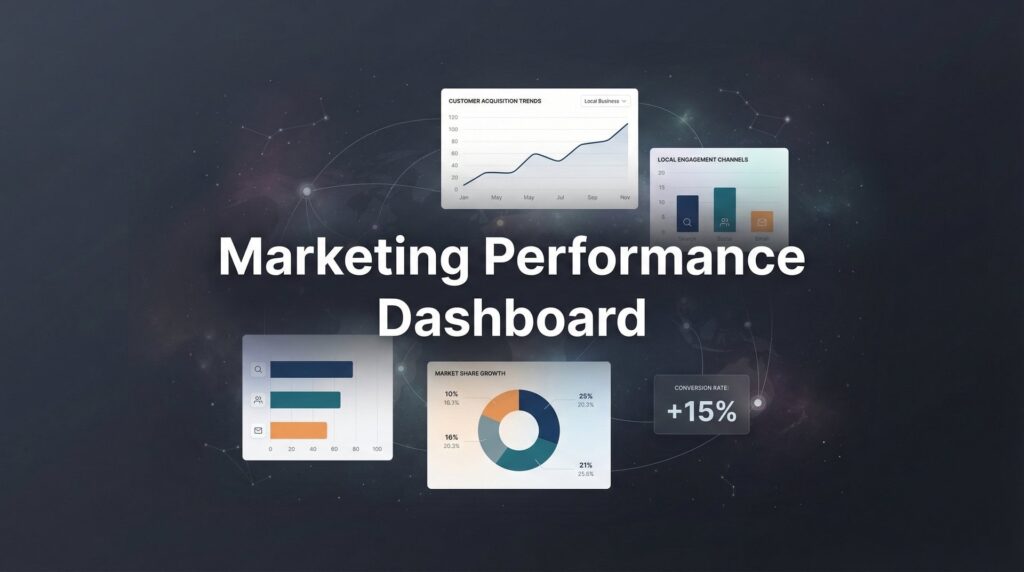
A marketing performance dashboard changes everything. Instead of logging into five different platforms and trying to piece together what’s happening, you get one clear view of your entire marketing operation. You see which channels are bringing in leads, which campaigns are burning cash, and exactly where to double down for growth.
In this step-by-step guide, I’ll walk you through building a marketing performance dashboard from scratch—one that’s actually useful, not just pretty charts that collect dust. Whether you’re running PPC campaigns, managing SEO efforts, or juggling multiple lead sources, you’ll have a system that shows you the truth about your marketing ROI in minutes, not hours.
Step 1: Define Your Core Marketing KPIs (The Metrics That Actually Matter)
Before you touch any dashboard software, you need to know exactly what you’re measuring and why. This is where most people screw up—they track everything and end up tracking nothing useful.
Start by identifying 5-7 primary metrics that tie directly to revenue. For most local businesses, these should include cost per lead, conversion rate from lead to customer, customer acquisition cost, and return on ad spend. If you’re running paid campaigns, add cost per conversion and quality score. If you’re tracking phone calls, include call volume and call conversion rate.
Here’s the critical part: avoid the vanity metrics trap. Impressions look impressive. Website visits feel good. Social media engagement makes you smile. But none of that matters if it’s not turning into actual customers who pay you money. I’ve seen businesses celebrate 50,000 impressions while their cost per lead doubled—that’s not success, that’s distraction.
Map each KPI to a specific business question. When you look at return on ad spend, you’re answering “Is my Google Ads spend profitable?” When you check cost per lead, you’re asking “Am I paying too much to get someone interested?” This connection between metric and decision is what makes your dashboard useful instead of decorative.
Think about the actions you’d take if each metric changes. If your cost per lead suddenly jumps 40%, what would you do? If your conversion rate drops from 8% to 4%, where would you look first? If you can’t answer these questions, that metric doesn’t belong on your dashboard yet. Understanding how to track marketing ROI effectively starts with knowing which numbers actually drive decisions.
Write down your 5-7 core KPIs with the business question each one answers. This becomes your dashboard blueprint. Everything else you might want to track can wait—you need clarity first, comprehensiveness later.
Success indicator: You can explain exactly why each metric is on your dashboard and what action you’d take if it changes. If you’re explaining a metric with “it’s good to know,” delete it.
Step 2: Audit and Connect Your Data Sources
Now that you know what you’re measuring, you need to figure out where that data lives. This step is less exciting but absolutely critical—missing data sources mean blind spots in your marketing performance.
List every platform generating marketing data. For most local businesses, this includes Google Ads, Facebook Ads, Google Analytics, your CRM system, and call tracking software. If you’re running email campaigns, add your email platform. If you’re tracking offline conversions, note how that data gets recorded.
Check API access and export capabilities for each platform. Some platforms play nice with dashboard tools and offer direct integrations. Others require manual exports or third-party connectors. Google products typically integrate seamlessly with each other. Facebook has native connectors for most major dashboard platforms. Your CRM might need a CSV export or Zapier connection.
This is where proper UTM tracking becomes essential. If you’re not tagging your campaign URLs with source, medium, and campaign parameters, you can’t accurately attribute leads across channels. Set up a UTM naming convention now—before you build the dashboard. Use consistent formatting: lowercase, underscores instead of spaces, descriptive names that make sense six months from now.
Document everything. Create a simple spreadsheet listing each data source, the login credentials (stored securely), the API keys if applicable, and any integration notes. When something breaks at 2 AM before a big presentation, you’ll thank yourself for this documentation.
Test each connection by pulling a small data sample. Don’t assume it works—verify it. Check that the numbers match what you see in the native platform. If Google Ads shows 47 conversions but your export shows 52, something’s configured wrong. Many businesses struggle with tracking marketing conversions properly—fix it now, not after you’ve built visualizations on bad data.
Success indicator: You have a complete inventory of data sources with access credentials documented, and you’ve successfully pulled test data from each one showing accurate numbers.
Step 3: Choose Your Dashboard Platform and Set Up the Foundation
Time to pick your dashboard tool. This decision depends on your budget, technical comfort level, and the complexity of your data sources.
For most local businesses, I recommend starting with Google Looker Studio. It’s completely free, integrates natively with Google Ads and Google Analytics, and has enough power to handle sophisticated reporting. The learning curve is moderate—you’ll spend a few hours getting comfortable, but you won’t need a data analyst on staff.
If you’re managing client accounts or need more advanced features, consider paid options like Databox or AgencyAnalytics. These platforms offer better multi-client management, more sophisticated alerting, and pre-built templates that can save hours of setup time. Expect to pay $50-200 monthly depending on the number of data sources and users.
Custom solutions built in tools like Tableau or Power BI make sense if you have complex data transformation needs or a dedicated analyst. For most local businesses, this is overkill—you’ll spend more time maintaining the dashboard than using it to make decisions.
Once you’ve chosen your platform, create your first dashboard with proper organization from the start. Name it clearly: “Marketing Performance Dashboard – March 2026” not “Dashboard 1” or “New Report.” Create folders for different time periods or business units if needed. Set up proper sharing permissions—who needs edit access versus view-only.
Start with a blank canvas and resist the urge to use pre-built templates initially. Templates look impressive but often include metrics you don’t need, which defeats the purpose of focused reporting. You can explore templates later once you understand what you actually want.
Connect your first data source—typically Google Analytics or your primary advertising platform. Pull in one simple metric like total sessions or total conversions. See it update in real time. This small win builds momentum and confirms everything’s working before you invest hours in complex visualizations.
Success indicator: Dashboard platform is live with at least one data source connected and pulling real data that matches the numbers in the source platform.
Step 4: Build Your Channel Performance Views
Now you’re building the actual dashboard views that you’ll check daily. Organization matters here—scattered metrics create confusion, while logical grouping creates clarity.
Create separate sections for each major marketing channel. If you’re running paid search, paid social, organic search, and referral traffic, each deserves its own section. This structure lets you quickly identify which channels are performing and which need attention. A solid multi channel marketing strategy requires visibility into how each channel contributes to your overall results.
For each channel section, include the core metrics you defined in Step 1. Show the current period’s performance prominently—this week’s leads, this month’s spend, today’s cost per conversion. Then add comparison metrics: this period versus last period, actual versus target, current versus the same period last year.
Comparison context is what turns numbers into insights. Seeing “47 leads this month” tells you nothing. Seeing “47 leads this month, up from 31 last month, target was 40” tells you everything. You’re beating target, showing growth momentum, and can confidently increase investment in that channel.
For paid channels, always show cost efficiency metrics alongside volume metrics. Don’t just display “250 clicks”—show “250 clicks at $2.40 per click, generating 18 leads at $33.33 per lead.” This cost-per-result view is what separates profitable campaigns from expensive vanity projects.
Add simple visualizations that make trends obvious at a glance. Line charts work well for showing performance over time. Bar charts effectively compare channels side-by-side. Tables are perfect for detailed breakdowns when you need to dig deeper. Avoid pie charts—they’re rarely the best choice for marketing data.
Use color strategically. Green for metrics beating target, red for metrics below target, gray for neutral. But don’t overdo it—a rainbow dashboard is harder to read than a simple, consistent color scheme.
Success indicator: Each marketing channel has its own section showing spend, leads, and cost per acquisition, with comparison metrics that provide immediate context for performance.
Step 5: Add Lead Quality and Revenue Attribution
This is where your dashboard evolves from tracking activity to tracking actual business results. Lead volume means nothing if those leads don’t become paying customers.
Connect your CRM data to show which leads actually converted into customers. This requires proper lead tracking from initial contact through closed sale. If you’re not tracking this yet, start now—even a simple spreadsheet beats nothing. Tag each lead with its source channel so you can trace revenue back to the marketing activity that generated it.
Calculate true customer acquisition cost by channel. This isn’t just your ad spend divided by leads—it’s your total marketing investment divided by actual customers acquired. Include agency fees, software costs, creative production, and your time. Most businesses dramatically underestimate their real CAC because they only count ad spend.
Build a simple attribution view showing the customer journey from first touch to sale. For local businesses, this is often straightforward: someone clicks an ad, fills a form, receives a call, becomes a customer. But sometimes the path is messier—they see an ad, visit your website three times, call from organic search, then convert. Understanding these paths helps you allocate budget more intelligently.
Add a lead quality section that shows conversion rates by source. If Google Ads generates 50 leads monthly with a 12% close rate while Facebook generates 80 leads with a 4% close rate, Google is actually your better channel despite lower volume. This insight is invisible if you only track lead count. If you’re struggling with poor quality leads from marketing, this attribution data reveals exactly where the problem originates.
Include average deal size if it varies by channel. Some sources might bring smaller customers but higher close rates. Others might bring fewer leads but much larger deals. Revenue per channel tells the complete story that lead volume alone can’t.
Success indicator: Dashboard shows revenue generated by channel, not just lead volume, and you can calculate true customer acquisition cost including all marketing expenses.
Step 6: Configure Alerts and Automated Reporting
Your dashboard is useless if you don’t look at it, and you won’t remember to look at it consistently without automation. Set up systems that push information to you instead of waiting for you to pull it.
Configure threshold alerts for critical metrics. Set these up to notify you when something moves outside acceptable ranges. If your cost per lead suddenly jumps 50%, you want to know immediately, not when you check the dashboard three days later. If your conversion rate drops below a certain threshold, trigger an alert. If you’re burning through your monthly budget too quickly, get notified.
Most dashboard platforms offer email or Slack notifications when metrics cross defined thresholds. Set these conservatively at first—you want alerts for genuine problems, not daily noise about minor fluctuations. A 10% change might warrant investigation. A 2% change is probably just normal variance.
Schedule weekly email reports to stakeholders with key metrics summary. This keeps everyone informed without requiring them to log into the dashboard. Include the top 5-7 metrics, comparison to last week, and a brief note about any significant changes or actions being taken.
Create a monthly deep-dive template for strategic review sessions. This is more detailed than your weekly report—it includes trend analysis, budget pacing, channel performance comparisons, and recommendations for the coming month. Schedule this review on the calendar as a recurring meeting so it actually happens.
Set up data refresh schedules appropriate to your decision-making speed. If you’re optimizing campaigns daily, you need near real-time data. If you’re making strategic decisions monthly, daily refreshes are sufficient. More frequent updates consume more API calls and can increase costs on some platforms. The right marketing automation tools can handle much of this reporting workflow automatically.
Success indicator: You receive automatic notifications when metrics move outside acceptable ranges, and weekly reports arrive in your inbox without manual intervention.
Step 7: Establish Your Dashboard Review Rhythm
Building the dashboard was the easy part. Using it consistently to drive better decisions is where the real value comes from. Establish a review rhythm that matches your business pace.
Daily quick check: Spend two minutes scanning for anomalies and pacing issues. Is anything dramatically different from yesterday? Are you on track for your weekly targets? Are any campaigns burning budget faster than expected? This isn’t deep analysis—it’s a pulse check to catch problems early.
Weekly analysis: Block 15 minutes for a proper review of channel performance and optimization opportunities. Look at the week’s results versus targets. Identify which campaigns or channels overperformed and deserve more budget. Flag underperformers that need adjustment or should be paused. Make tactical decisions about bid adjustments, budget reallocation, or creative refreshes.
Monthly strategic review: Schedule 30-60 minutes for a deep dive into trends, attribution, and budget reallocation decisions. This is where you step back from daily optimization and look at bigger patterns. Are certain channels showing consistent growth? Are others declining? Should you test new channels or double down on what’s working? What does the data suggest about next quarter’s strategy?
Document your decisions and their results. When you increase budget on a channel, note it. When you pause an underperforming campaign, record why. Three months later, this history helps you understand what worked and what didn’t. Pattern recognition improves with documented experience. This approach is central to marketing campaign optimization—you can’t improve what you don’t systematically review.
Share insights with your team regularly. If you’re the only person who looks at the dashboard, you’re missing opportunities for collaborative problem-solving. When someone in sales notices lead quality declining from a specific source, that’s valuable intelligence. When your operations team identifies fulfillment issues with certain customer types, that should influence your targeting.
Success indicator: Dashboard drives actual marketing decisions and budget changes within 30 days of launch. You can point to specific actions taken based on dashboard insights.
Putting It All Together
Your marketing performance dashboard is only as valuable as the decisions it drives. Start with the essential metrics in Step 1, resist the urge to track everything, and focus on the numbers that directly connect to revenue.
Quick checklist before you launch:
✓ 5-7 core KPIs defined and mapped to business questions
✓ All data sources connected with proper tracking in place
✓ Channel-level views showing both volume and efficiency
✓ Revenue attribution connected to actual sales data
✓ Alerts configured for critical metric thresholds
✓ Review schedule blocked on your calendar
The difference between businesses that scale profitably and those that waste marketing budget often comes down to visibility. When you can see exactly what’s working, you make smarter decisions faster than competitors still logging into five different platforms trying to piece together the story. This is exactly what results driven marketing services focus on—connecting activity to actual business outcomes.
Your dashboard will evolve. You’ll add metrics as new questions emerge. You’ll remove metrics that don’t drive decisions. You’ll refine your alerting thresholds as you learn what normal variation looks like for your business. This evolution is healthy—it means you’re using the dashboard, not just admiring it.
The goal isn’t perfection on day one. The goal is having a system that shows you the truth about your marketing performance clearly enough to make confident decisions. Build it, use it consistently, and adjust based on what you learn.
Tired of spending money on marketing that doesn’t produce real revenue? We build lead systems that turn traffic into qualified leads and measurable sales growth. If you want to see what this would look like for your business, we’ll walk you through how it works and break down what’s realistic in your market.
Want More Leads for Your Business?
Most agencies chase clicks, impressions, and “traffic.” Clicks Geek builds lead systems. We uncover where prospects are dropping off, where your budget is being wasted, and which channels will actually produce ROI for your business, then we build and manage the strategy for you.