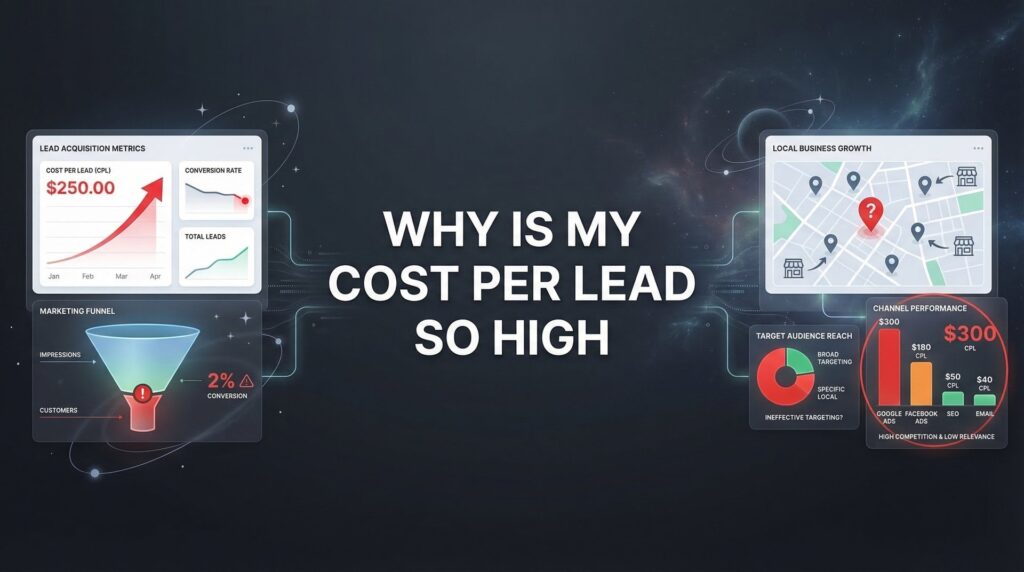
You check your ad dashboard and your stomach drops. Another $500 spent yesterday. Twelve leads came in. That’s $41 per lead. Again.
Except three were spam, two were tire-kickers asking if you offer services you clearly don’t, and one was from a city 200 miles outside your service area. Your actual cost per qualified lead? Closer to $83.
Meanwhile, your competitor down the street is apparently thriving on half your ad budget. What are they doing that you’re not?
Here’s the uncomfortable truth: your high cost per lead isn’t bad luck or a tough market. It’s a symptom of specific, fixable problems hiding in your campaigns. After auditing hundreds of PPC accounts at Clicks Geek, we see the same patterns over and over—businesses hemorrhaging money on issues they don’t even know exist.
This isn’t another article telling you to “improve your targeting” or “optimize your ads.” We’re going deeper. We’re exposing the actual culprits that inflate your CPL and showing you exactly how to fix them.
The CPL Reality Check: What Actually Counts as ‘Too High’
Before you panic about your cost per lead, let’s get something straight: a $150 CPL might be a goldmine or a disaster depending on what you’re selling.
A personal injury attorney who closes one case worth $50,000 can afford to pay $500 per lead if their close rate is decent. A plumber trying to book $300 drain cleaning jobs? That same $150 CPL would bankrupt them in weeks.
The number that actually matters isn’t your cost per lead. It’s your cost per acquisition—what you pay to land an actual paying customer.
Here’s how to calculate your maximum acceptable CPL. Take your average customer value. Let’s say you’re a home remodeling contractor and your average project is worth $15,000. If you close 20% of qualified leads, you can afford to pay up to $3,000 per customer and still maintain healthy margins.
Work backward: $3,000 divided by your 20% close rate means your maximum CPL is $600. Anything below that, you’re profitable. Anything above, you’re losing money on every customer you acquire.
But here’s where most businesses mess up. They look at total leads instead of qualified leads. If half your leads are junk—wrong service area, not serious buyers, competitors snooping—your real CPL just doubled.
Track these three numbers religiously: total CPL, qualified CPL, and cost per actual customer. The gap between them tells you exactly where your money is leaking.
Your Landing Page Is Bleeding Leads (And You’re Paying for Every Drop)
Someone clicks your ad. Google charges you $12. They land on your page and… bounce in 2.3 seconds.
You just paid $12 for nothing. Do that 100 times a day and you’re burning $1,200 on visitors who never even read your headline.
The three-second rule is brutal but real. Visitors decide whether to stay or leave before your page fully loads. If your headline doesn’t immediately confirm they’re in the right place, they’re gone.
Think about what happens when someone searches “emergency plumber near me” and clicks your ad. They land on your homepage with a generic “Welcome to Bob’s Plumbing Services” headline and a stock photo of a smiling guy holding a wrench. Where’s the emergency response promise? Where’s the “available 24/7” reassurance they’re looking for?
They bounce. You pay anyway.
Now let’s talk about form friction. Every field you add to your contact form is a barrier. Name, email, phone number—those are reasonable. But when you start asking for address, best time to call, how they heard about you, detailed project description, and preferred contact method, you’re killing your conversion rate.
We’ve seen conversion rates jump 40-60% just by cutting forms from seven fields down to three. That means if you were getting 20 leads at $50 each, you could get 30 leads at $33 each from the same ad spend. Same traffic, lower CPL, just by removing unnecessary friction.
And mobile? If your landing page isn’t lightning-fast on phones, you’re toast. Over 60% of clicks come from mobile devices. Pages that take more than three seconds to load see bounce rates spike dramatically. Your visitors are standing in their flooded basement or dealing with a broken AC in August—they’re not waiting for your hero image to load.
Test your landing page on your phone right now. Pull up your site on 4G, not your office WiFi. Count the seconds until everything loads. If it’s more than two seconds, you’re paying a speed tax on every single click. Learn more about creating high converting landing pages that actually turn clicks into customers.
Targeting Mistakes That Turn Your Budget Into a Bonfire
Google’s default settings are designed to spend your money, not make you money. Let that sink in for a second.
When you set up a campaign and leave targeting on “broad match,” Google interprets your keywords… creatively. You bid on “kitchen remodeling,” and Google shows your ad to someone searching “kitchen remodeling ideas Pinterest” or “how much does kitchen remodeling cost” or “kitchen remodeling TV shows.”
None of those people are ready to hire you. But you’re paying for every click.
The broad match trap costs businesses thousands every month. Someone running a roofing company bids on “roof repair” and ends up paying for clicks from people searching “roof repair cost calculator,” “DIY roof repair,” and “roof repair videos.” Zero buying intent. Maximum budget drain.
Then there’s geographic leakage. You serve a 30-mile radius around your city. But Google’s location targeting has a helpful feature called “people interested in your targeted location.” Sounds good, right?
Wrong. That setting shows your ads to people searching from anywhere who include your city name in their search. Someone in California planning a vacation to your city searches “best restaurants in [your city]” and sees your HVAC ad because Google thinks they’re “interested in your location.”
You just paid for a click from someone 2,000 miles away who will never become a customer.
Audience targeting creates similar problems. Google’s “in-market” audiences sound perfect—people actively researching your services. But these audiences are built on browsing behavior, not buying intent. Someone researching options for a school project or a competitor analyzing the market gets lumped in with actual prospects.
Your ad reaches researchers, students, competitors, and bargain hunters alongside the small percentage of people actually ready to buy. Your CPL reflects that reality—you’re paying to reach everyone, but only converting the few who were actually qualified. This is exactly why so many businesses struggle with poor lead quality from ads.
The fix? Phrase match and exact match keywords. Geographic targeting set to “presence only.” Aggressive negative keyword lists. Manual audience controls instead of letting Google’s algorithm decide who sees your ads.
The Quality Score Tax Silently Doubling Your Costs
Google has a dirty little secret called Quality Score. It’s a 1-10 rating that determines how much you pay per click. And most advertisers don’t even know it exists.
Here’s how it works. Two businesses bid on the same keyword. Business A has a Quality Score of 8. Business B has a Quality Score of 4. They both bid $5 per click.
Google doesn’t charge them the same amount. Business A might pay $3.50 per click. Business B pays $7.00 for the same click. Same keyword, same position, wildly different costs.
Over a month, that gap compounds brutally. Business A gets 100 clicks for $350. Business B gets 100 clicks for $700. Same traffic, double the cost. And that CPL gap follows through—Business B needs twice the budget to generate the same number of leads.
Quality Score is determined by three factors: expected click-through rate, ad relevance, and landing page experience. Most businesses fail on the third one without realizing it.
Someone searches “emergency AC repair.” Your ad says “Emergency AC Repair – 24/7 Service.” They click. They land on your homepage showing all your services—heating, cooling, maintenance, installations. Where’s the emergency AC repair content? Where’s the 24/7 availability promise from your ad?
Google sees this disconnect. Your Quality Score drops. Your costs go up.
The ad-to-landing-page relevance gap is one of the most expensive mistakes in PPC. Your ad makes a specific promise. Your landing page needs to immediately deliver on that exact promise. Not a related promise. Not a general overview. The exact thing they clicked for. Understanding how pay per click advertising works helps you avoid these costly mistakes.
Quick wins to boost Quality Score: Create dedicated landing pages for your top keywords. Match your headline to your ad copy word-for-word. Remove navigation that lets visitors wander away from your conversion goal. Add the keyword you’re bidding on into your page content naturally.
We’ve seen Quality Scores jump from 4 to 8 in two weeks with these changes. And when that happens, CPL drops by 30-50% overnight. Same campaigns, same keywords, just better alignment between what you promise and what you deliver.
When Smart Bidding Strategies Become Expensive Mistakes
Google’s automated bidding sounds like a dream. “Maximize Conversions” promises to get you the most leads for your budget. “Target CPA” claims to hit your exact cost-per-acquisition goal. Set it and forget it, right?
Wrong. Automation is only as smart as the data you feed it.
Here’s what actually happens. You turn on Maximize Conversions. Google’s algorithm starts optimizing. But what is it optimizing for? Every form submission you’ve tagged as a conversion.
That includes the spam submissions. The competitor intel gathering. The people asking if you serve areas 500 miles away. The job seekers submitting applications through your contact form. Google counts all of it as success and feeds you more of the same.
Garbage in, garbage out.
We audited a campaign spending $8,000 monthly with a CPL around $95. They were using Target CPA bidding. Sounds reasonable. Except when we dug into their conversion tracking, we found they were counting every form submission equally—qualified leads, spam, wrong service area, everything.
Google’s algorithm was optimizing to hit that $95 target by finding cheaper, lower-quality clicks. The business was hitting their CPL goal while their actual cost per qualified lead was over $200. This is the classic low quality leads problem that plagues automated campaigns.
Conversion tracking mistakes destroy automated bidding. If you’re not filtering out junk conversions, assigning different values to different lead types, and feeding Google clean data about what actually converts to revenue, automation works against you.
Manual bidding gives you control. You decide what to pay for clicks based on performance you can actually verify. You’re not trusting an algorithm that thinks a spam submission is just as valuable as a $50,000 customer.
That said, automation can work brilliantly when set up correctly. Use conversion values to tell Google a qualified lead is worth 10x a newsletter signup. Exclude conversions that don’t represent real business value. Give the algorithm 30-60 days of clean data before turning on automated bidding.
The key question: do you have enough high-quality conversion data for Google’s algorithm to learn from? If you’re getting fewer than 30 qualified conversions per month, automated bidding is flying blind. Stick with manual bidding until you have the volume to train the algorithm properly.
Putting It Into Action: Your 30-Day CPL Reduction Plan
You can’t fix everything at once. Trying to overhaul your entire campaign in one day usually makes things worse. Here’s a week-by-week plan to systematically cut your CPL without tanking your lead volume.
Week 1: Audit and Stop the Bleeding. Pull your search terms report and add negative keywords for anything irrelevant. Check your geographic settings and switch to “presence only” targeting. Review your conversion tracking and separate qualified leads from junk submissions. These changes stop you from wasting money on clicks that were never going to convert.
Week 2: Fix Your Landing Pages. Create dedicated landing pages for your top 3-5 keywords. Match headlines to ad copy exactly. Cut your form fields down to the bare minimum. Test your mobile load speed and fix anything over 2 seconds. Better landing pages mean more leads from the same traffic, which drops your CPL immediately.
Week 3: Tighten Your Targeting. Switch broad match keywords to phrase or exact match. Review your audience targeting and remove any that aren’t performing. Add more specific negative keywords based on Week 1’s search terms. Refine your ad copy to repel unqualified clicks before they cost you money. If you’re unsure which platform to focus on, our guide on Google Ads vs Facebook Ads for lead generation can help.
Week 4: Optimize Bidding and Quality Score. Review Quality Scores for your main keywords and fix the lowest performers first. Adjust bids based on actual performance data, not Google’s recommendations. If you’re using automated bidding, verify your conversion tracking is clean and consider switching to manual bidding until you have better data quality.
Track these metrics daily: total spend, total leads, qualified leads, and cost per qualified lead. Weekly, review: Quality Scores, conversion rates by landing page, search terms triggering your ads, and geographic performance.
Most businesses see CPL drop 20-40% within 30 days of implementing these changes. The ones who don’t usually discover they need more fundamental fixes—wrong offer, wrong market, wrong messaging. That’s when professional management pays for itself.
DIY optimization hits its limits when you’re spending $5,000+ monthly and still not seeing results, when you don’t have time to monitor campaigns daily, or when you’ve tried everything and CPL keeps climbing. At that point, the cost of not hiring experts exceeds the cost of hiring them. Consider exploring how to generate qualified leads online for a more systematic approach.
Turning High CPL From Problem Into Profit
High cost per lead isn’t a mystery. It’s not bad luck. It’s not a tough market or fierce competition.
It’s a symptom of specific problems: landing pages that leak conversions, targeting that reaches the wrong people, Quality Scores that inflate your costs, and bidding strategies optimizing for the wrong goals.
Every one of these problems is diagnosable and fixable. Most businesses can cut their CPL by 30-50% within 60 days just by addressing the issues we’ve covered.
Start with the audit. Find where your money is leaking. Fix the biggest problems first. Track your qualified CPL, not just total CPL. Give changes time to work—two weeks minimum before judging results.
The businesses that succeed with PPC aren’t the ones with the biggest budgets. They’re the ones who understand that every dollar needs to work toward actual revenue, not just vanity metrics like total leads or total clicks.
If you’re tired of watching ad spend climb while results stay flat, you have two options. Implement the fixes we’ve outlined and commit to monitoring them consistently. Or hand it to people who do this full-time and have fixed these exact problems hundreds of times.
At Clicks Geek, we specialize in taking underperforming campaigns and turning them into lead-generating machines. We’ve seen every variation of high CPL, and we know exactly which levers to pull to bring costs down while maintaining or improving lead quality.
Tired of spending money on marketing that doesn’t produce real revenue? We build lead systems that turn traffic into qualified leads and measurable sales growth. If you want to see what this would look like for your business, we’ll walk you through how it works and break down what’s realistic in your market.
Your high CPL isn’t permanent. It’s just waiting for someone to fix it.
Want More Leads for Your Business?
Most agencies chase clicks, impressions, and “traffic.” Clicks Geek builds lead systems. We uncover where prospects are dropping off, where your budget is being wasted, and which channels will actually produce ROI for your business, then we build and manage the strategy for you.