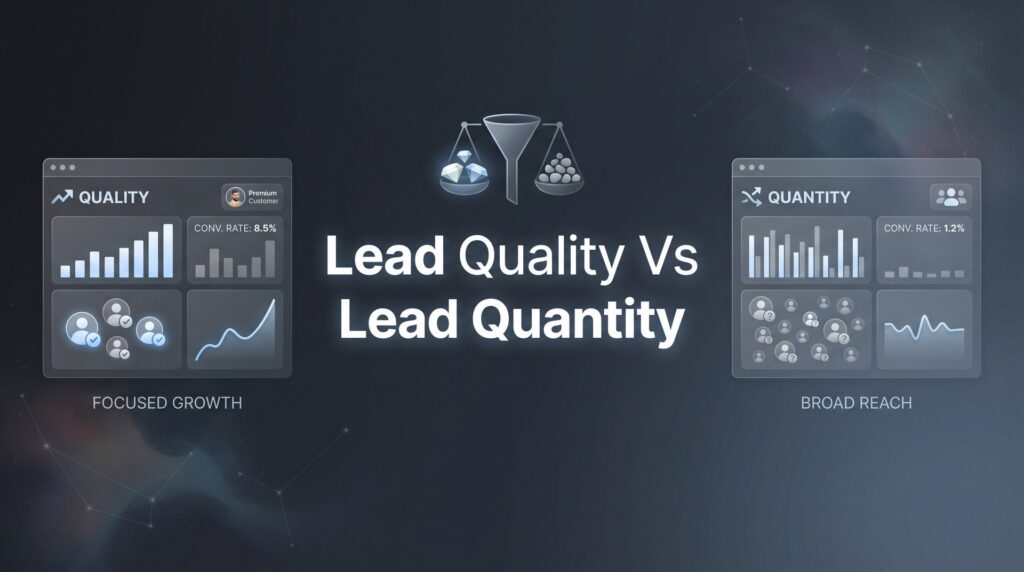
Picture this: your phone is ringing, your inbox is full, and your ad dashboard shows hundreds of leads generated this month. Looks like a win, right? But then your sales team reports they’re closing barely a fraction of those conversations, your cost per new customer keeps climbing, and half the “leads” never even answer a follow-up call.
This is one of the most common traps local business owners fall into, and it’s more expensive than most realize. The instinct to chase volume makes sense on the surface. More leads should mean more sales. But in practice, a bloated pipeline of low-quality inquiries drains your ad budget, burns out your sales team, and produces growth that looks impressive on a dashboard but doesn’t show up in your bank account.
The lead quality vs lead quantity debate isn’t really about choosing one over the other. It’s about strategic rebalancing. A smaller pipeline of high-intent, well-qualified prospects will consistently outperform a massive list of tire-kickers. The businesses that figure this out early grow faster, spend less, and operate with far less friction.
At Clicks Geek, a Google Premier Partner agency, we’ve seen this pattern repeat itself across hundreds of local business campaigns. The businesses that scale profitably aren’t the ones generating the most leads. They’re the ones generating the right leads.
The seven strategies below will show you exactly how to attract better prospects, filter out the noise, and build a lead system that drives real revenue rather than vanity metrics. Let’s get into it.
1. Define Your Ideal Customer Profile Before Spending a Dollar
The Challenge It Solves
Most local businesses start running ads before they’ve clearly defined who they’re trying to reach. Without a detailed picture of your best customer, every targeting decision becomes a guess. You end up casting a wide net and paying for clicks from people who were never going to buy from you in the first place.
The Strategy Explained
Your Ideal Customer Profile (ICP) is a detailed description of the type of customer most likely to buy, pay well, stay loyal, and refer others. Building one starts with looking backward: pull your last 20 to 30 closed deals and identify the patterns. What industries or neighborhoods did they come from? What problems were they trying to solve? What was their typical budget range? How quickly did they make decisions?
Once you identify the attributes your best customers share, you have a targeting blueprint. Every ad campaign, every keyword selection, every audience exclusion should be filtered through this profile. This single exercise often reveals that a significant portion of your current ad spend is reaching people who were never a realistic fit. If you’re struggling with this issue, learning how to generate more qualified leads online can help you build a stronger foundation.
Implementation Steps
1. Pull a list of your top 20-30 closed deals from the past 12 months and note shared characteristics: location, service type, job size, how they found you, and how quickly they converted.
2. Identify two or three “anti-customer” profiles based on deals that wasted time, required heavy discounting, or churned quickly. These will inform your exclusions.
3. Document your ICP in a simple one-page brief and share it with anyone involved in marketing, sales, or campaign management.
Pro Tips
Don’t build your ICP from assumptions. Build it from your actual closed revenue. If you’re a newer business without enough data, interview your three best current customers and ask what made them choose you. Their language will also give you gold for ad copy and landing page messaging.
2. Use Negative Keywords and Audience Exclusions to Repel Bad Leads
The Challenge It Solves
Even well-structured campaigns attract irrelevant clicks. Someone searching for a “free estimate” with no intention of paying market rate, or a competitor researching your pricing, can trigger your ads and consume budget without any realistic chance of converting into a customer. Without active filtering, you’re essentially funding your own noise problem.
The Strategy Explained
Negative keywords tell Google which searches should not trigger your ads. Audience exclusions do the same thing at the demographic and behavioral level. Together, they act as a filter that keeps your budget flowing toward people who actually match your ICP.
Google’s own documentation recommends regular search term audits as a core part of campaign management, and for good reason. The search terms that trigger your ads in the real world often include queries you’d never have anticipated. Reviewing this data regularly and adding negatives based on what you find is one of the highest-leverage optimizations available in paid search. This is a key reason why many businesses end up paying too much per lead without realizing it.
Common negative keyword categories for local businesses include DIY-intent terms (“how to,” “do it yourself”), competitor brand names, low-budget signals (“cheap,” “free”), and job-seeking terms (“careers,” “jobs,” “salary”).
Implementation Steps
1. Pull your search terms report in Google Ads weekly and flag any queries that are irrelevant, low-intent, or outside your service area.
2. Build a negative keyword list organized by category (intent signals, competitor terms, geographic exclusions) and apply it at the campaign or account level.
3. Set up audience exclusions to filter out segments unlikely to convert, such as age ranges outside your typical buyer profile or in-market audiences that don’t align with your service.
Pro Tips
Don’t treat negative keywords as a one-time setup task. Treat it as an ongoing audit. Search behavior shifts, and new irrelevant queries appear constantly. A monthly review cadence is a minimum; weekly is better when campaigns are scaling.
3. Qualify Leads at the Form Level, Not the Sales Call
The Challenge It Solves
When your lead form asks for nothing more than a name, phone number, and email, you’re essentially inviting everyone to raise their hand regardless of fit. Your sales team then spends hours on discovery calls that should have been filtered out in 30 seconds. This is a time and energy drain that compounds at scale.
The Strategy Explained
Your lead capture form is the first opportunity to qualify a prospect before they ever reach your team. Adding two or three targeted qualifying questions accomplishes two things simultaneously: it filters out low-fit prospects who won’t bother completing the form, and it gives your sales team critical context before the first conversation.
The key is asking questions that reveal intent and fit without creating so much friction that you lose genuinely good leads. Questions about project timeline, budget range, service location, or the specific problem they’re trying to solve are all effective. A prospect who is ready to move forward will answer them. Someone who is casually browsing often won’t. If your current forms are attracting the wrong people, our guide on why your leads are not qualified enough breaks down the most common causes.
This approach shifts the burden of qualification from your sales team’s calendar to the form itself, which means your team spends more time closing and less time disqualifying.
Implementation Steps
1. Identify the two or three questions that most reliably predict whether a lead will close. Typically these relate to timeline, budget range, and the nature of the problem they need solved.
2. Add these as required or optional fields to your primary lead capture form, keeping the total form length reasonable to avoid excessive friction.
3. Create a simple internal routing rule: leads that answer qualifying questions favorably get priority follow-up within minutes; leads that don’t get a different nurture sequence.
Pro Tips
Test your form questions over time. Some qualifying questions will reveal strong predictive value; others won’t correlate with close rate at all. After 30 to 60 days of data, compare close rates by how leads answered each question and cut anything that isn’t predictive.
4. Optimize Landing Pages for Intent, Not Just Conversions
The Challenge It Solves
A generic landing page that tries to appeal to everyone ends up resonating with no one in particular. Worse, it attracts a mixed bag of visitors with vastly different needs and intent levels, making it nearly impossible to pre-qualify visitors before they submit a form. High conversion rates on a poorly targeted page can actually make your lead quality problem worse.
The Strategy Explained
Service-specific and location-specific landing pages do more than improve Quality Score in Google Ads. They act as natural filters. When a page speaks directly to a specific problem, a specific service, and a specific geography, it attracts visitors who match that description and tends to repel those who don’t. Understanding how low Quality Score in Google Ads impacts your costs can further motivate this approach.
Think about the difference between a generic “contact us” page and a page titled “Emergency Roof Repair in [City Name]: Same-Day Estimates.” The second page tells visitors exactly who it’s for. Someone looking for a general roofing quote will likely click away. Someone with a genuine emergency in that city will feel like the page was written specifically for them, and they’ll convert with higher intent.
This is a core part of conversion rate optimization that many local businesses overlook. CRO isn’t just about getting more form fills. It’s about getting the right form fills.
Implementation Steps
1. Map your top three to five services and your primary service areas, then create a dedicated landing page for each combination that drives meaningful ad traffic.
2. Write page headlines and body copy that speak directly to the specific problem the visitor has, using language that mirrors the search intent of the ad that brought them there.
3. Include trust signals relevant to that specific service or location: local reviews, service-area-specific guarantees, or credentials that matter to that buyer.
Pro Tips
Resist the temptation to list every service you offer on a single landing page. Focused pages outperform general ones consistently. If you’re running paid traffic, match the message on your landing page as closely as possible to the exact ad that sent the visitor there.
5. Implement Lead Scoring to Prioritize Your Best Opportunities
The Challenge It Solves
When every lead gets treated the same, your best opportunities often get lost in the shuffle. A high-intent prospect who fills out a detailed form and is ready to buy this week may sit in the same queue as someone who submitted a vague inquiry three months ago with no follow-through. Without a system to distinguish between them, response time and effort get allocated randomly rather than strategically.
The Strategy Explained
Lead scoring assigns point values to specific attributes and behaviors that correlate with a higher likelihood of closing. The result is a ranked pipeline where your team always knows which leads deserve immediate attention and which ones can wait for a lower-touch follow-up sequence.
Scoring criteria typically fall into two categories: demographic fit (location, service type, job size, budget range) and behavioral signals (how they found you, which pages they visited, how quickly they responded to follow-up, whether they completed a qualifying form). CRM tools like HubSpot, Salesforce, and GoHighLevel all support lead scoring natively, making this more accessible for local and small-to-medium businesses than it used to be. Pairing scoring with strong lead nurturing strategies ensures that lower-scored leads still get moved through the pipeline effectively.
The practical impact is significant. When your sales team focuses their fastest response and highest effort on top-scored leads, close rates improve and the overall quality of conversations goes up.
Implementation Steps
1. List the attributes and behaviors that your best closed customers had in common, then assign relative point values to each based on how strongly they predict a closed deal.
2. Set up scoring rules inside your CRM so leads are automatically ranked as they come in, based on the information captured at the form level and through subsequent interactions.
3. Define a threshold score that triggers priority follow-up, such as a call within five minutes, versus a lower-score workflow that routes to an automated nurture sequence.
Pro Tips
Revisit your scoring model every quarter. As your business evolves and you gather more closed-deal data, the attributes that predict success may shift. A scoring model built on six-month-old data can quietly become less accurate without anyone noticing.
6. Track Cost-Per-Acquisition, Not Cost-Per-Lead
The Challenge It Solves
Cost-per-lead is a seductive metric because it’s easy to measure and easy to optimize for. But a campaign generating leads at a low cost-per-lead can still be completely unprofitable if those leads never convert. Many local businesses discover this the hard way after months of reporting “good” CPL numbers while their actual revenue from paid campaigns stays flat.
The Strategy Explained
Shifting your north-star metric from CPL to cost-per-acquisition (CPA) or revenue-per-lead changes what you optimize for at every level of your campaign. Suddenly, a channel that generates fewer leads but closes a higher percentage of them looks far more attractive than a channel flooding you with cheap, low-quality inquiries. Understanding lead generation pricing at a deeper level helps you benchmark whether your CPA is competitive in your market.
This shift requires closing the loop between your marketing data and your sales outcomes. You need to know not just how many leads each campaign generated, but how many of those leads became paying customers and at what average revenue. This is foundational to performance-based marketing and something experienced agencies prioritize from day one.
Many local businesses find that when they switch to tracking CPA, their channel mix changes significantly. Channels that looked expensive on a CPL basis often produce the most profitable customers, while “cheap” lead sources turn out to generate mostly tire-kickers.
Implementation Steps
1. Set up a system to track which leads from which campaigns actually closed, either through CRM tagging, UTM parameters, or a simple manual tracking sheet if you’re starting out.
2. Calculate your actual CPA for each channel by dividing total ad spend by the number of closed customers, not the number of leads generated.
3. Use this data to reallocate budget toward channels with the lowest CPA and highest revenue-per-customer, even if those channels have a higher CPL on the surface.
Pro Tips
If you’re running PPC advertising through an agency, make sure they have access to your closed-deal data or at minimum your lead disposition data. An agency optimizing only for CPL without visibility into downstream outcomes is optimizing for the wrong thing. Our guide on how to improve ad campaign performance walks through this process in detail.
7. Build a Feedback Loop Between Sales and Marketing
The Challenge It Solves
Marketing generates leads. Sales closes them. When these two functions operate in silos, critical information never travels in the right direction. Marketing doesn’t know which leads are converting and why. Sales doesn’t know which campaigns are sending the best prospects. Both teams end up working harder than necessary because they’re operating without the full picture.
The Strategy Explained
A structured feedback loop creates a regular flow of sales disposition data back to whoever is managing your marketing and ad campaigns. This means your marketing decisions are informed by real conversion outcomes rather than surface-level engagement metrics.
In practice, this looks like sales reps tagging every lead with a disposition (closed, unqualified, no budget, wrong service area, etc.) inside your CRM, and that data being reviewed by your marketing team or agency on a weekly or biweekly basis. Patterns in the disposition data reveal targeting problems, messaging gaps, and audience mismatches that would otherwise stay invisible. Building a scalable lead generation system depends heavily on getting this feedback loop right from the start.
Sales-marketing alignment is consistently cited by marketing thought leaders as one of the most impactful drivers of lead quality improvement. When both teams are working from the same data and toward the same revenue goals, the entire lead generation system becomes more efficient over time.
Implementation Steps
1. Set up a simple lead disposition taxonomy in your CRM: a short list of standardized tags (closed, unqualified, price objection, wrong geography, no response, etc.) that sales reps apply to every lead.
2. Schedule a biweekly or monthly review where marketing and sales look at disposition data together and identify patterns in which lead sources or campaigns are producing the highest close rates.
3. Use the findings to make specific adjustments: add negative keywords based on unqualified lead patterns, update ad copy to filter out price-sensitive prospects, or shift budget toward campaigns producing the best-disposition leads.
Pro Tips
Keep the feedback process as frictionless as possible for your sales team. If tagging a lead takes more than 10 seconds, it won’t happen consistently. Simple dropdown menus and a short list of standardized options beat a freeform notes field every time when it comes to data quality.
Your Implementation Roadmap
The lead quality vs lead quantity debate comes down to one thing: profitability. More leads that don’t convert don’t grow your business. They drain it. The seven strategies above work together to build a lead system that attracts the right prospects, filters out the wrong ones, and gives your sales team a pipeline worth working.
Here’s how to sequence the implementation without overwhelming yourself. Start with Strategy 1 this week. Audit your closed deals, define your ICP, and document it. This single exercise will immediately inform everything else. In the same week, run a search terms audit and begin building your negative keyword list (Strategy 2). These two steps alone can meaningfully shift lead quality without requiring any major structural changes.
Over the next 30 days, layer in Strategies 3 and 4: update your lead forms with qualifying questions and audit your landing pages for intent alignment. In days 30 to 60, implement lead scoring in your CRM (Strategy 5) and set up CPA tracking to replace CPL as your primary metric (Strategy 6). Finally, formalize the sales-marketing feedback loop (Strategy 7) so the whole system keeps improving automatically.
These strategies compound. Each one makes the others more effective. A well-defined ICP makes negative keyword selection easier. Better landing pages improve the quality of leads that reach your form. Lead scoring makes your CPA data more actionable. And the feedback loop ties it all together.
If you want to see what this would look like for your business, we’ll walk you through how it works and break down what’s realistic in your market. At Clicks Geek, we build campaigns optimized for revenue, not vanity metrics, and we’d be glad to show you exactly where your current lead system is leaving money on the table.