You set up an email list, sent a few newsletters, and the phone stayed quiet. Open rates looked fine on paper. Maybe 20%, maybe more. But nobody called. Nobody booked. The emails just… disappeared into inboxes and nothing happened.
That gap between “people opened it” and “people actually hired me” is where most service business email programs die. And it’s not because email doesn’t work. It’s because most service businesses send emails that read like mass retail blasts rather than messages from a contractor their customers already know and trust.
Email is one of the few marketing channels where you own the audience outright. No algorithm deciding who sees what. No auction driving up your costs. No platform changing the rules next quarter. A customer who gave you their email address already trusts you enough to let you into their inbox. That’s a real asset, and most service businesses are leaving it almost entirely untapped.
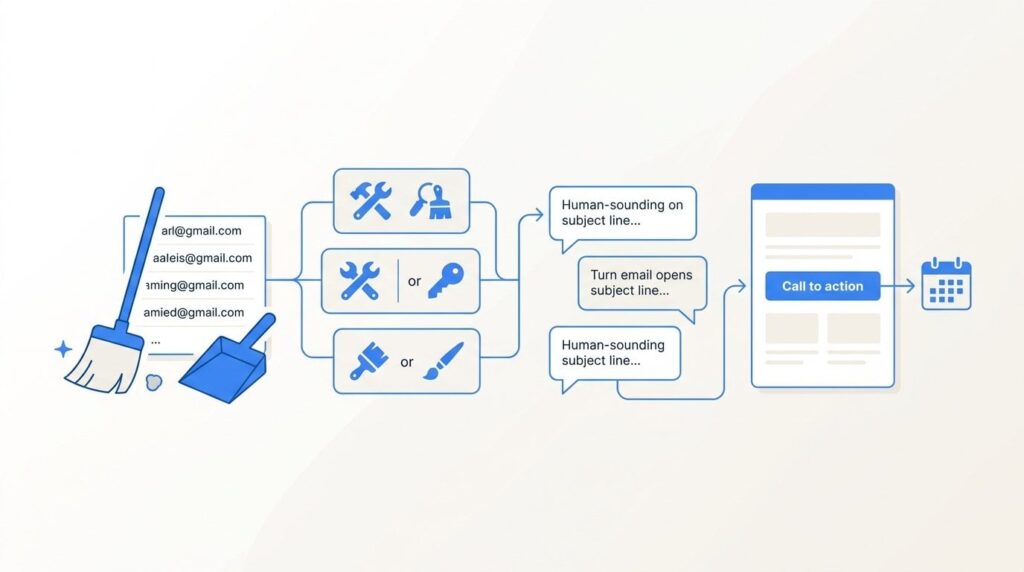
This guide is about fixing that. We’ll walk through cleaning your list, segmenting by job type, writing subject lines that sound like a contractor instead of a retailer, structuring emails around a single action, testing send times with your actual audience, and building the three automations that book jobs while you’re on the truck.
These steps are ordered by impact. Start at the top and work down. Don’t jump to the automation step before your list is clean. The sequence matters.
Step 1: Clean Your List Before You Send Another Email
Poor engagement isn’t usually a copy problem or a send-time problem. It’s a list problem. Sending to a dirty list is like canvassing a neighborhood where half the houses are vacant. You’re doing real work, but most of it lands nowhere.
A dirty list has a few specific characteristics. Inactive subscribers who haven’t opened or clicked anything in six to twelve months. Invalid addresses that bounce on every send. Role-based addresses like info@, admin@, or contact@ that route to a shared inbox nobody monitors. And contacts who never opted in properly in the first place, maybe someone added them from a business card pile without permission.
Start by pulling an engagement report from your email platform. Sort by last open or click date. Anyone who hasn’t engaged in six or more months goes into a re-engagement segment before you do anything else.
Send that segment one re-engagement email. Make it plain text. Keep it short. The subject line should be direct: something like “Should I keep sending you emails?” or “[First name], still interested in hearing from us?” The body is two or three sentences asking if they want to stay on the list, with a clear link or reply action to confirm. No promotions, no offers. Just a direct question.
Anyone who doesn’t respond to that email within seven to ten days gets removed. Not suppressed. Removed. Keeping unengaged contacts on your list hurts your sender reputation with every send, which means your emails are more likely to land in spam for the people who actually want to hear from you.
Google’s bulk sender requirements, enforced from 2024 onward, made this non-negotiable. High complaint rates and persistent inactivity increase spam classification risk across your whole list. List hygiene isn’t a best practice anymore. It’s table stakes.
Your list will be smaller after this process. That’s the point. A 25% open rate on 500 genuinely engaged contacts is worth more than an 8% open rate on 2,000 cold ones. The smaller, cleaner list will also cost you less on most platforms, which charge by subscriber count.
Step 2: Segment by Job Type and Customer Status
One-size-fits-all emails are why engagement dies after list cleaning. A customer who just had their water heater replaced doesn’t need a water heater replacement offer next month. Sending them one isn’t just a wasted send. It trains them to ignore you.
For most local service businesses, three core segments cover the majority of your sending needs. Past customers grouped by service type. Active leads who received an estimate but haven’t booked. And seasonal inquiry contacts who reached out during a peak period but didn’t convert at the time.
If you’re using Mailchimp, ActiveCampaign, Keap, or a similar platform, segmentation usually comes down to tags or custom fields. The simplest approach: export your completed jobs from your invoicing or CRM software, add a column for service category, and import that into your email platform. Tag each contact with the service they had done. “Drain cleaning,” “water heater install,” “AC tune-up,” whatever your job categories are.
For businesses without a CRM, the manual tagging approach still works. Pull your invoices from the last two years, create a spreadsheet with customer name, email, service type, and job date, then import with those fields mapped to custom tags in your email platform. It’s a few hours of setup once, and it changes what you can send.
Here’s why this matters practically. A plumbing company has drain cleaning customers and water heater customers on the same list. The follow-up offer and timing are completely different. Drain cleaning customers are good candidates for a maintenance reminder six months out or a “we’re in your neighborhood” campaign. Water heater customers who had an install three years ago might be approaching the point where an anode rod inspection makes sense. Those are two different emails going to two different groups, both relevant, neither annoying.
The test for whether your segmentation is working is simple: for every contact on a given send, you should be able to answer “why is this specific person getting this specific email?” If you can’t answer that question, the segment needs more work.
Step 3: Write Subject Lines That Get Opens From Real Customers
Subject lines for service businesses should sound like a contractor, not a retailer. “Your spring HVAC tune-up reminder” outperforms “Don’t miss our spring special!” because one sounds like a message from someone who knows you and one sounds like a coupon blast.
Three subject line structures work consistently for local service businesses.
The direct reminder: “[First name], your water heater is 8 years old” works because it’s specific and relevant. You know when the job was done. You know the product lifespan. That’s information the customer doesn’t have top of mind, and you’re doing them a genuine service by surfacing it. This structure requires the job date and product type in your contact data, which is another reason the segmentation step comes first.
The problem call-out: “Three signs your AC won’t make it through August” works because it matches how homeowners actually think about service problems. They’re not thinking “I should schedule maintenance.” They’re thinking “it’s making a weird noise, is that bad?” Problem-framed subject lines meet them where they are.
The personal follow-up: “Following up on your estimate from last Tuesday” works for unconverted leads because it mirrors a real sales conversation. It doesn’t sound like marketing. It sounds like a human being checking in. That’s exactly what it should sound like.
Preview text is the second subject line, and almost every service business ignores it. Most email clients show 40 to 90 characters of preview text after the subject line. If you haven’t set it, your platform will pull the first line of your email body, which is often “View this email in your browser” or a header image alt tag. That’s a wasted opportunity every single send.
Use the preview text to extend the subject line’s promise or add a specific detail. If the subject is “Your furnace is due for its annual check,” the preview text might be “We’re booking October slots now, and they fill fast.” That’s a complete thought that earns the open.
What to avoid: all caps anywhere in the subject line, more than one punctuation mark at the end, urgency language that feels manufactured (“Act NOW before it’s too late!!!”), and subject lines longer than 50 characters. Most of your recipients are reading on a phone. Anything past 50 characters gets cut off.
Track open rate by segment, not as an overall number. And keep in mind that Apple Mail Privacy Protection, widely adopted since 2022-2023, inflated open rates for businesses with significant iOS audiences by pre-loading tracking pixels. Open rate is a directional signal, not a precise count. Click-to-open rate and downstream conversions are more reliable.
Step 4: Structure Every Email Around One Action
The single biggest email mistake service businesses make is trying to do too much in one send. Promote two services, share a blog post, announce a new hire, and offer a discount, all in the same email. The reader looks at it, feels vaguely overwhelmed, and does nothing. Every option you add reduces the chance they take any of them.
One email, one action. Every time. And for a service business, that action should almost always be a phone call or a booking link, not a click to a blog post.
The anatomy of a high-converting service email is straightforward. Two to three sentences acknowledging the reader’s situation or why you’re reaching out. The specific offer or reason to act, stated plainly. One clear call to action with a phone number visible as text, not just a button. A brief trust line at the bottom: licensed, insured, serving [city] since [year].
That’s it. The whole email.
Plain text often outperforms heavily designed HTML emails for service businesses. A designed template with a header image, colored blocks, and multiple buttons reads like a promotion. A plain-text email reads like a message from a person. Your customers hired a contractor they trusted. The email should feel like it’s coming from that same contractor, not from a marketing department.
Mobile formatting matters more than most people realize. Per the Clicks Geek benchmarks, 40 to 70% of home service leads come in by phone. Many of those people are reading your email on a phone. Single column layout. CTA button large enough to tap with a thumb. Phone number as a clickable tel: link, not an image. Subject line under 50 characters. If your email template requires horizontal scrolling on a phone, it’s not working.
On length: most service emails should be under 200 words. If you’re writing more than that, you’re probably trying to accomplish more than one thing. Cut back to the single action, and cut the word count with it. Short emails that get read and acted on beat long emails that get skimmed and closed.
The success indicator here is click-to-open rate improving over time, and ideally, calls or bookings you can attribute to a specific send date. If you use call tracking, note the send date and watch for a spike in the days following. That’s your signal the email worked.
Step 5: Test Send Times and Frequency Without Guessing
Most published advice about best send times is based on aggregate data across every industry. That data includes e-commerce, SaaS, media companies, nonprofits. It doesn’t describe your customers, who are homeowners making decisions about service jobs on their own schedule.
The only send time data that matters is your own. Here’s how to get it.
Split a segment 50/50. Send the same email to both halves at different times on the same day, or on different days of the same week. Measure open rate and click rate after 24 hours. Document the result. Do this a few times across different segments before drawing conclusions. You’re building a picture of your specific audience, not confirming a generic best practice.
That said, some patterns show up often enough for home service audiences to be worth testing first. Tuesday through Thursday mornings, roughly 8 to 10am, tend to work for planned service reminders because homeowners are in a task-oriented mindset at the start of the workday. Sunday evenings often perform well for seasonal campaigns, when people are thinking about the week ahead and making home-related decisions. These aren’t rules. They’re starting points for your own tests.
On frequency: past customers can typically receive one to two emails per month without significant unsubscribe spikes. Active leads who received an estimate but haven’t booked can receive more frequent follow-up for 30 to 60 days post-estimate, then drop to monthly if they still haven’t converted. Don’t apply the same frequency to every segment. A customer who had a job done last week doesn’t need the same cadence as someone who’s been dormant for eight months.
Unsubscribe rate is a signal worth reading carefully. A spike after a specific send usually means one of two things: the content was off for that segment, or you’re mailing that group too often. Either way, it tells you something specific. Don’t ignore it and keep sending.
The goal is a documented send calendar, not mailing whenever you remember to. Once you have test results for your main segments, you can build a repeatable schedule. That consistency also helps deliverability, because inbox providers look at sending patterns over time.
Step 6: Build the Three Automations That Book Jobs While You’re Working
Manual campaigns are useful. Automation is where email starts generating revenue without you having to think about it. Three sequences cover most of what a local service business needs, and the setup time for all three is a few hours once.
Automation 1: The post-job follow-up sequence. This triggers when a job is marked complete in your CRM or invoicing system. Email 1 goes out three days after job completion: a thank-you note plus a direct link to leave a Google review. Keep it short. One paragraph, one link. Email 2 goes out 30 days later: a brief check-in on the work, plus a mention of a related service that makes sense for that job type. A plumbing company might mention a water quality test after a water heater install. An HVAC company might mention a duct cleaning after a new system installation. This sequence alone drives review volume and repeat business without any manual follow-up from you or your team.
Automation 2: The unconverted estimate sequence. This triggers when an estimate is sent but no booking is recorded after 72 hours. Email 1 is a plain-text message from the owner’s name, not the company name, asking if the customer has any questions about the estimate. Email 2 goes out seven days later: a brief note about current availability. Email 3 goes out at 14 days: a final check-in. The sequence stops automatically when they book, or after email 3 if they don’t. Unconverted estimates are one of the biggest revenue leaks in trades businesses. An estimate that wasn’t followed up is a lead that probably went to a competitor. This sequence closes that gap without requiring anyone to remember to follow up manually.
Automation 3: The seasonal re-engagement campaign. This one triggers by calendar date rather than customer action. Set it up four to six weeks before your peak season. HVAC companies send before summer cooling season and before fall heating season. Plumbers in northern markets send before freeze season. Landscapers send before spring and before fall cleanup season. The email goes to past customers who had the relevant service type, which is why the segmentation in Step 2 matters. A well-timed seasonal email to the right segment, sent before the rush, books jobs before your competitors are even thinking about it.
Mailchimp, ActiveCampaign, Keap, and HubSpot all support these automation triggers. If you’re not sure how to set them up in your specific platform, the documentation for each is solid. The investment is a few hours of setup. The automation runs indefinitely after that.
Track automation performance in your reporting dashboard: opens, clicks, and where possible, calls or bookings attributed to each sequence. That data tells you which automations are working and where to tune the copy or timing.
Putting It All Together: Your 30-Day Email Reset
The sequence matters. Clean the list first. Then segment. Then fix the emails themselves. Then test timing. Then automate. Skipping to automation before your list is clean means you’re automating bad sends to the wrong people. Work the steps in order.
Here’s a practical four-week plan. Week 1 is list hygiene: pull the engagement report, build the re-engagement segment, send the re-engagement email, and remove non-responders by the end of the week. Week 2 is segmentation: tag your contacts by service type and customer status using your invoicing or CRM data. Week 3 is writing: build your core email templates for each segment, using the one-action structure and the subject line formats from Steps 3 and 4. Week 4 is automation: set up the three sequences in your platform and test each trigger.
Realistic expectations: email is not a fast channel. Engagement improvements show up over 60 to 90 days as you build cleaner send history and better deliverability. Don’t judge the program after two sends.
Email also works best as a retention and repeat-business channel, not a primary customer acquisition tool. For new customer acquisition, paid search and local SEO carry more weight. For HVAC businesses, that might mean Google Ads during peak season alongside these email automations running in the background. For plumbers, it might mean a strong local SEO presence combined with the unconverted estimate sequence picking up the leads that don’t book immediately. The channels work together.
If you want to see what a full-funnel approach would look like for your specific business, including where email fits alongside paid search and local SEO, we’ll walk you through how it works and break down what’s realistic in your market. Clicks Geek has been building lead systems for local service businesses since 2015, across more than 298 industry verticals. No lock-in contracts, no vague promises about traffic. Just a clear picture of what the numbers actually look like in your market.
Tired of spending money on marketing that doesn’t produce real revenue? We build lead systems that turn traffic into qualified leads and measurable sales growth. If you want to see what this would look like for your business, we’ll walk you through how it works and break down what’s realistic in your market.