If you want your business to show up in the Google Map Pack, you need to understand how Google thinks. It all boils down to three main factors: relevance, distance, and prominence.
In simple terms, Google tries to find the best, closest, and most reputable business for a user's search.
Your command center for this is your Google Business Profile. Getting this right isn't just a small task—it's the foundation for everything else you do.
Why Your Google Business Profile Is Key to the Map Pack
Think of your Google Business Profile (GBP) as your digital storefront on Google. For many customers, it's their first impression of you. A half-finished profile might suggest you're not on top of your game. A polished one, however, shows professionalism.
In Short: A complete and active Google Business Profile sends strong signals to Google that you are a legitimate business that deserves to be shown to local searchers.
A complete profile is also seen as 2.7 times more trustworthy by customers.
Let's walk through how to get it right.
Start With Your Business Categories
This is one of the most important settings in your profile. Your primary category tells Google exactly what your business is. If you get this wrong, you'll struggle from the start.
- Be specific. If you're a plumber, choose "Plumbing Contractor," not just "Contractor."
- Add secondary categories. After picking your main one, add others that fit. A plumber might also add "Water Heater Installation & Repair Service." This helps you appear in more specific searches.
Getting these first steps right—categories, details, and photos—sets the stage for success.
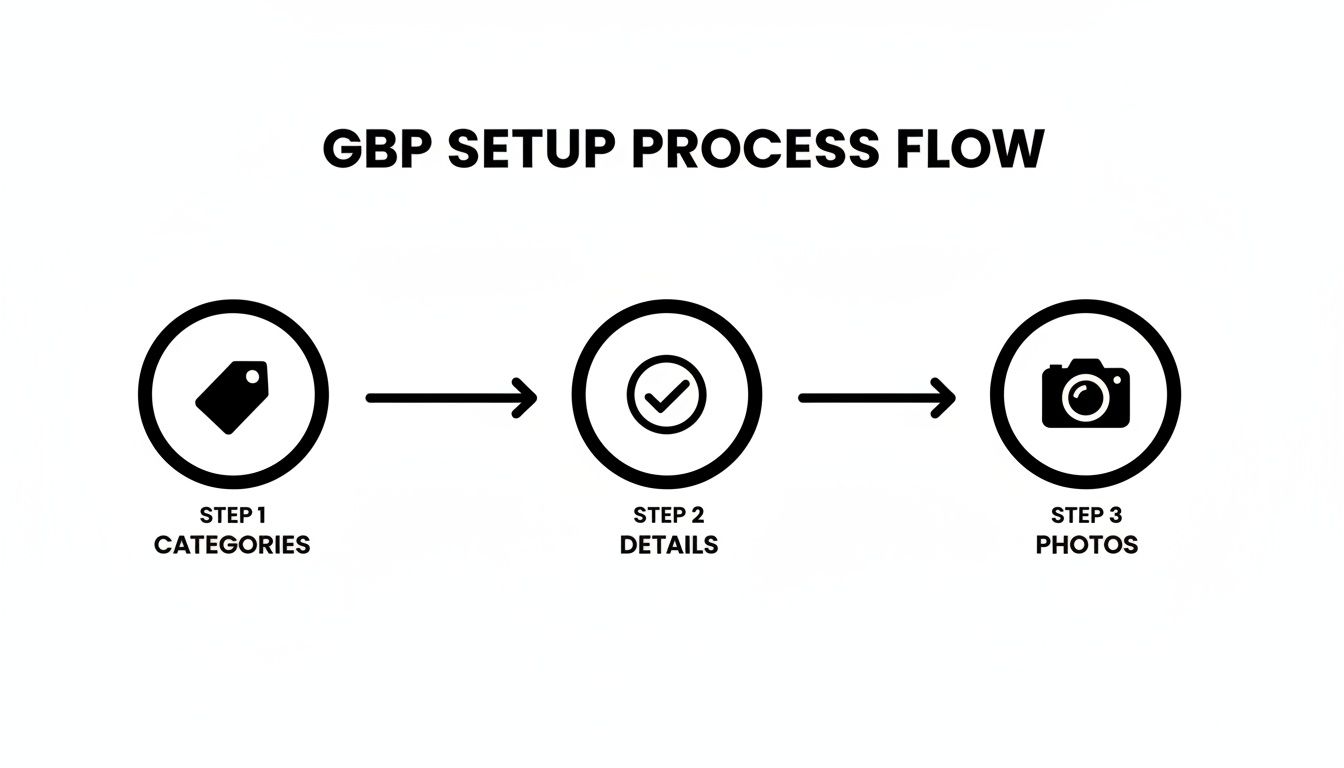
As you can see, it all starts with picking the right categories. From there, you build out your profile with rich details and compelling photos to make a strong first impression.
Write a Business Description That Converts
Your business description isn't just for keywords. It's your elevator pitch. You have 750 characters to convince a potential customer you're the right choice.
Instead of a dry "We fix leaky pipes," try telling a story. For example: "As a family-owned plumber proudly serving Springfield for over 20 years, we’re your go-to for emergency leak repairs. We believe in transparent, upfront pricing, so you’ll never get a surprise on your bill."
This approach builds trust and a local connection. For a deeper look into this, check out this guide on how to rank higher on Google Maps.
Use Every Feature GBP Offers
Many businesses fill out the basics and stop. This is a huge missed opportunity. To get ahead of the competition, you need to use every tool available.
A dormant Google Business Profile is a red flag for Google. Consistent activity shows you’re open and engaged, which boosts your prominence and ranking.
- Google Posts: These are like free mini-ads. Share updates, special offers, or recent projects. They expire, so post regularly to show you're active.
- Q&A Section: Don't wait for customers to ask questions. Add common questions yourself and answer them. This lets you control the narrative.
- Products & Services: This is very important. Detail every single service you offer. This helps you rank for long-tail searches like "tankless water heater installation near me."
A fully optimized profile is powerful. GBP signals can account for up to 32% of your local ranking power, making it the most important factor to focus on.
GBP Optimization Checklist From Basic to Advanced
| Optimization Area | What to Do | Why It Matters for Map Pack Ranking |
|---|---|---|
| Basic Information | Verify your business name, address, and phone number (NAP) are 100% accurate. | This is the foundation of local SEO. Inconsistencies hurt trust with Google. |
| Business Categories | Select the most specific primary category possible. Add relevant secondary categories. | This is the #1 factor for relevance. It tells Google what your business does. |
| Business Hours | Set your regular hours and always update for holidays or special events. | Signals to Google that you are active and provides a better user experience. |
| Business Description | Write a compelling, 750-character description using local keywords naturally. | Your chance to sell your business to both users and search engines. |
| Photos & Videos | Upload high-quality photos of your storefront, team, and work. Aim for at least 10. | Visuals increase engagement and trust. Geotagging photos can add a small boost. |
| Services/Products | Add every individual service or product you offer with detailed descriptions. | Allows you to rank for very specific, high-intent searches. |
| Google Posts | Publish updates, offers, or event posts at least once a week. | Consistent activity is a strong ranking signal for "prominence." |
| Q&A Section | Proactively ask and answer your own frequently asked questions. | Controls the narrative and provides valuable information to potential customers. |
| Reviews & Responses | Actively request reviews and respond to every single one (good and bad). | Reviews are a massive trust signal. Responding shows you're engaged. |
Build Local Trust with Reviews and Citations
Ranking in the Google Map Pack isn't just about your profile. It's about what others say about you. Google looks for outside validation that you're a real, trustworthy business. This proof comes from two key sources: customer reviews and online citations.
Your GBP is like your resume. Your reviews and citations are your professional references.
The Power of Customer Reviews
Reviews are a huge trust signal. They impact both customers and Google's algorithm. A steady stream of positive reviews tells Google you’re an active, popular business. This helps build prominence, a key factor for ranking in the Google Map Pack.
In Short: Reviews show Google that your business is not only active but also well-regarded by the local community.
Businesses in the top Map Pack spots often average over 80 reviews. In one study, a business saw its rankings drop after just 18 days without a new review. You can explore the research on review velocity and rankings to see how important this is.
How to Get More Reviews the Right Way
Getting reviews doesn't have to be awkward. Just make it easy for your happy customers.
- Ask at the right moment. The best time is right after a great service experience.
- Keep it simple. Create a short link to your GBP review form and text or email it to customers.
- Don't offer incentives. This is against Google's policies and can get your profile in trouble. You want genuine feedback.
Responding to every review—good or bad—is also crucial. It shows you're engaged and care about feedback.
What are citations in SEO?
Beyond reviews, Google checks your business info across the web for accuracy. These online mentions are called citations. The most important ones contain your NAP (Name, Address, Phone Number).
Think of each consistent citation as a vote of confidence. When Google sees your exact NAP on sites like Yelp or the Better Business Bureau, it trusts your information more.
Inconsistency is a ranking killer. If one directory lists you on "Main St." and another has "Main Street," it creates confusion for Google's algorithm and hurts your ranking.
Key Steps for Citation Management
- Start with the big players: Make sure your NAP is identical on Google, Bing, Facebook, Apple Maps, and Yelp.
- Move to industry sites: Find directories relevant to your niche. A plumber should be on Angi; a restaurant should be on TripAdvisor.
- Audit existing citations: Use a tool like Moz Local or BrightLocal to find and fix incorrect listings.
Your Website is Your Map Pack Superpower
Your Google Business Profile is powerful, but it doesn't work alone. Your website is its essential partner. For your business to dominate the Map Pack, your website needs to send the same signals to Google as your profile.
When your GBP says, "I'm a roofer in Springfield," your website should confirm it with proof.
Build Landing Pages That Match Your GBP
Here’s a pro tip many businesses miss: create specific pages on your website that match your GBP categories and services. If your primary category is "Plumbing Contractor," you need a "Plumbing Contractor" page on your site.
This creates a clear connection between your profile and your website. It tells Google that these services are central to what you do.
For a landscaper, your site structure might look like this:
yourlandscaper.com/lawn-care-boulderyourlandscaper.com/tree-trimming-boulder
Each page should have useful content about that specific service and location. This is a core part of successful local SEO services for small businesses.
Use Local Business Schema to Help Google
Schema markup is a type of code you add to your site that helps search engines understand your content better. It's like a secret language for Google.
For local businesses, LocalBusiness schema is essential. It lets you clearly state your:
- Exact business name
- Full address
- Phone number
- Hours of operation
- Service areas
When you add this code, you make it very easy for Google to verify your information. This builds trust and directly supports your Map Pack performance.
Don't Forget On-Page SEO Basics
A few other website elements are essential for supporting your Map Pack listing.
- Embed Your Google Map: Add the actual Google Map of your business location to your contact page. This physically ties your website to your storefront.
- Keep Your NAP Consistent: Your Name, Address, and Phone number (NAP) must be 100% identical on your website and your GBP.
- Speed Up Your Mobile Site: Most local searches happen on a phone. A fast, mobile-friendly website is a critical ranking factor.
Advanced Tactics for Competitive Markets
You've nailed the basics. Your GBP is optimized, and reviews are coming in. But you're still stuck in a competitive market.
To break through, you need to go deeper. This is about building real-world authority and creating a local advantage. This is how to rank in Google map pack when the competition is fierce.
Build Real Local Links That Matter
The best links for local SEO come from within your own community. These are strong trust signals to Google.
- Sponsor a local event. A link from a charity 5K or a community festival is local SEO gold.
- Team up with other local businesses. A plumber could write a guest post for a local real estate agent's blog.
- Join your Chamber of Commerce. This often provides a high-authority local citation and link.
These links are harder to get, which is why they are so valuable. They build your business's prominence.
Create Hyperlocal Content
Stop just writing about your services. Create content focused on the specific towns and neighborhoods you serve. This establishes you as the local expert.
A roofer in Denver should get specific:
- A guide on the "Best Roofing Shingles for Denver's Hail Season."
- A case study on a "Recent Roofing Job in the RiNo Arts District."
This kind of content shows a real connection to the community. It's a powerful strategy for any local maps SEO campaign.
Ethically Spy on Your Competitors
To outrank the competition, you need to know what they're doing right. Analyze the top three businesses in the Map Pack for your main keywords.
- Analyze Their Categories: What primary and secondary categories are they using? You might find one you missed.
- Check Their Review Velocity: How many new reviews are they getting each month? This gives you a benchmark.
- Audit Their Citation Sources: Use a tool to see where they are listed. This can reveal valuable citation opportunities.
The goal isn't to copy them. It's to understand the landscape so you can build a smarter plan.
Is It Working? Tracking Your Map Pack Progress
All this effort is pointless if you don't know what's working. Tracking your performance is the final, crucial piece of the puzzle. Without data, you're just guessing.
Use Google Business Profile Insights
Your first stop is the Insights (or Performance) section built into your GBP. It's a goldmine of data from Google.
Here’s what to watch:
- How Customers Search for You: This shows if people found you via a "Direct" search (your name) or a "Discovery" search (a service like "plumber near me"). High Discovery searches are a big win.
- Search Queries: This reveals the exact keywords people used to find you. You can uncover valuable new terms here.
- Customer Actions: This tracks how many people clicked to your website, requested directions, or called your business.
The "Search queries" report is incredibly useful. If you see people finding you for a new service, you can build a dedicated page for it.
Use Rank Trackers for an Accurate View
GBP Insights doesn't show your actual ranking position. A third-party rank tracker can help.
Tools like BrightLocal or Whitespark solve a big problem: Google's results are personalized based on location. A good local rank tracker lets you see your Map Pack position from different zip codes, giving you a true picture of your visibility.
Connecting Actions to Results
Once you have data, you can make strategic moves.
- Seeing a dip in phone calls? Try a new Google Post or push for more reviews.
- Not ranking in a key neighborhood? Create a hyperlocal blog post for that area.
- A new search query pops up? Add it as a service in GBP and create a Q&A for it.
Key Metrics for Map Pack Performance
| Metric | Where to Find It | What It Tells You |
|---|---|---|
| Discovery Searches | GBP Insights > Performance > How customers searched for your business | Shows how many new customers found you by searching for a product or service. A high number is a great sign. |
| Search Queries | GBP Insights > Performance > Queries used to find your business | The exact keywords customers are using. Helps you understand intent and find new opportunities. |
| Direction Requests | GBP Insights > Performance > See your performance | A strong indicator of foot traffic. Shows how many people are trying to get to your location. |
| Phone Calls | GBP Insights > Performance > See your performance | One of the most valuable metrics. Tracks direct leads from your profile. |
| Website Clicks | GBP Insights > Performance > See your performance | Measures how many people want to learn more about you on your website. |
| Photo Views | GBP Insights > Performance > Photos | High photo views indicate strong engagement. Shows customers are visually checking out your business. |
Tracking is a continuous loop: make a change, measure the impact, learn, and adapt.
People Also Ask: Your Map Pack Questions Answered
When you're trying to rank in the Google Map Pack, a few common questions always pop up. Here are some straight answers.
How Long Does It Take to Rank in the Google Map Pack?
This is the most common question, and the answer is: it depends.
If you're in a small town with little competition, you might see results in a few weeks. But if you're a lawyer in a big city, it could take 6-12 months of consistent effort.
In Short: Patience is essential. Map Pack ranking is about building a solid foundation over time, not quick hacks.
Does My Business Name Need Keywords to Rank?
While having a keyword in your legal business name can help, you should never stuff keywords into your name on your profile.
Changing "Bob's Plumbing" to "Bob's Plumbing – Best Plumber in Phoenix" violates Google's rules and can get your profile suspended. It's not worth the risk.
Instead, focus on:
- Your business categories
- Your services list
- Your business description
- Your website content
What Is More Important: Reviews or Citations?
You need both. They serve different purposes.
Citations (your NAP listed consistently online) are the foundation. They prove to Google you are a legitimate business at a specific location.
Reviews are your social proof. They tell Google that people like doing business with you, which builds prominence.
When you're starting, focus on getting your citations consistent. For long-term growth, a steady flow of fresh, positive reviews is what will make the biggest difference.
At Clicks Geek, we specialize in local SEO. If you're ready to make the Map Pack your number one source for new business, let's talk.