Want to get more local customers from Google Maps? It all starts with your Google Business Profile (GBP). This profile is the foundation of your local SEO.
A complete and active profile with lots of photos, current reviews, and correct info sends strong signals to Google. This directly helps you show up higher in local searches and the important "Local Pack."
In Short: A great Google Business Profile is the key to improving your Google Maps ranking.
1. Get the Basics Right: Your Google Business Profile
Showing up first on Google Maps isn't a secret. It's about building a solid foundation with your Google Business Profile. Think of it as the main hub for your local presence.
A well-maintained profile is the most important signal you can send Google. It shows your business is real, active, and a good match for what local searchers want.
You need to turn your profile from a simple listing into something that attracts customers. This means paying attention to the details. Every field you fill out adds more trust and information for both Google and potential customers. This is the first step to improve your Google Maps ranking and puts you ahead of competitors who don't bother.
Before you try any advanced tactics, make sure you've mastered properly listing your business on Google Maps.
Why a Complete Profile Is So Important
Imagine a store with a broken sign and dirty windows. You'd probably walk right by. An incomplete GBP has the same effect online.
When your profile is missing key details like your hours, website, or a good business description, it tells Google you might not be the best choice.
A complete profile, however, shows you're a serious and engaged business owner. This directly helps you rank higher. Businesses that take a few minutes to fill out their GBP are the ones that win in the Local Pack.
Here's a quick checklist of the most important fields to fill out right away.
Google Business Profile Optimization Checklist
| Profile Section | Action Item | Why It Matters for Ranking |
|---|---|---|
| Business Name | Make sure it matches your real-world business name exactly. Don't add extra keywords. | Consistency is a huge trust signal for Google. |
| Primary Category | Choose the most specific category that describes your main service. | This is one of the most powerful ranking factors. |
| Address & Service Area | Verify your physical address and set your service areas correctly. | This tells Google exactly where you are relevant. |
| Hours of Operation | List all regular and special hours. Keep them updated for holidays. | Accuracy builds user trust and can improve ranking. |
| Phone Number & Website | Add your main phone number and a link to your website's homepage. | Provides key contact info and sends traffic to your site. |
| Business Description | Use all 750 characters to describe what you do, what makes you unique, and who you help. | Adds important context and keywords for Google. |
| Photos & Videos | Upload at least 10 high-quality images of your location, team, and work. | Visuals increase engagement, which is a key ranking signal. |
Getting these basics right is the first and most important step.
The Power of Your Primary Category
If you focus on one thing, make it your primary category. This is a huge factor for your ranking. It tells Google what you do and which searches you should appear in.
For example, choosing "Roofer" instead of the general "Contractor" makes a big difference.
But don't stop there. Add secondary categories to provide more context. This helps you show up for related, specific searches. For instance, a "Roofer" could also add "Gutter Cleaning Service" and "Siding Contractor" as secondary categories.
Use Photos to Show, Not Just Tell
Photos make your listing more interesting and build trust with customers. They are also a known ranking factor.
Studies show that top-ranking businesses have many more photos than their competitors. It's common for businesses in the top 3 to have over 100 images on their profiles.
🔑 Key Takeaway: A complete, accurate, and visually rich Google Business Profile is the bedrock of any successful local SEO strategy.
Make a habit of uploading high-quality photos of your storefront, your team, your products, and happy customers. This activity shows Google your business is active. Getting these foundational steps right is a core part of effective local SEO services for small businesses.
2. Get Reviews and Engage with Customers
Reviews are more than just feedback. For Google Maps, they are a huge signal that your business is real, active, and trusted by customers.
Google wants to show users the best local businesses. A steady flow of positive reviews is one of the strongest signs that you're a top choice.
It’s not just about the number of reviews. The frequency and quality of your reviews also matter. This is a big piece of the puzzle for improving your Google Maps ranking.
How to Get More Reviews
Asking for reviews can feel awkward, but it doesn't have to be. The key is to make it very easy for happy customers to leave feedback.
Here are a few simple ways to do it:
- Follow-Ups: After a sale, send a quick email or text. A simple "Thanks for your business! We'd love it if you could share your experience on Google" with a direct link works well.
- QR Codes: Put a QR code on your counter, invoices, or business cards. Customers can scan it with their phone to go straight to your review page.
- A Note on Receipts: A friendly message at the bottom of a receipt can be effective. Something like, "Love our work? Let us know on Google!" is perfect.
The goal is to make it easy for customers to leave a review when they are most satisfied.
Why You Must Respond to Every Review
This is a big one. Responding to reviews—yes, all of them—is just as important as getting them.
When you reply, you're showing potential customers (and Google) that you are an engaged, professional business. A good response to a positive review makes the customer feel appreciated. A calm, helpful reply to a negative review can solve the problem and show others you handle issues well.
Data from Starfish.reviews confirms that businesses that respond to reviews see better customer engagement.
In Short: Responding to reviews shows Google you're actively managing your profile and care about customers. It's a direct signal that can boost your visibility.
Quick Guide for Responding to Reviews
| Review Type | Key Objective | Example Response Snippet |
|---|---|---|
| 5-Star Rave | Amplify positivity, encourage repeat business | "Thanks, [Name]! We're so glad you loved the [specific product/service]. We can't wait to see you again soon!" |
| 4-Star with Minor Feedback | Acknowledge the good, address the critique | "Thanks for the great feedback, [Name]! We appreciate you pointing out [the issue] and are looking into it." |
| Generic Positive | Show appreciation, keep it personal | "Thank you so much for taking the time to leave a review, [Name]. We really appreciate your business!" |
| 1- or 2-Star Negative | De-escalate, take it offline, show accountability | "Hi [Name], we're very sorry to hear about your experience. That's not our standard. Please call us at [phone number] so we can make this right." |
Remember, your responses are public and shape your reputation.
A great customer experience is what leads to five-star reviews. This is especially true for service businesses. Good call handling often sets the stage for a positive final review, as explained in this guide on growing your home service business with effective call handling.
3. Build Local Authority with Citations and Backlinks
How does Google know if your business is a respected local player? It looks for mentions of your business across the web.
When Google sees your information listed consistently in the right places, it starts to trust you. This is where local citations and backlinks come in.
Think of it this way: your GBP is what you say about yourself. Citations and backlinks are what others say about you. When those two stories match, Google sees you as a trustworthy business, which helps your Maps ranking.
What Are Local Citations?
A local citation is any online mention of your business's Name, Address, and Phone number (NAP). You can find them on local directories, social media, and apps.
Citations are important because they verify your information for Google. When your NAP is identical across many reputable sites like Yelp, Apple Maps, and the Better Business Bureau, it signals that you are a legitimate business.
In Short: Consistent citations build trust. Google rewards trustworthy businesses with better visibility.
On the other hand, incorrect information is a red flag. If one directory has an old address and another has a typo in your phone number, it creates confusion. This "NAP inconsistency" can hurt your rankings.
How to Build High-Quality Citations
Building citations is a key part of any local maps SEO strategy. It's about quality over quantity.
Here's a simple approach:
- Start with the Big Players: Get your business listed correctly on major directories and data aggregators.
- Yelp
- Apple Maps
- Bing Places
- Find Niche Directories: Look for directories specific to your industry. If you're a contractor, you should be on Angi and Houzz. If you run a restaurant, TripAdvisor is a must. These sites are highly relevant.
- Audit and Clean Up: Use a tool to find all existing mentions of your business online. Correct any NAP inconsistencies. This cleanup is just as important as building new listings.
Get an Edge with Local Backlinks
While citations are about consistency, local backlinks are about authority. A backlink is a clickable link from one website to another.
When a local news site, community blog, or another local business links to your website, it's a powerful endorsement.
Google sees these local links as a vote of confidence. It tells the algorithm that your business is a recognized part of the local community. A link from your city's Chamber of Commerce website, for example, is excellent for local SEO.
How to Earn Local Backlinks
Getting good backlinks takes effort, but it's worth it. You have to earn them by getting involved in your community.
- Sponsor a Local Event: Sponsor a local sports team or a charity run. Most organizations will list sponsors on their website with a link.
- Host a Community Workshop: A local financial planner could host a free workshop on buying a first home. This is a great way to get links from local blogs and news sites.
- Partner with Other Businesses: Team up with a non-competing business for a promotion. A local gym and a health food store could write a blog post together and link to each other.
Every local link you earn tells Google you're a trusted local authority.
4. Advanced Tactics to Outrank Competitors
You have the basics down. Now it's time to pull ahead of the competition.
Most of your competitors probably ignore powerful tools inside their Google Business Profile. This is a big opportunity for you.
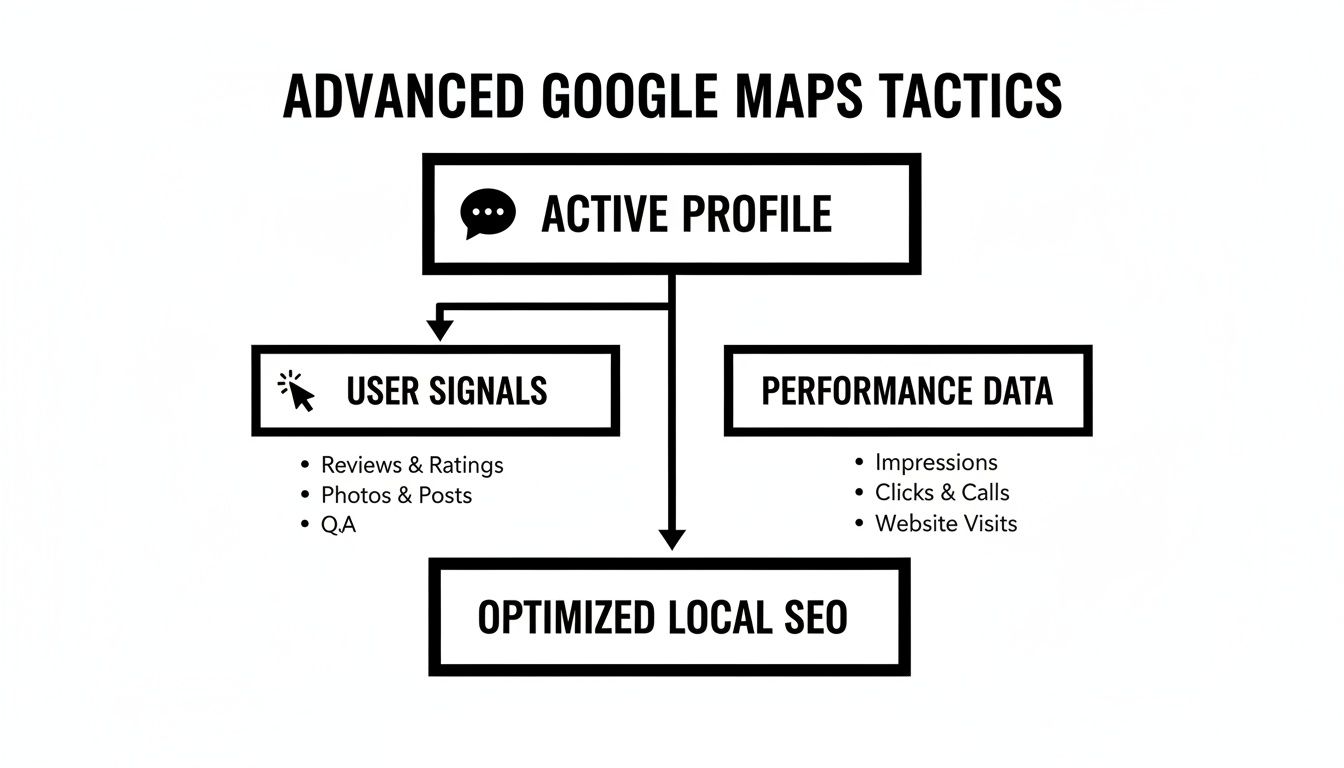
Using features like Google Posts, the Q&A section, and product listings sends strong signals to Google that your business is active and relevant. It also gives customers more reasons to call you.
Use Underused GBP Features
Your GBP is a marketing platform. When you treat it like one, your rankings on Google Maps will improve.
- Google Posts: These are like free mini-ads on your profile. You can share special offers, new products, or events. Each post adds fresh, keyword-rich content to your profile.
- Products and Services: Don’t just list what you do—show it off. Add photos, descriptions, and even pricing. This helps you rank for more specific searches.
Manage the Questions & Answers Section
The Q&A section on your profile is a goldmine. Anyone can ask a question, and anyone can answer. If you don't manage it, you let others control the story about your business.
Take control of your Q&A:
- Add your own questions. Think of the top 5-10 questions you get from customers. Ask those questions on your profile, then immediately answer them clearly.
- Use your keywords. When someone asks, "Do you offer free estimates?" don't just say "yes." A better answer is, "Yes, we offer free, no-obligation estimates for all residential roofing services in the Springfield area."
- Upvote good answers. The answer with the most upvotes gets pinned to the top, so it's the first thing people see.
Influence User Behavior Signals
Google watches how users interact with your profile. These are powerful behavioral signals that tell the algorithm if your business is a popular choice.
The main signals to focus on are:
- Clicks-to-Call: People tapping the "Call" button.
- Clicks-for-Directions: Users getting directions to your location.
- Website Clicks: Visitors going to your site from your GBP.
You can influence these by making your profile attractive. Use high-quality photos, post frequent updates with clear calls-to-action ("Call today for a free quote!"), and get great reviews.
For businesses with multiple locations, a consistent strategy is essential. You can learn more in this guide to local SEO for multiple locations.
Use GBP Insights to Guide Your Strategy
Your GBP Insights (now called "Performance") is your analytics dashboard. It helps you fine-tune your local strategy.
Here you can find:
- Search queries: The exact terms customers used to find you.
- How customers find you: A breakdown of direct vs. discovery searches.
- User actions: A count of your calls, direction requests, and website clicks.
Check your Insights regularly. If you see a spike in traffic from a specific keyword, create a Google Post about it. This data-driven approach removes the guesswork.
People Also Ask: Common Questions About Google Maps Ranking
How can I improve my ranking on Google Maps for free?
You can improve your ranking for free by fully optimizing your Google Business Profile.
- Fill out every section completely.
- Choose the most specific primary category.
- Upload at least 10 high-quality photos.
- Regularly get new customer reviews and respond to all of them.
- Use Google Posts and the Q&A feature weekly.
How do I get my business to the top of Google Maps?
Getting to the top requires focusing on Google's three main local ranking factors:
- Relevance: Make sure your GBP categories, services, and description accurately match what people are searching for.
- Proximity: This is how close your business is to the searcher. You can't change this, but you can excel at the other two.
- Prominence: This is how well-known your business is. Build prominence by getting lots of positive reviews, earning backlinks from local websites, and having consistent business listings (citations) across the web.
Why is my business not showing up on Google Maps?
There are several common reasons:
- Your profile is incomplete or unverified: A new or incomplete profile might not show up. Make sure you've completed the verification process.
- Your business category is too broad: If you use a generic category like "Contractor" instead of a specific one like "Roofer," you might not appear for relevant searches.
- You have inconsistent NAP: If your Name, Address, and Phone number are inconsistent across different online directories, it can confuse Google and hurt your visibility.
- You lack reviews or activity: An inactive profile with few reviews is less likely to be shown.
Can I rank in a city where I don't have a physical address?
This is very difficult. Google Maps is designed to show users businesses that are physically near them.
If you are a service-area business, you can set a service radius, but your ranking will always be strongest near your verified address. Using a virtual office or P.O. box is risky and can lead to your profile being suspended. It's best to focus on dominating the area you actually serve.
Mastering Google Maps is one of the most powerful things you can do to generate local leads. At Clicks Geek, we build comprehensive local SEO strategies that put your business in front of the right customers at the right time. Learn how we can help you dominate your local market.