Want to get more calls, clicks, and customers from Google Maps? It comes down to three things Google cares about: Relevance, Proximity, and Prominence.
If your business profile matches what someone is searching for (relevance), is close to them (proximity), and is well-regarded online (prominence), you win.
This guide will show you exactly how to improve your Google maps ranking by focusing on the factors you can control.
Why Does Google Maps Ranking Matter?
Scoring a high rank on Google Maps is like having the best storefront on the busiest street in town. It’s not an accident when you see the same businesses in the top "map pack" spots.
For a local business, this is huge.
When people search for something "near me," showing up in the top three results can be the difference between a busy day and a quiet one. It's a critical part of building an effective online presence for your small business and one of the best ways to get new customers.
The 3 Pillars of Google Maps Ranking
Google's local search algorithm is built on three main ideas. Understanding them tells you where to focus your effort.
- Proximity: How close is your business to the person searching? You can't move your shop, but you can make sure Google knows exactly where you are.
- Relevance: How well does your business match what the person is looking for? If your Google Business Profile is optimized for "emergency plumber," you're more likely to show up for that search.
- Prominence: How well-known is your business online? Google looks at reviews, links, and online directory listings to figure this out.
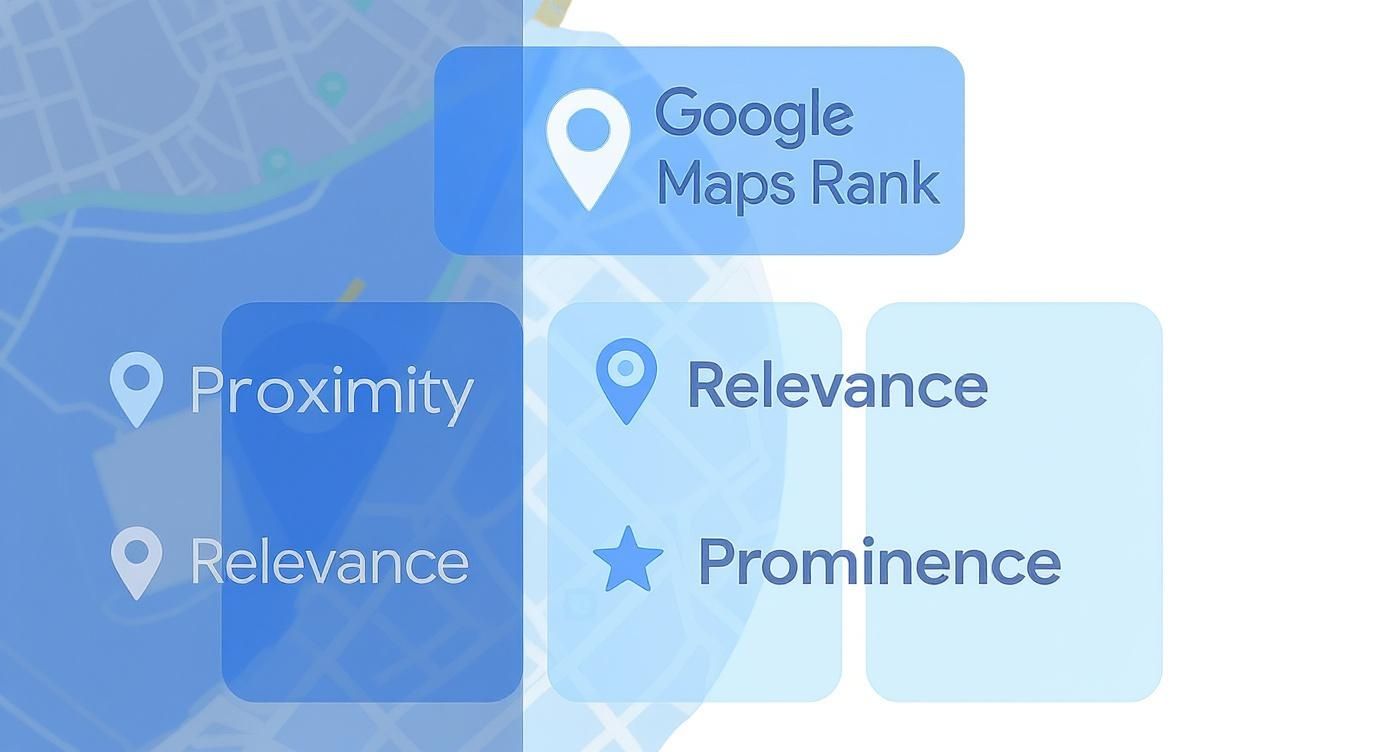
You can't change proximity, but you have total control over your relevance and prominence. That's where the real work begins.
In Short: Getting a top spot on Google Maps drives leads and sales by making your business visible to nearby customers actively searching for your services.
Key Ranking Factors You Can Control
Here’s a breakdown of the signals that matter most.
| Ranking Factor | What It Means | Why It Matters for Your Rank |
|---|---|---|
| Google Business Profile | Your business name, categories, hours, photos, and posts. | This is the #1 factor (about 32% of your rank). An incomplete profile tells Google you're not a good result. |
| On-Page SEO Signals | Keywords and location info on your website. | Your website confirms your GBP info. Strong on-page signals (about 19% of your rank) prove your relevance. |
| Review Signals | The number, speed, and quality of your Google reviews. | This is a huge trust signal, making up roughly 16% of your ranking power. More positive reviews increase your prominence. |
| Local Citations (NAP) | Mentions of your Name, Address, and Phone number (NAP) on sites like Yelp and Yellow Pages. | Consistency proves you are a legitimate, established local business. |
| Local Link Building | Getting other local, relevant websites to link to your site. | Backlinks act as a vote of confidence, boosting your authority and prominence in Google's eyes. |
Does a top spot really make a difference?
Yes. The numbers are clear. About 86% of people use Google Maps to find local businesses.
And businesses in the top three map pack spots get 126% more traffic than those just a few positions lower. A high rank is a direct line to more customers.
Step 1: Optimize Your Google Business Profile
Your Google Business Profile (GBP) is your digital front door. Many owners fill in the basics and then forget it. The real wins are in the details.
A complete and active profile sends strong signals to Google that you are a relevant, trustworthy business that deserves a top spot.
Nail Your Business Categories
Your categories are a powerful ranking factor. They tell Google exactly what you do.
- Primary Category: This is your most important choice. It should be the core of what you do. If you're a plumber who also does HVAC, pick the service that brings in the most revenue.
- Secondary Categories: Don't skip these. Add every other relevant service you offer. For the plumber, you’d add "HVAC contractor," "Air conditioning repair service," and "Furnace repair service." This helps you show up for more specific searches.
Pro Tip: Look at the categories your top-ranking competitors are using on Google Maps. It’s a great way to find relevant secondary categories you might have missed.
Write a Helpful Business Description
Your business description is valuable space. Tell Google and customers who you are and why they should choose you.
A good description should:
- Highlight what makes you special. Are you family-owned? Offer 24/7 service? Put that first.
- Include keywords naturally. Use terms your customers search for, like "emergency plumbing in downtown."
- State your service area. Clearly name the neighborhoods, towns, or cities you serve.
In Short: A strong business description uses keywords, highlights unique selling points, and clearly defines your service area to attract both customers and Google.
Complete Every Detail
Completeness is key. Filling out every field can make a big difference.
Data shows that 75% of businesses in the top three local spots have complete GBP descriptions, compared to just 40% for those outside the top 10. You can find more Google Business Profile statistics on Starfish.reviews.
Here’s a quick checklist of details people often miss:
- Products and Services: Add every single service as its own item. Include descriptions and prices if you can.
- Attributes: Do you have free Wi-Fi? Are you women-owned? These are searchable filters for customers.
- High-Quality Photos: Use clear photos of your storefront, team, and work. Geotag your photos by adding location data to the image file before uploading.
- Consistent NAP: This is critical. Your Name, Address, and Phone number must be identical everywhere online.
Stay Active with Posts and Q&A
An outdated profile looks abandoned. Google's algorithm favors active businesses.
- Google Posts: Use these weekly to share special offers, new products, or company news. Think of them as mini-ads on your profile.
- Q&A Section: Be proactive. Ask and answer your own "Frequently Asked Questions" to control the narrative and provide helpful info upfront.
Managing all this takes time, which is why many businesses use professional local SEO services for small businesses to keep their profile optimized.
Step 2: Build Your Local Prominence
Next, you need to prove to Google that you're a trusted player in your area. This comes down to two things: reviews and citations.
The Power of Google Reviews
Customer reviews are pure gold for local SEO. They signal to Google that people are interacting with and value your business.
Getting reviews can feel awkward. The trick is to make it a natural part of your process.
- Ask at the right time. The best time is right after a great experience when a customer is happy.
- Make it easy. Google gives you a direct link to your review page. Put it in your email signature, on invoices, or use a QR code at your counter.
- Send a gentle follow-up. A simple email or text after a sale can work wonders.
Why You Must Respond to Every Review
Responding to reviews—good and bad—shows everyone you care about customer feedback.
For Good Reviews:
Don't just say "Thanks!" Be specific. "So glad you enjoyed the spicy tuna roll! It's one of our favorites. Hope to see you again soon."
For Negative Reviews:
A bad review is a chance to show your professionalism.
- Stay calm. Never get defensive.
- Acknowledge and apologize. Start with, "I'm sorry you had a frustrating experience."
- Offer to make it right. Take the conversation offline. "We want to learn more. Please give me a call directly at…"
In Short: Your response to a negative review is really for all the future customers who will see how you handle problems.
Understanding Local Citations (NAP)
A citation is any online mention of your business's Name, Address, and Phone number (NAP). Think of sites like Yelp, Apple Maps, or industry directories.
The most important rule is NAP consistency. Your Name, Address, and Phone number must be identical everywhere. Even a small difference like "St." vs. "Street" can confuse Google and hurt your rank.
Where to Build Citations
Quality matters more than quantity. Start with the big, authoritative directories.
- Apple Maps
- Yelp
- Bing Places
- Better Business Bureau (BBB)
- Your local Chamber of Commerce
After these, look for niche directories for your industry. For example, a cafe should be on TripAdvisor. These online efforts support your physical presence. Just as captivating shop window displays pull people in, a strong online presence brings them to your door.
Step 3: Connect Your Website to Your GBP
Your website and your Google Business Profile work as a team. Your website is the ultimate source to verify everything you claim on your GBP.
When they work together, they send powerful signals to Google that push you higher on Maps.
On-Page SEO for Local Authority
On-page SEO is crucial for Google Maps. Google cross-references your website to confirm your profile details.
Start with your NAP (Name, Address, Phone Number). It needs to be easy to find. The footer of your website is a great place, so it appears on every page.
Crucial Tip: Your NAP on your website must be an exact match to what’s on your Google Business Profile. No exceptions.
Create Location-Specific Pages
If you serve multiple towns or neighborhoods, build dedicated pages for each of them.
For example, a plumber in a large metro area should create pages like:
- Emergency Plumbing in Northside
- Downtown Core Drain Cleaning Services
- South Hills Water Heater Repair
Each page needs unique content. Mention local landmarks and testimonials from customers who live there. This strategy proves to Google you have a real presence in those areas. This SEO for auto repair shops guide shows how this is applied.
Develop Locally Relevant Content
Use your blog to show you're part of the community. This tells Google you’re an active, local business.
A few ideas:
- Community Guides: Write about local events or markets.
- Local Case Studies: Detail a project you completed in a well-known neighborhood.
- Partnership Spotlights: Feature another local, non-competing business you admire.
This content naturally includes local keywords, reinforcing your geographic authority.
Implement LocalBusiness Schema Markup
Schema markup is special code you add to your website to speak Google's language.
LocalBusiness schema spells out your business details—what you do, where you are, your hours—in a format Google can instantly understand. It removes all guesswork and makes it easy for Google to verify your information.
Step 4: Track Your Success and Fight Spam
Once you have the fundamentals down, it's time to fine-tune your strategy and measure what's working.
How to fight spam on Google Maps?
You've probably seen a competitor ranking with a keyword-stuffed name or a fake address. This is map spam, and it steals clicks from honest businesses.
You can fight back. Google has a "Suggest an edit" feature. If you see a listing breaking the rules, report it.
Look out for:
- Keyword Stuffing: Names like "Dave's Roofing – Best Roofer in Springfield" when the business is just "Dave's Roofing."
- Fake Locations: A P.O. Box or virtual office address used to fake a physical presence in a prime location.
Reporting spam helps clean up the search results for everyone and gives your legitimate business a better chance to rank.
Use the Q&A Feature Proactively
The "Questions & Answers" section is a powerful tool. Don't wait for customers to ask questions.
Think of the top 5-10 questions you get on the phone every day. Go to your own profile, ask those questions, and then answer them from your business account.
This lets you control the narrative and provide perfect, pre-vetted answers.
Understand Your GBP Insights
You can't improve what you don't measure. Your Google Business Profile has a "Performance" dashboard full of data.
| Metric | What It Measures | What It Means for You |
|---|---|---|
| Searches | How people found you: "Direct" (typed your name) vs. "Discovery" (searched a category). | A high number of Discovery searches means your optimization is attracting new customers. |
| Views | The total times your profile was seen on Google Search and Maps. | Look for spikes in views after you post an offer or get new reviews to see what grabs attention. |
| Website Clicks | The number of people who clicked the website link on your profile. | This measures how well your profile convinces people to take the next step. |
| Calls | How many times someone tapped the "Call" button on your profile (on mobile). | For most local businesses, this is the most important metric. It's a direct lead. |
Track Your Real-World ROI
How do you know for sure that a customer came from your Google Maps listing?
- Use a Call Tracking Number: Services like CallRail or WhatConverts give you a unique phone number to use only on your GBP. When it rings, you know the lead came from Maps.
- Create a Trackable Website Link: Use a tool like Bitly or build a UTM-tagged link for your website URL. Your analytics will show how many people came from that specific link.
These methods remove the guesswork and prove the return on investment (ROI) of your local SEO efforts.
Frequently Asked Questions About Google Maps Ranking
Here are answers to some of the most common questions about ranking better on Google Maps.
How can I rank higher on Google Maps for free?
You can rank higher for free by fully optimizing your Google Business Profile. This includes:
- Choosing the correct primary and secondary categories.
- Uploading high-quality, geotagged photos regularly.
- Getting a steady stream of positive customer reviews.
- Responding to all reviews (both positive and negative).
- Ensuring your business Name, Address, and Phone number (NAP) are consistent everywhere online.
- Using Google Posts and the Q&A feature weekly.
How long does it take to rank higher on Google Maps?
There’s no magic wand. After a thorough optimization, you might see positive signs in a few weeks. But securing a stable spot in the top-3 map pack usually takes 3 to 6 months of consistent effort.
The timeline depends on:
- Competition: How many other businesses are you up against?
- Your Industry: Some niches, like lawyers or dentists, are very competitive.
- Consistency: Are you regularly getting new reviews and adding photos?
Will paying for Google Ads help my organic Maps ranking?
No. Paying for Google Ads does not directly boost your organic (free) ranking on Google Maps. The ad algorithm and the organic algorithm are separate.
However, ads can have an indirect benefit. Running Local Search Ads gives you instant visibility at the top of the map results. This extra exposure can lead to more clicks and reviews, which do help your organic ranking over time.
What do I do if I get a negative review?
First, don't panic or ignore it. A prompt, professional response can build more trust than a dozen positive reviews.
Here’s a simple plan:
- Respond Quickly: Acknowledge the feedback within 24 hours.
- Apologize & Empathize: Start with, "We're sorry to hear about your experience."
- Take it Offline: Provide a direct contact to make things right. "Please give me a call at [phone number] so I can learn more."
If a review is fake or violates Google's policies, you should flag it for removal.
At Clicks Geek, we turn these questions into a clear, actionable strategy. If you're ready to stop guessing and start seeing real results from your local SEO, let's talk. We help businesses like yours dominate their local market and turn Google Maps into a powerful customer acquisition machine. Learn more at https://clicksgeek.com.