Getting a better ranking on Google Maps boils down to three key things.
You need a complete Google Business Profile (GBP), a steady stream of good customer reviews, and an accurate business name, address, and phone number (NAP) everywhere online. These are the main signals that tell Google you're a real, active business that deserves to show up first.
This guide will show you how to improve google maps ranking with practical, step-by-step actions.
Your Blueprint for Google Maps Ranking
When your local business appears in the top spots on Google Maps, you get more calls and website traffic. It makes you the obvious choice for customers in your area.
Here's a key statistic: 88% of people use Google Maps to find local businesses. It's a massive source of new customers. And since people are 2.7x more likely to trust a business with a complete profile, leaving yours unfinished is a mistake.
We've seen clients boost their Map Pack visibility by over 70% just by filling out every part of their GBP. It's the most important first step.
The Core Ranking Process
Google's local algorithm is simple. It wants to show users the most relevant, prominent, and closest businesses. Your job is to master the three pillars you can control.
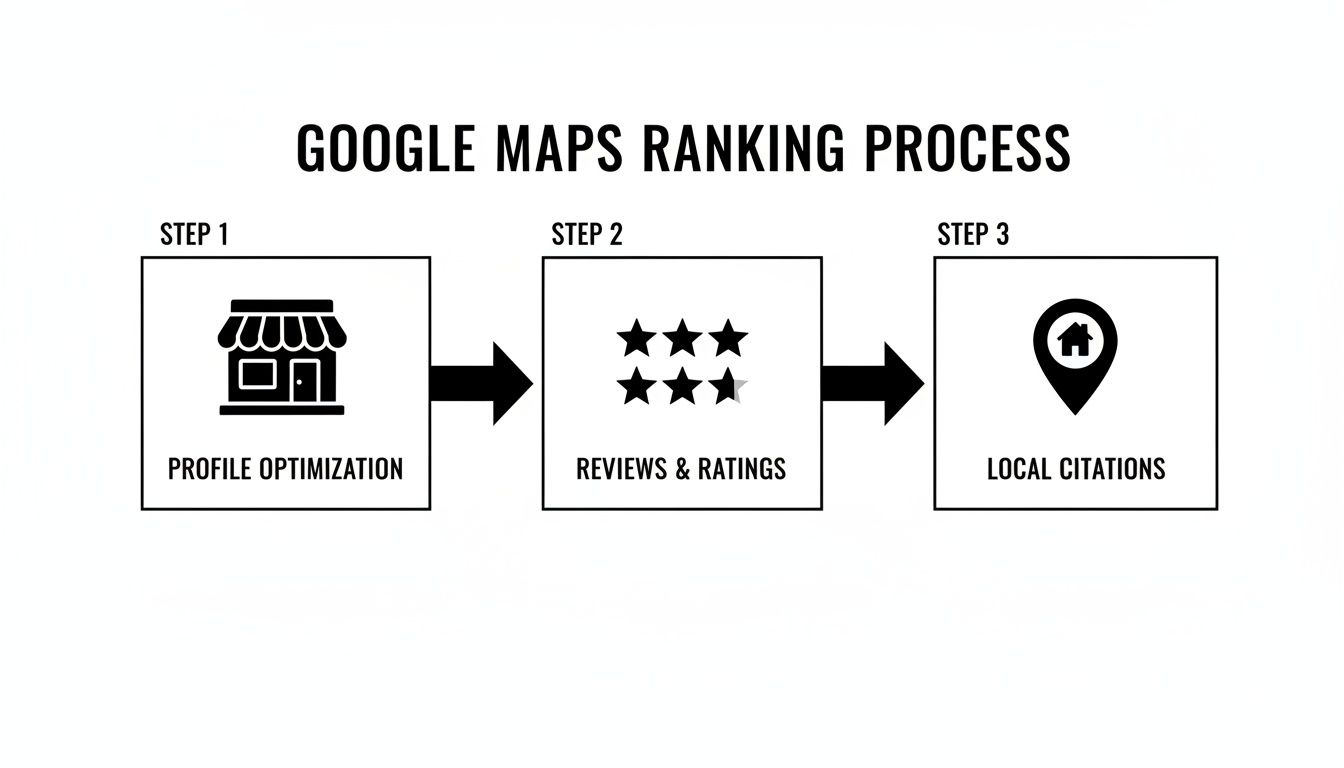
This image shows how it all fits together. A strong profile, positive reviews, and consistent online listings build the authority Google needs to rank you higher.
Here is a quick breakdown of what to focus on first.
Key Pillars of Google Maps Ranking
| Ranking Pillar | Why It Matters for Ranking | Your First Action Item |
|---|---|---|
| GBP Optimization | This is your business's online storefront. A full profile gives Google all the data it needs to match you with searches. | Fill out every single section of your Google Business Profile. Don't skip Q&A, services, or product listings. |
| Customer Reviews | Reviews provide social proof and build trust. Google sees a steady flow of positive reviews as a sign of a quality business. | Create a simple way to ask every happy customer for a review. A quick text or email with a link works great. |
| Local Citations (NAP) | Consistent Name, Address, and Phone number (NAP) data across the web confirms your location and legitimacy to Google. | Check your top 10 online directory listings (like Yelp, BBB) and fix any mistakes in your business info. |
Think of these pillars like the legs of a stool. If one is weak, the whole strategy is unstable.
Why Every Local Business Needs a Maps Strategy
You can't just hope customers will find your business anymore. Today, you need a proactive local Maps SEO strategy to stand out. Without one, you're invisible to people searching for your services.
In Short: For a local business, Google Maps is your new homepage. It's often the first impression a customer has of your brand.
Ranking on Maps is just one part of your marketing. It should work with your other efforts, both online and offline. You can also explore general strategies for attracting customers to support your local SEO plan.
Optimizing Your Google Business Profile
If you want to rank higher on Google Maps, start with your Google Business Profile (GBP). It's the most powerful tool you have. A complete and active profile is essential.
Every field you fill out gives Google more information. It helps Google understand who you are, what you do, and trust that you're a real business serving a local area.
It all starts with your business categories.
Nailing Your Business Categories
Your business categories have a huge impact. They tell Google exactly what your business is. If you get this wrong, you'll show up for the wrong searches, or not at all.
Your primary category should be the most specific description of your main service. For example, don't just pick "Contractor." Choose "Roofing Contractor" or "Plumbing Contractor." Be precise.
Then, use secondary categories to cover everything else you offer. If that roofing contractor also provides a "Gutter Cleaning Service," add that. Use these slots to give a full picture of your services.
A Quick Warning: Don't add categories for services you don't offer. This confuses Google and customers, which can hurt your rankings.
Writing a Business Description That Works
You have 750 characters for your business description. This is your chance to talk to customers and give clues to Google.
- Lead with what matters: Start with your main value. Why should they choose you?
- Use keywords naturally: Mention your main services and the city or neighborhood you serve. For example, "We're a family-owned roofing contractor specializing in residential roof repair in downtown Austin."
- Sound human: Avoid corporate jargon. Write in a natural voice. A robotic, keyword-stuffed paragraph doesn't help anyone.
A good description helps both people and search engines understand your business.
Using GBP Features to Drive Engagement
A "set it and forget it" profile won't work. Google likes to see activity because it signals that your business is open and engaged.
Get Active with Google Posts
Google Posts are like free mini-ads on your profile. Use them for:
- Limited-time offers
- Company updates
- New service announcements
- Highlighting local events
Posts usually last for seven days, so try to post something new each week. It keeps your profile fresh and sends good signals to Google.
Show, Don't Just Tell, with Photos and Videos
Visuals make a big difference. Profiles with lots of photos get 42% more requests for driving directions and 35% more clicks to their websites.
Regularly upload high-quality, geotagged photos. Show your storefront, your team, and your finished work. People want to see who they’re hiring.
Turn on Messaging & Use the Q&A Section
The messaging feature lets customers contact you directly from your profile. Just be sure to respond quickly.
Also, be proactive with the Q&A section. Post common questions you get and answer them clearly. This helps customers and lets you control the narrative.
Turning Customer Reviews into Ranking Fuel
If your Google Business Profile is the engine, customer reviews are the fuel. They are powerful social proof for customers and a major ranking signal for Google. A steady flow of positive reviews tells the algorithm you're a trusted business.
Think about it yourself. When you search for a service and see a business with hundreds of great reviews, you trust them more. Google's algorithm is designed to think the same way.
Building a Simple and Effective Review System
Getting more reviews doesn't have to be hard. The key is making it easy for happy customers to share their feedback. Most people are willing to leave a review if the process is simple and you ask at the right time.
The best time to ask is right after you've provided great service.
Here are a few easy ways to ask:
- Email or Text Follow-ups: A day after the job, send a message with a direct link to your GBP review page.
- QR Codes: Put a QR code on receipts or business cards that goes straight to your review page.
- In-Person Requests: A simple, "We'd be grateful if you could share your experience on Google!" works well.
In Short: Create a consistent, low-pressure process for asking for reviews. Make it as easy as possible for happy customers to click and give you five stars.
Reviews are a core part of your ranking. In fact, reviews are ranking rocket fuel. Having a higher average rating and getting reviews consistently is often more important than the total number. Data shows that businesses in the local 3-pack get 126% more traffic. With 80% of local searches converting, the stakes are high. While things like proximity are huge, reviews validate your business to Google. You can read more about Google Maps ranking factors to see their impact.
Why Responding to Every Single Review Matters
This is a step many business owners skip, which is a big mistake. Responding to every review—good and bad—is critical. It sends powerful signals to customers and to Google.
For customers, it shows you care. For Google, it confirms your business is active and values interaction.
Responding to Positive Reviews
A simple, personalized thank you goes a long way.
- Thank them by name.
- Mention the service they liked.
- Invite them to come back.
Example: "Thanks so much, Sarah! We're thrilled you loved the new landscaping. We look forward to helping with any future projects!"
Handling Negative Reviews Like a Pro
Negative reviews are an opportunity. A thoughtful response can show potential customers how you handle problems.
- Acknowledge and Apologize: Start by acknowledging their frustration and offer a sincere apology.
- Don't Get Defensive: Focus on their feelings and the issue.
- Take it Offline: Provide a direct contact, like an email or phone number, to resolve the issue privately.
Example: "Hi Mark, we're very sorry to hear your experience didn't meet your expectations. Please contact me directly at [email/phone] so we can make things right."
How Keywords in Reviews Give You an Edge
Here is a powerful, often overlooked tip. When customers naturally use keywords for your services or location in their reviews, it reinforces your relevance to Google.
For example, if you're a plumber in Miami, a review that says, "They did a fantastic job with our emergency pipe repair in our Miami home" helps you rank for that term. You can't ask customers to do this, but descriptive feedback adds another layer of relevance to your profile.
Building Authority with Citations and Local Links
Once your GBP is optimized, you need to build credibility across the web. Google looks for clues that your business is a trusted local player. Two of the biggest clues are citations and local links.
Citations are mentions of your business's Name, Address, and Phone number (NAP). Every time Google sees your correct NAP on a trustworthy site like Yelp, it's a vote of confidence.
Why NAP Consistency Is Non-Negotiable
NAP consistency is everything. Inconsistent information is a major red flag for Google.
If one directory has you on "Main St." and another lists "Main Street," it might seem small, but to an algorithm, it's a discrepancy. This chips away at your trustworthiness and can hurt your ranking.
Your business name, address, and phone number need to be 100% identical everywhere they appear online. This is the foundation of building trust with Google.
Your First Move: The Citation Audit and Cleanup
Before building new citations, you need to fix incorrect, outdated listings. This is a citation audit.
Start by Googling your business name, address, and phone number. Look for directory listings from places like Yelp, Yellow Pages, and Angi. Search for old phone numbers or variations of your business name.
Once you have a list, the mission is simple:
- Claim Your Profiles: Take ownership of any unclaimed listings.
- Correct the NAP: Update the info to be an exact match of your GBP.
- Kill the Duplicates: If a site has multiple listings for your business, contact them to get duplicates removed.
Managing citations for multiple storefronts can be complex. If you have several locations, our guide on local SEO for multiple locations can help.
Building High-Quality Local Citations
After cleaning up, start building new citations. But remember: quality over quantity.
Focus on sites that are respected and relevant to your business.
- The Big Dogs: Get listed on major platforms like Yelp, the Better Business Bureau, Apple Maps, and Facebook.
- Industry-Specific Sites: If you're a contractor, be on Angi or HomeAdvisor. For restaurants, use OpenTable.
- Hyper-Local Directories: This is pure gold. Join your local Chamber of Commerce, city business associations, or get featured on neighborhood blogs.
Essential Local Citation Sources for US Businesses
This list features high-authority directories to build your business citations.
| Platform | Industry Focus | Why It's a Priority |
|---|---|---|
| Yelp | Broad (Services, Restaurants, Retail) | A highly trusted review platform. A strong Yelp profile is essential. |
| Better Business Bureau (BBB) | Broad (All Industries) | A strong signal of trust. An A+ rating here carries significant weight. |
| Apple Maps | Broad (All Industries) | Crucial for visibility among iPhone users. |
| Broad (All Industries) | A major source of customer interaction and reviews. | |
| Angi | Home Services | The go-to directory for home service pros. |
| Tripadvisor | Travel & Hospitality | Essential for hotels, restaurants, and attractions. |
| Chamber of Commerce | Local Businesses | A powerful, hyper-local link that connects your business to your community. |
Getting listed on these core platforms is a great starting point.
The Power of True Local Links
Citations are the foundation, but genuine local links truly set you apart. A link from another respected local business's website is a massive vote of confidence.
Getting these links is about community involvement, not SEO tricks.
Here are a few ways to earn valuable local links:
- Sponsor a local team or charity event. You'll often get a link from their sponsor page.
- Partner with complementary businesses. A wedding photographer could partner with a local florist and link to each other's websites.
- Host a free workshop or community event. Local news outlets or bloggers might write about it and link to your site.
These strategies also build real brand awareness in your community.
Turning Your Website Into a Local SEO Powerhouse
Your Google Business Profile is only half the battle. Your website is its home base. If your GBP says you’re a plumber in Austin, but your website is vague or slow, you're sending mixed signals. Google hates mixed signals.
A professional website that shows you're a local expert is a huge vote of confidence. It must be in sync with your GBP, reinforcing your location, services, and credibility. Over 60% of Google searches happen on mobile, so a non-mobile-friendly site is a non-starter.
Create Hyper-Local Service Pages
Many businesses put everything on one generic "Services" page. This is a missed opportunity. You need dedicated pages for each service in each location you serve.
Instead of one page, build specific ones like:
- "Emergency Roof Repair in Austin"
- "Residential Gutter Cleaning in Round Rock"
- "Commercial Flat Roofing in Cedar Park"
This lets you target each page with the exact local keywords people search for. You can then link these super-relevant pages from your GBP services, creating a powerful message to Google.
The Bottom Line: Ditch the generic service list. Building location-specific service pages is one of the smartest moves for dominating Google Maps.
Weave Your Location into Your Website's DNA
Make it obvious to visitors and Google where you are.
A simple trick is to put your full Name, Address, and Phone number (NAP) in your website's footer. It will then appear on every page, reinforcing your location. Make sure it’s a 100% exact match to your GBP.
Next, embed a Google Map on your "Contact Us" page. This is a direct signal to Google that confirms your business location, adding a layer of geographic trust.
Speak Google's Language with Local Schema
Local Business schema is code added to your website that translates your business info into a language search engines easily understand. It neatly packages your NAP, hours, and business type.
Think of it as spoon-feeding Google the exact data it needs to verify your business. This structured data is a powerful signal that can give you an edge over the competition.
These website tweaks are an essential piece of the puzzle. For businesses that want a clear path, professional local SEO services for small business can help tie everything together.
Measuring What Matters & Scoring Some Quick Wins
You can't improve what you don't measure. This is especially true when you want to learn how to improve google maps ranking. You need to see what's actually working.
Your Google Business Profile has a built-in dashboard called GBP Insights. This is where you can see the impact of your work.
Pay attention to these three metrics:
- Search Queries: What phrases are people using to find you? This helps you understand your customers.
- User Actions: Are people calling you, clicking to your website, or asking for directions? This tracks real engagement.
- Discovery vs. Direct: This shows how many people found you by searching for a category, like "plumber near me" (Discovery), versus those who searched for your business name (Direct).
Your Quick-Win Checklist
If you're short on time and need to make an impact now, focus on this checklist.
- Fill in the Gaps: Go through your profile and complete every single section. Services, products, Q&A—don't leave anything blank.
- Add 10 Fresh Photos: Snap some high-quality, recent pictures of your storefront, team, and work.
- Publish a Google Post: This takes five minutes. Share an update or special offer to show Google you're active.
- Reply to Your Last 5 Reviews: Good or bad, respond to them. It shows you're engaged.
- Clean Up Your Top 3 Citations: Check your business on Yelp, Facebook, and Angi. Is your NAP identical everywhere? If not, fix it.
The Bottom Line: Regularly check your GBP Insights to guide your strategy, and use these quick wins to build momentum.
For a more detailed breakdown, this SEO playbook for gyms is a great resource for making your website a local search magnet.
Frequently Asked Questions
Here are answers to some of the most common questions about ranking on Google Maps.
How do I rank higher on Google Maps in 2024?
To rank higher on Google Maps, focus on three main areas:
- Optimize your Google Business Profile (GBP): Fill out every section, use accurate categories, upload photos regularly, and use Google Posts.
- Get more reviews: Consistently ask happy customers for reviews and respond to every single one, both positive and negative.
- Build local citations: Ensure your business Name, Address, and Phone number (NAP) are consistent across all online directories like Yelp and the BBB.
Why is my business not showing up on Google Maps?
There are several common reasons your business might not be showing up:
- It's not verified: You must verify your Google Business Profile before it can appear on Maps.
- Incomplete profile: A profile with missing information is less likely to be shown by Google.
- Incorrect categories: If you've chosen the wrong business categories, you won't show up for relevant searches.
- Inconsistent NAP: If your Name, Address, and Phone number are different across the web, it confuses Google and hurts your visibility.
- It's a new profile: New profiles can take some time to build enough authority to rank for competitive terms.
How long does it take to see results on Google Maps?
You can often see early results within a few weeks, especially after fully optimizing your Google Business Profile.
However, building lasting authority takes more time. Creating a strong review profile and building consistent citations is a long-term effort. Most businesses see a significant, stable jump in their local rankings after 3 to 6 months of consistent work. The timeline depends on your market's competitiveness and your starting point.
Does responding to reviews really help my ranking?
Yes, absolutely. Responding to every review, good or bad, sends a strong signal to Google that you are an active and engaged business that values its customers.
This builds trust with potential customers and shows Google that you are a quality business worth recommending. It also encourages more customers to leave reviews, creating a positive feedback loop.
What is the most important ranking factor for Google Maps?
Google's local algorithm uses three core factors: Relevance, Distance, and Prominence.
- Relevance: How well your profile matches what a user is searching for.
- Distance: How close your business is to the user.
- Prominence: How well-known your business is, based on reviews, citations, and website authority.
You can't control distance, but you have full control over relevance and prominence. The single most important starting point is a completely optimized Google Business Profile, as it influences all other factors.
Ready to stop guessing and start dominating the local map pack? At Clicks Geek, we build data-driven local SEO strategies that get you seen by the customers who matter most. Let's build your local presence together. Learn more about our local SEO services.