Want to know how to get higher on Google Maps? It starts with your Google Business Profile (GBP). This is your digital storefront. Getting the details right is the most important first step to ranking higher in local search results.
This guide will walk you through the key steps to improve your visibility on Google Maps and attract more local customers.
Your Google Business Profile is Your Foundation
Before anything else, your Google Business Profile must be perfect. It's the core of your local SEO strategy. For many people, this is their first impression of your business.
In Short: A complete and accurate Google Business Profile is the most critical factor for ranking on Google Maps.
Why does it matter? Over 86% of customers use Google Maps to find local businesses. Most don't look past the top few results. Years ago, being close to the searcher was enough. Now, Google's algorithm focuses on relevance, distance, and prominence. Learn more about this at local business SEO.
Claim, Verify, and Complete Your Profile
Getting your business on the map involves three main steps.
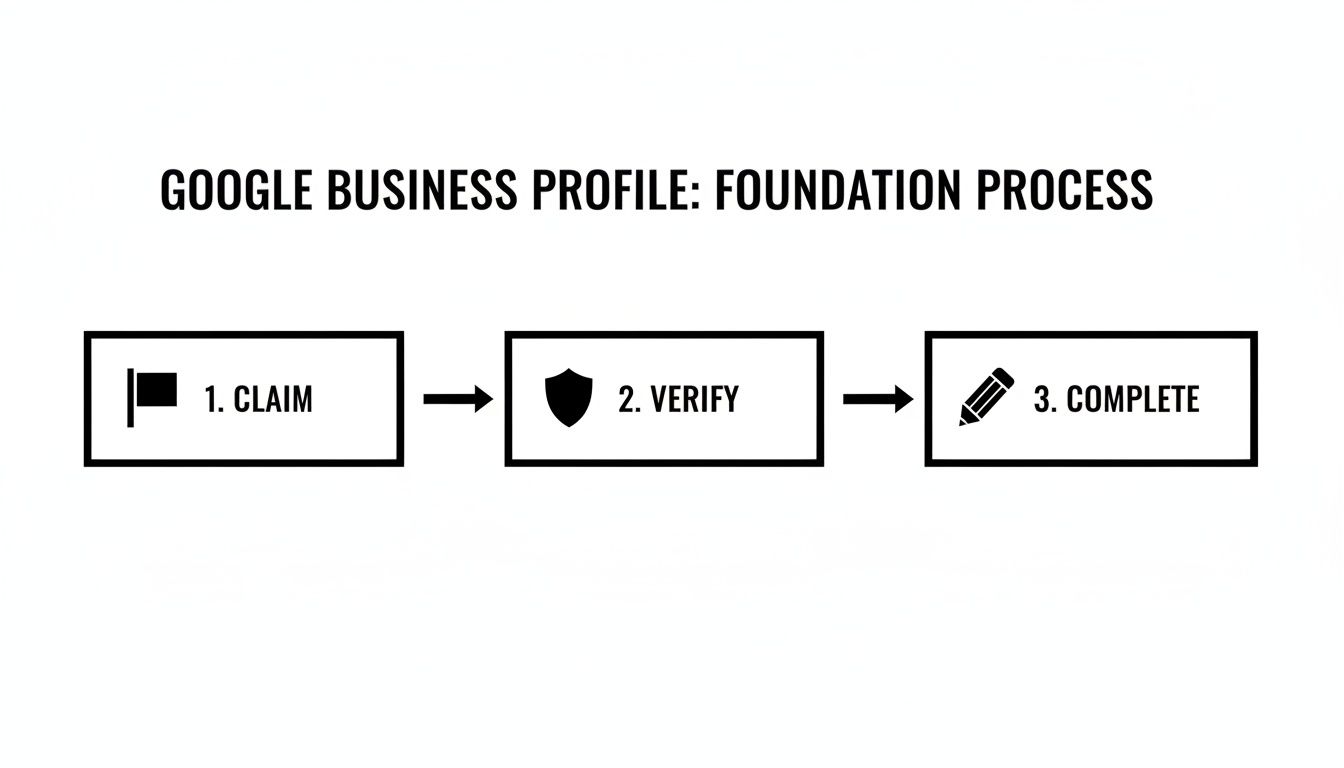
This process proves to Google you're a real business. It also gives customers the information they need. Each step is a building block for your local SEO success.
Why Every Detail Matters
Filling out your GBP seems simple, but small details have a big impact. A common mistake is choosing a broad primary business category or forgetting secondary ones.
- Primary Category: This is the most important field. Be specific. Don't choose "Restaurant"—choose "Italian Restaurant."
- Secondary Categories: Add other services people search for. If you're a plumber, add "Water Heater Repair" and "Drain Cleaning."
- Complete Information: An empty profile looks untrustworthy. Fill out everything: services, products, photos, and attributes like "wheelchair accessible."
Use this checklist to make sure your profile is ready to compete.
Google Business Profile Optimization Checklist
Here's a quick table to ensure your GBP has all the essential elements.
| Element | Why It Matters for Ranking | Action Item |
|---|---|---|
| Business Name | Your official name. Consistency builds trust. | Use your actual business name, no extra keywords. |
| Primary Category | The most important signal for what you do. | Choose the most specific category possible. |
| Secondary Categories | Captures related services and long-tail searches. | Add all relevant categories for your offerings. |
| Address | Confirms your physical location for proximity searches. | Ensure your address is 100% accurate everywhere. |
| Phone Number | A primary contact and trust signal. | Use a local number that is consistent online. |
| Website | Connects your profile to your main online presence. | Link to your homepage or relevant location page. |
| Business Hours | Informs customers when you're open. | Keep hours updated, especially for holidays. |
| Photos & Videos | Increases engagement and shows you're an active business. | Upload high-quality photos of your space, team, and work. |
| Services/Products | Details your offerings to match specific queries. | Add every service or product with descriptions. |
| Business Description | Your chance to tell your story and use keywords. | Write a compelling 750-character summary. |
Getting these right is the baseline for local SEO. It’s the difference between being visible and invisible. For a more detailed walkthrough, see this guide to optimize your Google Business Profile.
Build Authority with Reviews and Citations
Your profile is set up. Now you need to prove you're a trusted local business. This is about building authority.
In Short: Getting positive reviews and ensuring your business information is consistent online are crucial for building trust with Google.
Reviews and consistent online mentions are like votes of confidence. They tell Google you're the real deal.
How to Get More Reviews
Google rewards businesses that customers talk about. Positive reviews are a major ranking factor. But you have to ask for them.
- Ask at the right time. The best time is right after a great service experience.
- Make it easy. Get your direct review link from your GBP dashboard. Text it, email it, or put it on a QR code.
- Never pay for reviews. Offering incentives can get your profile penalized.
🔑 Pro Tip: Respond to every single review—good or bad. It shows potential customers you're engaged and signals to Google that your business is active.
The Importance of NAP Consistency
Next up are citations. A citation is any online mention of your business information: Name, Address, and Phone number (NAP).
Your NAP needs to be 100% identical everywhere online.
Even a small difference like "St." vs. "Street" can confuse Google and hurt your authority. It's a small detail with a huge impact.
Where to Build Citations
You don't need to be everywhere, just on the platforms that matter.
- Data Aggregators: Services like BrightLocal or Moz Local push your correct info to hundreds of directories at once. This saves a lot of time.
- Major Platforms: Make sure your listings on Yelp, Bing Places, Apple Maps, and Facebook are claimed and match your GBP perfectly.
- Industry-Specific Sites: If you're a contractor, get on Angi and HomeAdvisor. If you're a restaurant, focus on Yelp and TripAdvisor. These niche directories are very powerful.
Fixing inconsistent citations is tedious but worth it for the ranking boost.
People Also Ask: Common Questions about Google Maps SEO
Here are a few questions people often ask about ranking higher on Google Maps.
How do you get to the top 3 on Google Maps?
To get into the "Local Pack" (the top 3 map results), you need to focus on three things:
- Relevance: How well your business profile matches a search. This means having a complete GBP with the right categories and services.
- Distance: How close your business is to the person searching. You can't change this, but you can ensure your address is accurate.
- Prominence: How well-known your business is. This is influenced by reviews, online citations, local links, and overall website SEO.
Can you pay to be higher on Google Maps?
No, you cannot pay to improve your organic ranking on Google Maps. The rankings are determined by Google's algorithm. However, you can pay for Google Local Service Ads, which appear at the very top of search results, even above the organic map pack.
How do I get a Google review link?
It's easy. Log into your Google Business Profile manager. On the home dashboard, you'll see a card that says "Get more reviews." Click it to find your shareable link. Copy it and send it to your happy customers.
Can negative reviews hurt my Google Maps ranking?
A few bad reviews won't destroy your rankings, especially if you have many positive ones. What matters more is how you respond. A professional response to a negative review can actually build trust.
Use Your Google Business Profile to Its Fullest
A complete profile is the minimum. To get ahead, you need a profile that's active.
In Short: Regularly updating your profile with Posts, photos, and Q&As signals to Google that you're an active, engaged business.
A dynamic profile is more trustworthy and inviting.
Keep Your Profile Fresh with Google Posts
Google Posts are mini-updates that appear on your profile. They show Google you're actively managing your listing.
Use them to share timely information:
- Deals: "Get 15% off all services this month."
- Events: "Join our free workshop this Saturday."
- Updates: "We've extended our holiday hours."
- New Products: "Check out our new line of products."
Posting once a week is enough to send positive signals and keep your profile looking fresh.
Show, Don’t Just Tell, with Photos and Videos
High-quality photos and videos tell a richer story than text. They give customers a real feel for your business.
Businesses with photos get 42% more requests for driving directions and 35% more clicks to their websites.
🔑 Pro Tip: Mix professional shots with authentic photos of your team, happy customers (with permission), and behind-the-scenes content. This builds trust.
Take Control of the Q&A Section
Anyone can ask and answer questions on your profile. If you don't monitor it, misinformation can spread.
Take a proactive approach:
- List FAQs: Write down the 5-10 questions you get all the time.
- Post and Answer Them: Post these questions yourself, then provide clear, official answers.
This controls the narrative and gives customers valuable information upfront.
Be Specific with Services and Attributes
The more specific you are, the better Google can match you with the right customers. Don't just list "contractor." List every service, like "kitchen remodeling" and "deck installation."
Use Attributes to highlight key features:
- Accessibility: "Wheelchair accessible entrance"
- Amenities: "Free Wi-Fi"
- Offerings: "Online appointments"
- Crowd: "LGBTQ+ friendly"
These details help you show up in specific, high-intent searches.
Tie Your Website Into Your Maps Strategy
Your GBP and your website need to work together. A well-optimized website sends trust signals to Google, confirming your location and legitimacy.
In Short: Your website must support your Google Maps presence with local landing pages and technical SEO like schema markup.
Build Hyper-Local Landing Pages
This is a powerful tactic, especially for service-area businesses. Create dedicated pages for each core service in each location you serve.
For a Dallas-based roofer, this means pages like:
- Roof Repair in Plano
- Hail Damage Repair in Frisco
- New Roof Installation in McKinney
Each page should have unique content relevant to that specific area. Mention local landmarks or projects you've completed there. Don't just copy and paste content.
What to Include on a Local Landing Page
Each page should be a mini-homepage for that location. Include these elements:
- Unique, localized content
- An embedded Google Map of the service area
- Testimonials from customers in that city
- Clear NAP (Name, Address, Phone) information
- A strong call-to-action
For more ideas, check out how to build a mobile landing page.
Use Local Business Schema Markup
Let's get a bit technical. Local Business Schema is code you add to your website. You can't see it, but Google reads it.
Schema tells Google crawlers:
- Your exact business name, address, and phone number
- Your hours and business category
- Your geographic coordinates
This code eliminates guesswork for Google and reinforces the connection between your website and your physical location. Many website platforms and SEO plugins make adding schema simple. It's a key part of learning how to improve website SEO.
Boost Prominence with Local Links and Signals
Your profile is optimized and your website is solid. Now it's time to work on prominence.
In Short: Prominence is about how well-known your business is locally, which is boosted by local links and user interactions with your profile.
Google wants to see that you're a respected part of your local community.
Earn Meaningful Local Links
For local SEO, one good link from a local source is worth more than a dozen random links. These act as a local endorsement.
Here are proven ways to get them:
- Sponsor a local team or event. This almost always gets you a link from their website.
- Join the local Chamber of Commerce. The link from their member directory is a strong signal of legitimacy.
- Partner with other local businesses. Team up with a non-competing business and link to each other as trusted partners.
- Get featured in local news or blogs. Reach out to local media with a unique story or expert tip.
These aren't just backlinks; they are proof that you're a real player in your town.
What Are Behavioral Signals?
Behavioral signals are how people interact with your GBP. Every interaction sends a signal to Google that your business is relevant.
These signals matter most:
- Click-to-Call: Tapping the "Call" button.
- Direction Requests: Asking for directions to your business.
- Website Clicks: Visiting your website from your profile.
- Photo Views: Scrolling through your photos.
- Saving Your Location: Adding your business to a "Favorites" list.
A high volume of these actions tells Google, "People in this area like this business!"
How to Increase User Engagement
You can't force engagement, but you can encourage it.
- Use great photos. Your photos are your digital storefront.
- Use Google Posts. Run special offers to give people a reason to act now.
- Manage your Q&A section. Answering questions quickly builds trust.
For businesses with multiple locations, a consistent strategy is key. Get advice on local SEO for multiple locations to ensure every profile performs well.
Got Questions About Ranking on Google Maps? We've Got Answers.
Diving into local SEO can feel confusing. It's normal to have questions as you try to climb the Google Maps rankings.
Let's tackle some of the most common questions from business owners.
The Big One: How Long Does It Actually Take to Rank on Google Maps?
It's a marathon, not a sprint. You're building trust with Google.
- Initial Bump (2-4 Weeks): A fully optimized GBP can give you a small initial boost.
- Steady Climb (2-4 Months): As you get reviews, build citations, and use Google Posts, you’ll see more significant movement.
- Top Positions (6+ Months): Earning high-quality local links and building strong behavioral signals is the long game that solidifies top rankings.
🔑 Pro Tip: Plan for at least 3 to 6 months of consistent effort to see stable, high rankings.
Can I Rank in a City Where I Don't Have an Office?
Yes, but it's an uphill battle. Your physical address is a major ranking factor.
Here’s how to improve your chances in nearby towns:
- Build Hyper-Local Service Pages: Create dedicated, unique website pages for each city you serve.
- Get Reviews from That City: Ask customers in your target city to leave a review and mention the location.
- Get Local Links: A link from that city's Chamber of Commerce or a local blog is pure gold.
It's harder, but a focused strategy can get you on the map.
Are Photos Really That Important for My Google Maps Ranking?
Yes, but indirectly. Google doesn't rank you higher just for having more photos.
Instead, photos impact user behavior, and that's what Google watches.
A profile with great photos gets 42% more requests for directions and 35% more clicks to the website. Those are powerful engagement signals that tell Google your business is popular. That popularity helps you rank higher.
Ready to stop guessing and start seeing real movement in the rankings? The team at Clicks Geek lives and breathes this stuff. We build local SEO strategies based on data that drive real customers to your door. Let us help you climb the Google Maps ladder and get in front of the people who matter. Explore our local SEO services today!