Ranking higher on Google Maps starts with your Google Business Profile. Think of it as the control center for your local online presence. Optimizing your profile is the single most important step you can take to show up in local search results.
This guide will show you exactly how to improve google map ranking by focusing on your profile, customer reviews, and local content.
Optimize Your Google Business Profile
Your Google Business Profile (GBP) is your digital storefront on Google. It's not a "set it and forget it" listing. A complete profile helps Google understand your business and builds trust with potential customers.
In Short: A fully optimized Google Business Profile is the foundation of a strong Google Maps presence.
Choose the Right Business Categories
Your primary category is critical. It must describe the main service you offer. If you're a plumber who also does HVAC work, your primary category must be “Plumber,” not “Home Services.” Be specific.
After setting your primary category, add secondary ones. For that same plumber, you could add:
- HVAC contractor
- Air conditioning repair service
- Furnace repair service
These secondary categories help you appear in searches for your other services without confusing Google about your main focus.
Write a Compelling Business Description
You have 750 characters for your business description. Use them to include keywords your customers search for, but keep it natural.
Instead of saying, "We offer photography services," try this: "As Austin's premier wedding photographer, we specialize in capturing authentic moments. From engagement shoots to full ceremony coverage, we create timeless memories."
Add High-Quality Photos and Videos
Visuals build trust. An empty photo gallery can look unprofessional. Regularly upload high-quality photos and short videos.
- Exterior Shots: Show your storefront and signs to help people find you.
- Interior Shots: Give customers a feel for your office or shop.
- Team Photos: Show the real people behind your business.
- Action Shots: Showcase your team at work or highlight your products.
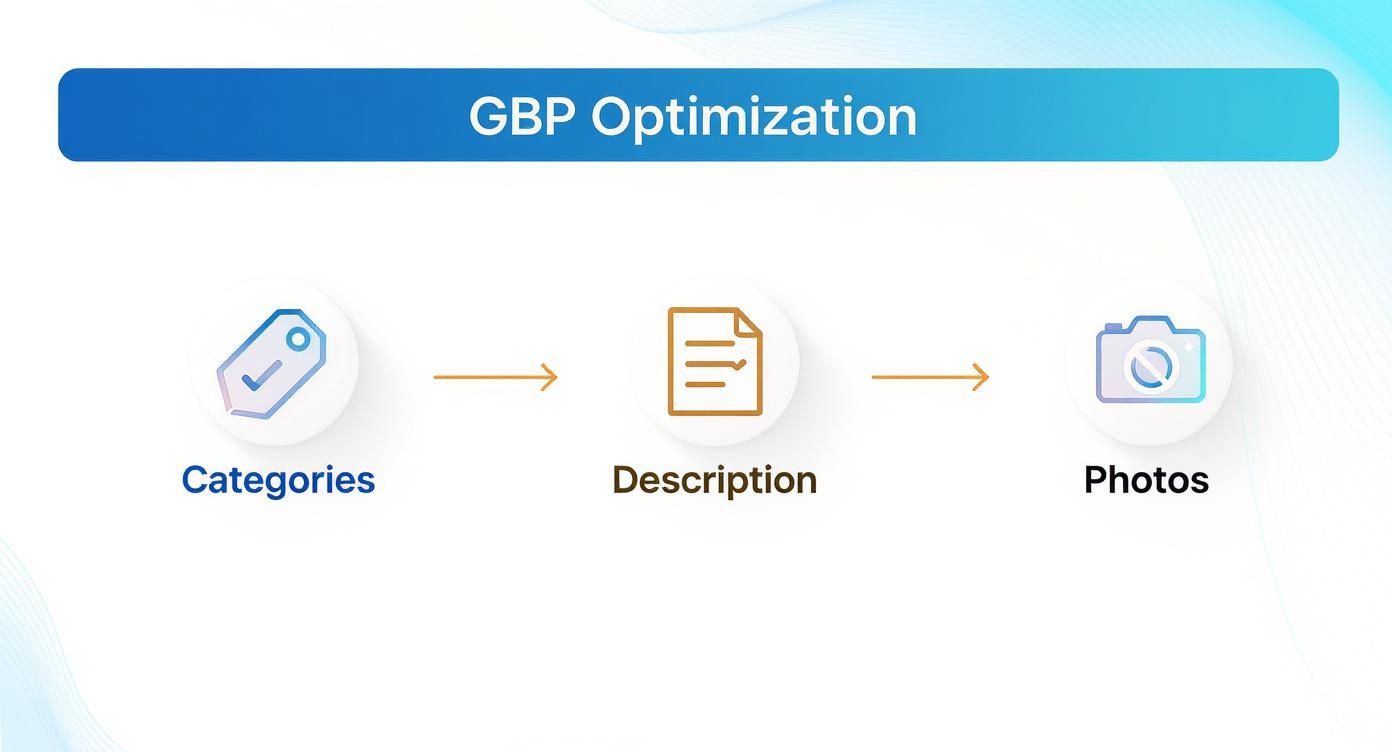
This process shows how your categories, description, and photos work together. You need to select the right tags, write a great description, and then add visuals to back it up.
Why a Complete Profile Matters
Is the effort worth it? Yes. Businesses with a complete GBP are more likely to appear in the local 3-pack.
And remember how people search now. A complete and accurate GBP is the first step for being found in voice searches through Siri or Alexa. For more on this, check out this guide on how to optimize your business for local voice search.
Encourage Reviews and Customer Engagement
What your customers say about you is more important than what you say about yourself. Positive reviews are a huge signal to both customers and Google's algorithm.
A steady stream of recent, positive reviews tells Google that your business is active and providing great service. This is a key factor in your map ranking.
How to Get More Reviews
You don't need a complicated system. Just make it easy for happy customers to leave a review.
- Ask at the Right Time: The best time to ask is right after a great experience.
- Use a Direct Link: Your GBP has a direct review link. Shorten it with a tool like Bitly and share it everywhere.
- Use QR Codes: For physical locations, a QR code at the checkout counter linking to your review page works well.
In Short: Never offer gifts for reviews. This violates Google's policies. Instead, ask for "feedback" to help your business and other customers.
Respond to Every Review
Getting reviews is only half the battle. Responding to them—both positive and negative—shows you are an engaged business owner. This is a crucial part of learning how to improve google map ranking because it's an engagement signal Google watches.
Aim to reply within 24-48 hours.
- For Positive Reviews: Thank the customer by name and mention the specific service they liked.
- For Negative Reviews: Acknowledge their complaint publicly, apologize, and offer to resolve the issue offline. This shows professionalism.
Use Google Posts and Q&A
Your GBP has other powerful engagement tools.
Google Posts are like mini-updates that appear on your profile. Use them weekly to share:
- Special offers or promotions
- New products or services
- Company news or events
The Q&A feature lets customers ask questions directly. Be the first to answer them. You can also proactively add your own frequently asked questions and answer them yourself.
These actions have a real impact. Businesses with high review scores and quick response times often rank higher. Sites like MapRanks.com offer more details on these ranking factors.
Build Trust with Off-Profile Signals
Ranking high on Google Maps isn't just about your GBP. Google looks for consistent, positive mentions of your business across the web to verify its legitimacy.
This is called "off-profile" local SEO. It's about building a consistent online presence that supports the information on your GBP.
Master NAP Consistency
The foundation of off-profile SEO is your NAP: Name, Address, and Phone Number. This information must be identical everywhere it appears online.
Even small differences can confuse Google and hurt your ranking. For example, "123 Main St." on your GBP and "123 Main Street" on Yelp can be seen as a discrepancy.
Ensure your NAP is identical across:
- Your website (header and footer)
- Social media profiles (Facebook, LinkedIn)
- Major online directories (Yelp, TripAdvisor)
- Industry-specific directories
In Short: Your business name, address, and phone number must be exactly the same everywhere online.
Find and Fix Your Citations
An online mention of your NAP is called a citation. You can find your citations by searching for your business, but using a tool is more efficient.
Tools like BrightLocal or Semrush can audit your citations and find inconsistencies. Once you have a report, start fixing the errors, beginning with the most authoritative directories.
Make Your Website a Local Hub
Your website is your online home base. Google cross-references your website with your GBP, so the information must align.
Your NAP should be clearly visible, usually in the footer of every page.
Create Location-Specific Pages
If you serve multiple towns, create a unique page for each one. A roofer in Austin could create pages for:
- "Roof Repair in Round Rock"
- "Metal Roofing in Cedar Park"
Each page needs unique content relevant to that specific location, such as mentioning local landmarks or common issues in that area.
Use Local Schema Markup
Schema markup is code added to your website that helps search engines understand your content. Use "LocalBusiness" schema to explicitly tell Google your NAP, hours, and service area.
This removes guesswork for Google. Many website builders have plugins that make adding schema easy. Putting these elements together is key to a good local maps SEO strategy.
Create Content That Proves Local Authority
Your website should reflect your service area. Create content that anchors your business to your local community. This proves to Google that you are a true local authority.
This strategy creates a powerful feedback loop: you create great local content, share it via Google Posts, and strengthen your local relevance—a key part of how to improve google map ranking.
Build Hyper-Local Landing Pages
Create specific pages on your site for the neighborhoods or towns you serve. These pages must be unique, not just copies with the city name changed.
For example, a Dallas plumber could create pages like:
- Emergency Plumbing in Uptown Dallas: This page could discuss challenges specific to older high-rise buildings in the area.
- Slab Leak Repair in Plano: This page could detail how Plano's soil affects foundations.
- Water Heater Installation in Frisco: This page might focus on the larger, newer homes common in that suburb.
Each page should have unique text, photos from local jobs, and testimonials from local customers.
In Short: Hyper-local pages attract long-tail searches and show Google you have deep roots in the community.
Showcase Your Work with Local Case Studies
Turn your best local projects into detailed case studies or "project spotlights" on your blog.
A great local case study should include:
- The Location: "We recently completed a kitchen remodel in a craftsman home near White Rock Lake in East Dallas."
- The Problem: Briefly explain the client's issue.
- Your Solution: Describe the work you did, including "before" and "after" photos.
- The Result: End with a happy customer quote and a gallery of the finished project.
This type of content is naturally rich with local keywords and showcases your expertise.
Get Involved in Your Community
Community involvement is a powerful local signal. Sponsoring a local sports team, participating in a festival, or volunteering are all great content opportunities.
Document these events with photos and write a short blog post about them. This allows you to naturally mention local landmarks and organizations, strengthening your local ties in Google's eyes.
Understanding the broader benefits of content marketing can help your brand grow. This local-first content strategy helps your website rank and gives you authentic material for your GBP and social media.
Advanced Tactics for Competitive Markets
In competitive industries like plumbing or real estate, the basics aren't enough. To reach the top three spots in the Map Pack, you need to find edges your competitors are ignoring.
Geotag Your Photos
Before you upload photos to your GBP, geotag them. This embeds location coordinates directly into the image file. It's like a digital stamp that tells Google, "This photo was taken at this exact business location."
This is a powerful signal that reinforces your physical location and adds authenticity. Many free online tools can add this data to your images.
Analyze Your Competitors
Competitor analysis is an underrated local SEO tactic. Take a close look at the businesses outranking you.
- Their Categories: Are they using a niche category you missed?
- Their Q&A: See what questions customers are asking. Are any unanswered? Use this to build out your own Q&A section.
- Their Reviews: Note the language customers use in positive reviews. These are often the keywords real people are searching for.
In Short: The goal isn't to copy competitors but to find gaps in their strategy. If they respond to reviews slowly, be faster. If their photos are poor, invest in professional ones.
Use Geogrid Tracking to See Your True Rank
Checking your Google Maps rank from your office computer gives you a skewed perspective. Your ranking changes based on the searcher's location.
Geogrid tracking tools show you how you rank from dozens of different points across your service area. This gives you a true bird's-eye view of your visibility.
This data shows you where you are strong and where you are weak. If you aren't ranking in a valuable neighborhood, you can create a location-specific page or run targeted Google Posts about a job you did there. This surgical approach is a key part of any effective Google Map Pack ranking strategy.
People Also Ask: Top Questions Answered
How long does it take to improve Google Map ranking?
It depends. If your GBP is incomplete, you might see a small improvement in a few weeks after filling it out. For a significant, lasting jump into the top 3, especially in a competitive market, you should expect to see results in 3 to 6 months of consistent effort. This includes getting reviews, building local content, and fixing citations.
Does my website affect my Google Maps ranking?
Yes, absolutely. Google sees your website and GBP as a package. A professional, mobile-friendly website signals to Google that you are a legitimate business, which boosts your GBP's authority. Your website confirms your NAP (Name, Address, Phone number), proves your local relevance through location-specific pages, and provides a good user experience for customers who click through from the map.
How do you get 3-pack on Google?
Getting into the 3-pack requires a combination of factors. The most important are:
- Relevance: How well your business profile matches a user's search. This is influenced by your business categories and description.
- Proximity: How close your business is to the person searching. You can't change this, but you can signal your relevance in a wider service area.
- Prominence: How well-known your business is. This is based on factors like the number and quality of your reviews, your online citations, and your website's authority.
What is the best way to handle a negative review?
The worst thing you can do is ignore it. How you respond can win over new customers.
- Respond Quickly: Reply publicly within 24 hours.
- Acknowledge and Apologize: Start with empathy, like "I'm sorry to hear you had a frustrating experience."
- Don't Argue: Avoid getting into a public debate. It never looks good.
- Take it Offline: Offer a direct contact to resolve the issue, such as "Please email me at owner@email.com so I can make this right."
Ready to stop guessing and start ranking? The team at Clicks Geek specializes in data-driven local SEO that gets real results for businesses just like yours. Let's build a strategy to dominate your local market and drive more customers to your door. Learn more and get in touch at https://clicksgeek.com.