If you want to land that coveted #1 spot on Google Maps, you need to understand the three core ideas: Relevance, Distance, and Prominence.
In short: Google wants to show users a business that’s a perfect match for what they need (relevance), is conveniently located (distance), and has a great reputation (prominence). Nail all three, and you're on your way to the top.
How Google Maps Ranks Businesses
Before we get into tactics, let's understand how Google's local algorithm thinks. Google is open about what it looks for.
Understanding these fundamentals is the foundation for everything. Without this, profile tweaks and optimization tricks won't get you very far.
This visual shows how these three pillars work together.
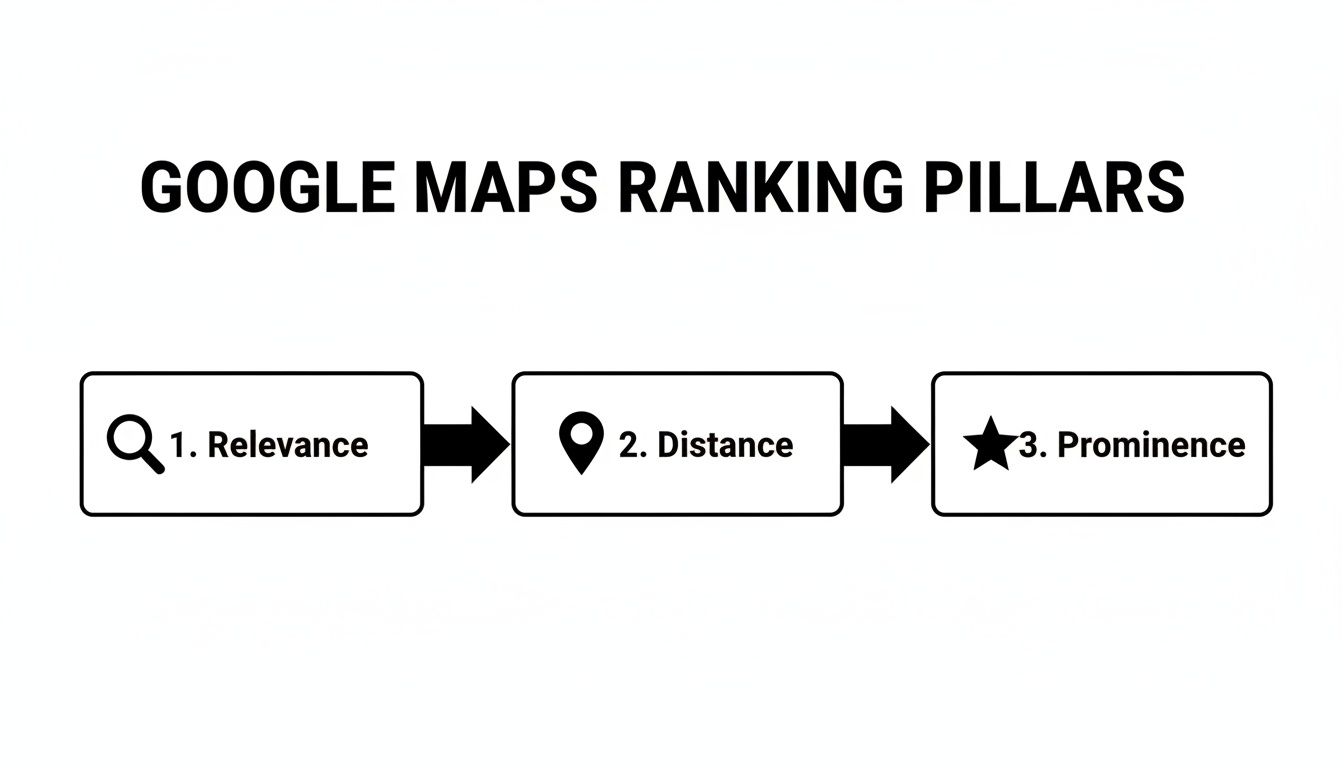
As you can see, it's a layered approach. They all matter and build on one another to tell Google, "Hey, this business is the real deal."
The Three Pillars of Local Ranking
Google's entire local ranking system is built on this framework. Businesses that work on all three see a big boost in the "local pack"—that valuable map and list of three businesses you see for searches like "plumber near me."
So, what do these pillars actually mean?
- Relevance: How well your business profile matches a person's search. If someone searches for a "24-hour emergency vet," Google looks for businesses categorized as "Veterinarian" whose profiles and reviews mention "24-hour" and "emergency care."
- Distance: This is how far your business is from the person searching. Google uses the person's known location or the area in their search (like "sushi in downtown Denver") to calculate this.
- Prominence: This is your online reputation. How well-known is your business? Google looks at your online reviews, mentions in local blogs, and listings in online directories. A business with lots of great reviews is seen as more prominent.
My Take: Proximity is a huge deal, but it's not the only deal. I’ve seen businesses farther away outrank closer competitors because their prominence signals—like reviews and local links—were much stronger. Never underestimate the power of a great online reputation.
For a detailed breakdown, this Local SEO for Car Dealerships: Your Ultimate Guide is a fantastic resource.
Here's a quick look at the three core ranking factors.
The Three Pillars of Google Maps Ranking
| Pillar | What It Really Means | Your Top Priority |
|---|---|---|
| Relevance | How well your profile matches the searcher's query. | Fill out every section of your Google Business Profile with detailed, keyword-rich information. |
| Distance | How physically close you are to the searcher. | Ensure your address is 100% accurate and verify your location. |
| Prominence | How well-known and trusted your business is online. | Build a consistent strategy to earn high-quality reviews and local backlinks. |
Ultimately, excelling at all three is what separates the businesses that show up from the ones that get all the calls.
Why You Can't Ignore Any Pillar
A common mistake is focusing on just one or two of these areas. You might have a great profile for a "bakery in Brooklyn," but if you have zero reviews (low prominence), you’ll get beat.
On the other hand, you could have hundreds of five-star reviews, but if you're 15 miles away, distance will be a major hurdle.
Winning on Google Maps requires a balanced approach. Every tactic we're about to cover strengthens at least one of these pillars. To see how these pieces fit together, check out our guide on local Maps SEO strategies.
Make Your Google Business Profile a Customer Magnet
Your Google Business Profile (GBP) is the heart of your Google Maps strategy. Think of it as your digital storefront. A complete, detailed, and active profile is one of the most powerful signals you can send to Google.
This isn't just about plugging in your name and address. Every section is a chance to outshine your competition. We're going to treat your GBP like the marketing tool it is, one that directly answers how to rank first on Google Maps.
Nail Your Core Business Information
First, let's lock down the fundamentals. Any inconsistency here is a major red flag for Google and can hurt your ranking efforts.
Your business name, address, and phone number (NAP) must be identical everywhere online. If your GBP says "Main Street," your website can't say "Main St." These tiny details matter for building trust with search engines.
- Business Name: Use your real-world business name. Don't stuff it with keywords like "Joe's Plumbing – Best Plumber in Austin." This violates Google's guidelines and can get your listing suspended.
- Address: Make sure your map pin is in the exact location. If you’re a service-area business without a physical storefront, you can hide your address and define your service areas.
- Phone Number: Use a local phone number with your area code. This reinforces your local connection.
Choose Categories That Attract the Right Customers
Your business category is critical. It tells Google precisely what you do.
Your primary category needs to be the most specific description of your main offering. For example, instead of "Restaurant," choose "Italian Restaurant" or "Pizza Restaurant."
Pro Tip: After you choose your primary category, add relevant secondary categories. A "Landscaper" might also offer "Lawn Care Service" or "Tree Service." This helps you show up for more specific searches.
Write a Compelling and Keyword-Rich Description
Your business description is your 750-character elevator pitch. Tell customers who you are and why they should choose you.
It's also a great spot to naturally work in important keywords related to your services and location. Don't just list keywords. Weave them into helpful sentences.
For instance, a roofer in Miami could write:
"As a family-owned Miami roofing contractor for over 20 years, we specialize in roof repair, new roof installation, and hurricane-proof solutions. We offer free estimates on all shingle, tile, and metal roofing projects."
People Also Ask About Google Business Profiles
Here are a few common questions business owners ask.
Can I use a P.O. Box for my Google Business Profile?
No. Google requires a physical address for verification. Using a P.O. Box is against the rules and can get you suspended. If you work from home, you can use your home address for verification and then hide it from the public.
How many photos should I add to my Google Business Profile?
More is better. Aim for at least 10 high-quality photos to start—show your storefront, your team, and your work. After that, add a new photo or two every week to keep your profile fresh.
What's the difference between Products and Services?
The Services section is a list of what you offer. The Products section is more visual and detailed. It lets you add photos, descriptions, and prices. If you run a retail store, you should be using the Products feature.
Use Every Feature at Your Disposal
A great GBP uses all the tools Google provides. Consistently using these features signals to Google that you're an active, engaged business.
- Google Posts: These are like mini-updates on your profile. Share offers, news, or events. They expire after seven days, so they're great for promotions.
- Photos and Videos: Regularly add high-quality, geo-tagged photos of your work, team, and location. Photos show customers what to expect.
- Q&A Section: Proactively ask and answer your own frequently asked questions here. This lets you control the narrative and provide valuable info.
By treating your Google Business Profile as a central hub, you send powerful signals that lead to better rankings on Google Maps.
Build a Review Strategy That Dominates the Local Pack
When it comes to local SEO, your reviews are everything. They are the clearest signal to Google that your business is prominent and trusted. Think of every 5-star review as a vote of confidence.
The secret isn't just getting a bunch of reviews at once. The real power is in a simple system that keeps a steady stream of fresh feedback flowing. Consistency is key for climbing the local pack rankings.
Why Fresh Reviews Matter More Than Old Ones
Many business owners focus on their total review count. While a solid base is great, Google is more interested in what's happening now. A profile actively getting new reviews looks more relevant than one with old reviews.
Fresh reviews are a heavily-weighted ranking factor. I've seen businesses with 80 solid reviews from the last year outrank a competitor with 200 stale reviews. Google wants to see current proof of your quality.
How to Ask for Reviews Without Being Awkward
The number one reason businesses don't get reviews? They don't ask. It doesn't have to be pushy. The trick is to make it easy and ask at the perfect moment—right after a great customer experience.
Here are a few ways to do it:
- The Simple SMS: After a job, send a quick text. "Hey [Customer Name], thanks for having us out! If you have a second, we'd love it if you could share your experience on Google: [Your Review Link]."
- The Email Follow-Up: A day later, send a friendly email. "Hope you're enjoying your [Product/Service]! Honest feedback helps us and other customers. Would you mind leaving a quick review? [Your Review Link]."
- The In-Person Nudge: At the checkout counter, say, "So glad we could help you today! If you were happy with everything, a quick Google review would mean the world to us."
Respond to Every Single Review—Good and Bad
Getting the review is only half the job. Replying is just as important. When you respond, you're showing the algorithm and potential customers that you're an engaged owner.
Key Takeaway: Your review replies are a public billboard for your customer service.
Make it a habit to reply to all reviews, positive and negative, as quickly as you can.
- For the Raves: Thank them personally. Mention the specific service they loved to naturally reinforce keywords.
- For the Rants: Acknowledge their issue calmly. Offer to take the conversation offline to find a solution. This shows you’re a problem-solver.
A well-managed review profile is non-negotiable for how to rank first on Google maps. For a deeper look at top spots, check out this guide on how to rank in the Google 3-pack.
People Also Ask About Google Review Strategy
Does responding to Google reviews help SEO?
Yes, 100%. Responding tells Google you're an active business. It also encourages others to leave reviews, and your replies can include keywords that boost relevance.
How do I get my Google review link?
Log into your Google Business Profile manager and go to the "Home" tab. You'll see a card that says "Get more reviews." Click "Share review form" to get a short link.
Is it okay to offer incentives for reviews?
No, avoid this. Offering discounts or gifts for a review violates Google's policies. You risk having your reviews removed and your profile penalized. Focus on great service and make it easy for happy customers to share their thoughts.
Your Website: The Anchor for Your Google Maps Rank
Your Google Business Profile isn't an island. Google cross-references information from your website to see if you're legit. Think of your website and your GBP as two sides of the same coin—strengthening one boosts the other.
This connection is critical if you're serious about figuring out how to rank first on Google Maps. Google needs consistent signals across your entire digital footprint.

Making Your Website a Local Powerhouse
Your website needs to scream "local authority." It should be clear who you are, what you do, and where you do it.
First, embed a Google Map directly on your website, like on the contact page. This creates a direct link between your site and your physical location. Make sure it's the map of the exact GBP listing you're trying to rank.
Next, display your Name, Address, and Phone number (NAP) in the footer of every page. This NAP info must be an exact match to what's on your Google Business Profile. Consistency is king.
Don't Skip Location and Service Pages
If you serve multiple towns or offer distinct services, build dedicated pages for them. Don't just lump everything onto one generic "Services" page.
Get specific and create pages like:
- [Your City] Plumbing Repair
- Emergency Roofing in [Neighboring Town]
- Residential HVAC Installation in [Your City]
Each of these pages needs unique local content. Talk about jobs in specific neighborhoods, mention local landmarks, and include testimonials from customers in that area.
Speaking Google’s Language With Schema Markup
Think of Local Business schema as a cheat sheet for Google. It's code you add to your website that translates your key business info—name, address, phone, hours—into a language search engines understand perfectly.
It might sound technical, but most website platforms and SEO plugins make adding schema simple. This step removes guesswork for Google and connects your business details to your GBP.
My Take: Schema is a massively underutilized tool in local SEO. It's an easy technical win. Taking 30 minutes to implement it can give you a serious edge.
What are Local Citations?
Local citations are mentions of your business's Name, Address, and Phone number (NAP) on other websites like Yelp, Yellow Pages, and industry-specific directories.
Every time Google finds a consistent citation, it’s another vote of confidence confirming your business details.
Why NAP Consistency is a Deal-Breaker
Inconsistent information is a huge red flag for Google. If one directory lists "123 Main St." and another has "123 Main Street," it creates confusion and kills trust.
Your first job is to do a citation audit. Search for your business online and put every mention into a spreadsheet. Check for inconsistencies in your:
- Business Name: Is "Inc." or "LLC" different across sites?
- Address: Are you switching between "St." and "Street" or "Suite" and "#"?
- Phone Number: Is the formatting identical everywhere?
Once you spot errors, contact each site to get them fixed. The cleanup process is a grind, but it's the foundation for building the "Prominence" Google looks for. For bigger messes, professional local SEO services for small businesses can help fix these errors fast.
Building Citations That Matter
Not all citations are equal. A listing on your local Chamber of Commerce site is worth more than a mention on a spammy directory. Focus on high-quality places relevant to your industry and city.
Look for high-value opportunities like:
- Your local Chamber of Commerce
- Industry-specific associations
- Hyper-local community blogs
These citations send strong, relevant signals to Google, cementing your status as a legitimate local business.
Measuring What Matters: Tracking Your Google Maps Performance
If you're not measuring results, you're just guessing. You need to know what’s actually moving the needle.
This is why you need to get comfortable with your Google Business Profile (GBP) Performance report. This dashboard shows you if your efforts are paying off.
How Are People Finding You?
Your Performance data shows how people discovered your business. Two types are critical for understanding your visibility.
-
Direct Searches: Someone types your exact business name or address. They already know you.
-
Discovery Searches: This is where the magic happens. These are people who found you by searching for a category, like "pizza near me."
A rising number of Discovery searches is your North Star. It's a clear signal that your Google Maps SEO is working and you’re reaching new customers.
From Clicks to Customers: Tracking Real-World Actions
The Performance report also shows you what people do next. This connects your online presence to actual revenue.
The report tracks key customer actions:
- Website Clicks: How many people clicked the website link.
- Phone Calls: The number of users who tapped the "Call" button.
- Direction Requests: How many people asked Google for directions to you.
These aren't just vanity metrics. A direction request is a customer on their way. A phone call is someone ready to book.
My Two Cents: Watch the trends. Did you upload new photos and publish Google Posts this month? If you see a jump in phone calls next month, you’ve found a winning tactic. Double down on it.
Common Questions About Tracking GBP Performance
Where do I find my Google Business Profile performance data?
Just Google your business name while logged into the account that manages your profile. A control panel will appear in the search results, and your performance data is a click away.
What’s a "good" number of views for my profile?
There's no magic number. A law firm in a small town will have different numbers than a coffee shop in Manhattan. Instead of a specific number, focus on the trend. You want to see steady, month-over-month growth.
How often should I check my GBP Performance?
Once a month is perfect. Checking daily will drive you crazy. A monthly check-in gives you enough data to see real trends and spot what’s working.
By reviewing this data, you can stop flying blind and fine-tune your strategy to win more customers from Google Maps.
Your Top Google Maps Ranking Questions, Answered
Even with the best plan, you’ll have questions. Let's dig into some of the most common things business owners ask about getting to the top of Google Maps.
How Long Does It Take to Get to #1 on Google Maps?
This is the million-dollar question, and the honest answer is… it depends. There’s no magic timeline. It reflects how competitive your industry is in your specific city.
- A niche business in a small town might see movement in 2-3 months.
- A personal injury lawyer in a huge city could take 6-12 months or longer.
The secret is steady execution. Keep optimizing, keep earning reviews, and keep building your local authority.
Can I Rank in a City Where I Don’t Have an Office?
Ranking in the map pack for a city where you don't have a verified physical address is next to impossible. Google’s algorithm is built around proximity.
Instead, focus on dominating the traditional organic search results below the map for that city.
Build out location pages on your website for every city you serve. Use hyper-local content: testimonials from local clients, photos from local jobs, and mentions of specific neighborhoods.
Will Bad Reviews Kill My Google Maps Ranking?
No. A couple of negative reviews won't torpedo your rankings. A profile with only perfect 5-star reviews can sometimes feel fake.
What Google cares about is the bigger picture:
- Your overall star rating
- How often you get new reviews
- How you respond to feedback
Responding to a negative review calmly is a golden opportunity. It shows both Google and potential customers that you’re a real human who cares.
Key Takeaway: Don't stress about the occasional bad review. Stress about ignoring it. Your public response often has more power than the original complaint.
What’s the Single Most Important Ranking Factor?
There isn't one. Google's algorithm is a mix of Relevance, Distance, and Prominence.
But if you want to know where to put your energy first, it's your Google Business Profile. It is the absolute bedrock of your entire local SEO strategy.
Once that foundation is solid, the next biggest lever is generating a steady stream of new, positive reviews. This boosts your "Prominence" and is often the fastest way to leapfrog the competition.
At Clicks Geek, we're experts at making Google Maps your best source of new customers. If you're tired of guessing and want to see real, measurable growth, we should talk. Learn more about our data-driven local SEO strategies at Clicks Geek.