Want to learn how to rank better on Google maps? It starts with your Google Business Profile (GBP). Think of it as the foundation for all your local marketing. A complete and active profile is the biggest factor for showing up in local search and the "Map Pack."
This guide will walk you through the key steps. We'll cover optimizing your profile, getting customer reviews, building local authority, and connecting your website.
Step 1: Master Your Google Business Profile (GBP)
Your Google Business Profile is your digital storefront. It’s often the first impression a customer has of your business. An incomplete profile can look untrustworthy. A detailed one builds confidence with both Google and your customers.
In Short: Getting your GBP right is the absolute first step to ranking higher on Google Maps.
First, you must claim and verify your profile. This tells Google you own the business. Without verification, you can't manage your info or respond to reviews.
Fill Out Every Detail
Once verified, fill out every single section of your profile. Google prefers complete profiles. The more accurate information you provide, the more Google trusts you enough to show you to searchers. Don't leave anything blank.
This diagram shows how important parts like categories, business info, and photos build a strong GBP foundation.
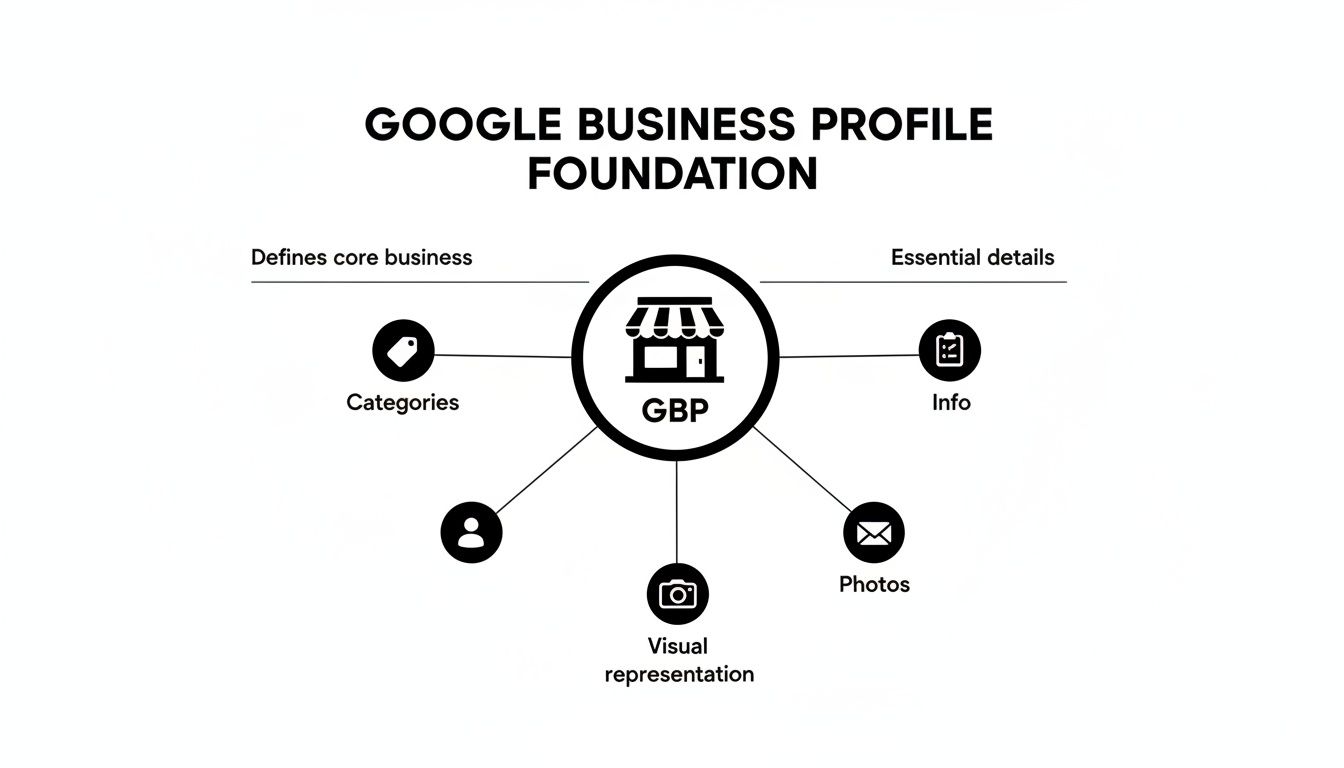
Use a well-rounded approach to create a digital storefront that both Google and customers will trust.
Here's a checklist of the core GBP elements that have the biggest impact on your Maps ranking.
GBP Optimization Checklist
This table covers the essentials. Get these right, and you're ahead of most competitors.
| Element | Why It Matters | Actionable Tip |
|---|---|---|
| Business Name, Address, Phone (NAP) | This is the bedrock of local SEO. Inconsistencies confuse Google and hurt your authority. | Your NAP must be 100% identical everywhere online—your website, GBP, and all other directories. No exceptions. |
| Primary & Secondary Categories | Your primary category is how Google classifies your business. It's a massive ranking signal. | Be specific. "Plumber" is better than "Contractor." Then, add secondary categories like "Water Heater Installation" to capture niche searches. |
| Service Areas | For businesses that travel to customers, this tells Google where you're willing to go. | Define your service area by specific cities, counties, or zip codes. This helps you show up for searches outside your physical address. |
| Business Description | This is your chance to sell your business and include relevant keywords naturally. | Write a compelling summary of what you do and who you serve. Mention your key services and service locations. |
| Photos & Videos | Visuals build trust and engagement. Google rewards profiles that have them. | Upload consistently. Show your storefront, team, work in progress, and finished jobs. Aim for at least 10 high-quality photos to start. |
Getting these basics right proves to Google you're a real, active business worth showing to users.
Bring Your Business to Life
A complete profile is more than just data. You need to give people a reason to choose you.
Use your business description to write a clear summary of who you are. Weave in terms your customers search for, like specific services or neighborhoods. Write for humans, not robots.
Photos are crucial. Profiles with great photos get more clicks and more requests for directions.
Upload pictures of your storefront, your team, finished projects, and happy customers (with their permission). This visual proof is very powerful.
Key Insight: Don't just upload photos once. Adding new pictures regularly signals to Google that your business is active. An up-to-date profile is a trusted profile.
Research shows that consumers are 2.7 times more likely to find a business with a complete GBP reputable. This trust leads to more engagement and better rankings. About 32% of local SEO experts say GBP signals are the most important factor for Map Pack visibility. You can read more in these local SEO findings.
Step 2: Build Authority with Reviews and Engagement
Once your GBP is set, focus on social proof. For local businesses, this means reviews. They are a powerful signal to both Google and customers that you are a trusted business.

Put yourself in a customer’s shoes. You're looking for a plumber on Maps. One has 150 positive reviews, and the other has three. Which one do you call? It’s an easy choice. Google’s algorithm thinks the same way.
How to Get More Customer Reviews
Getting a steady flow of reviews is about making it easy for happy customers.
- Use a QR Code: Place a QR code that links to your review page at your checkout counter or on an invoice. A quick scan with a phone takes them right there.
- Send a Follow-Up: A day after a sale, send a friendly email or text. "Thanks for your business! We'd love to hear how we did." Include the review link.
- Ask in Person: When a customer compliments your service, just ask. "That's great to hear! If you have a moment, we'd appreciate it if you shared that on Google."
Important: Never offer discounts or freebies for reviews. This can get your profile penalized. If you need help, a reputation management service can manage this process for you.
Respond to Every Review
Getting reviews is only half the battle. Responding to all of them shows you are engaged and that you care.
Pro Tip: Google sees your responses as a sign of an active profile. This activity is a real ranking signal that builds trust.
For a positive review, a simple "Thank you for the kind words!" works well.
For a negative review, don't panic. A calm, professional response can turn a bad situation around. Thank them for the feedback, apologize, and offer to resolve the issue offline.
Use Google Posts to Stay Fresh
Another way to show Google you're active is with Google Posts. Think of them as small updates on your Business Profile.
Use Posts to:
- Announce a sale or special offer.
- Share news about an event.
- Showcase a new product.
- Post photos from a recent job.
Posting regularly tells Google your business is active and relevant right now. This consistent activity is key to building local authority.
Step 3: Build Local Authority with Citations and Links
Google looks for evidence across the web that your business is legitimate. Local citations and backlinks act as votes of confidence from around the internet. They tell Google you're an established local business.
The more consistent these digital mentions are, the more Google trusts you. And when Google trusts you, it rewards you with better visibility.
Why Consistent Citations Matter
A "local citation" is any online mention of your business's Name, Address, and Phone number (NAP). You find them on business directories, social media, and other websites.
Consistency is everything.
If one directory lists you on "Main St." and another on "Main Street," this small difference creates confusion. This issue, called NAP drift, can weaken your citations and hurt your Google Maps ranking.
Your first step is to get your info correct on the most important directories.
- Major Platforms: Start with Yelp, Bing Places, Apple Maps, and Facebook.
- Industry Sites: If you're a roofer, get on Angi and Houzz. If you run a restaurant, get on TripAdvisor.
- Local Directories: Don't forget your local Chamber of Commerce or community blogs.
The Bottom Line: Your NAP (Name, Address, Phone) must be 100% identical everywhere. No exceptions. Even a small variation can confuse Google.
How to Clean Up Your Digital Footprint
Before building new citations, you have to fix old ones. You can start by Googling your business name plus your phone number, and then your name plus your address. Keep a spreadsheet of any listings with incorrect info. Then, claim each listing and correct the mistakes. This takes time, but it's essential for good local SEO. Many local SEO services for small business can handle this for you.
Get Local Links That Make a Difference
Local link building involves getting clickable links from other local websites to yours. These links act as a direct endorsement.
Here are a few simple ways to get them:
- Sponsor a Local Event: Support a local 5k or a little league team to get a link from their website.
- Host a Community Workshop: An accountant could host a "Tax Tips" workshop and get featured on local news sites.
- Partner with Nearby Businesses: A coffee shop could team up with a bookstore for a promotion and get a link from the bookstore’s site.
These are the local signals Google loves. They prove you're an active part of the community, which boosts your relevance.
Step 4: Connect Your Website to Your Maps Strategy
Your GBP and your website should work together. When they are in sync, they send strong, consistent signals to Google. General SEO knowledge is a big help here. A good starting point is understanding what search engine optimization (SEO) is.
Connecting your site and your Maps profile tells Google a clear story about who you are, what you do, and where you operate. This alignment is key if you want to learn how to rank better on google maps.
Why You Need Dedicated Location Pages
If you have more than one location, you must create a separate page on your website for each one. Trying to list multiple cities on a single "Contact Us" page confuses customers and Google.
Each location page should be a hub for that specific branch. This lets you get hyper-local with your content.
For example, a page titled "Plumber in Northwood" will always rank better for searches in that area than a generic contact page.
How to Optimize Your Local Landing Pages
Just creating the page isn’t enough. You need to fill it with the right local signals.
Here’s a checklist for every location page:
- Consistent NAP Info: Your Name, Address, and Phone Number must be on the page. It must match your GBP for that location perfectly.
- Local Keywords: Naturally include the city, neighborhood, and nearby landmarks in your page title, headings, and text.
- Embedded Google Map: Add an interactive Google Map showing your exact pin.
- Unique Content: Write unique content for each page. Talk about the local team or mention services specific to that branch.
The Secret Weapon: Local Business Schema
Local Business schema markup is a game-changer. It's a piece of code you add to your website that feeds information to search engines in a language they easily understand.
This code tells Google things like:
- Your business name and type (e.g., "Restaurant," "Plumber").
- Your exact address and geocoordinates.
- Your phone number and hours.
- Links to your social media profiles.
Key Takeaway: Schema markup removes the guesswork for Google. You're handing it a neat data sheet. This clarity builds trust and often leads to better rankings.
Implementing schema is one of the most effective things you can do on your site for local SEO. It reinforces your GBP data and strengthens your local authority.
Step 5: Monitor and Troubleshoot Your Rankings
Optimizing your GBP is a great start, but the work isn't over. You need to keep your profile tuned up. This means switching to ongoing management to keep your top spot.
Start with the Performance dashboard inside your Google Business Profile. It’s a goldmine of information that shows how real people find and engage with you on Google.
It shows you the exact words people use to find you. You can also see how many people called you, asked for directions, or clicked to your website directly from your profile.
Key Insight: Look for trends in the data. If one search term drives most of your calls, focus your Google Posts on that topic. If direction requests are down, you may need to rethink your service area.
What Your Performance Data Means
Digging into your GBP Performance dashboard is essential if you want to know how to rank better on google maps. It’s Google’s way of giving you direct feedback.
- Queries: This is your keyword list. You might find customers search for "emergency plumbing near me" more than technical terms. Use these real-world phrases in your content.
- Profile Interactions: This tracks clicks on your call button, website link, and directions. Lots of calls but few website clicks could mean your profile is very effective.
- How people find you: Data shows most views—around 84%—come from "discovery" searches (e.g., "italian restaurant") not "direct" searches (your business name). Optimize for what you do, not just who you are.
For a deeper look at using this data, our complete guide on Local Maps SEO breaks it down even further.
What to Do When Rankings Drop
If your rankings suddenly drop, don't panic. Work through this checklist to find the problem.
- Sudden Bad Reviews? A wave of negative reviews can hurt your star rating and rankings. Respond professionally to every single one. Then, find and fix any internal issues.
- Is Your NAP Consistent? Did you get a new phone number? A small change not updated everywhere can confuse Google. Audit your main online directories and ensure your NAP is 100% identical.
- Spammy Competitor? If a competitor has a name like "Bob's Plumbing | Best Plumber," that's keyword stuffing. You can suggest an edit on their profile to report it.
- Losing on Proximity? If you're not showing up for searches a few miles away, you need to build more authority there. Get reviews from customers in that area and create location-specific content on your website.
People Also Ask About Ranking on Google Maps
Here are answers to some of the most common questions business owners have about Google Maps SEO.
How do I rank #1 on Google Maps?
Ranking number one on Google Maps requires a combination of factors. The most important are relevance, distance, and prominence.
- Relevance: Make sure your business categories and description match what users are searching for.
- Distance: Google prioritizes businesses closest to the searcher's location.
- Prominence: Build a strong online presence through positive reviews, consistent citations (NAP), local links, and an active, complete Google Business Profile.
How can I improve my local ranking on Google?
To improve your local ranking, focus on these key actions:
- Fully complete your Google Business Profile.
- Choose specific and accurate business categories.
- Encourage a steady stream of positive customer reviews and respond to them.
- Add high-quality photos and videos regularly.
- Ensure your business name, address, and phone number (NAP) are consistent across the web.
- Use Google Posts to share updates and offers.
Why is my business not showing up on Google Maps?
There are several common reasons your business might not appear on Google Maps:
- It's not verified: You must verify your business before it can appear in Maps.
- Incomplete information: Your profile may be missing key details like an address, category, or phone number.
- You're too far away: Google's results are based on proximity, so your business might not be close enough to the searcher.
- It has been suspended: Your profile may have violated Google's guidelines.
- It's a new listing: It can take a few weeks for a new business profile to appear in search results.
Can I rank in a city where I don’t have an office?
For the Map Pack, it's very difficult. The Google Maps algorithm is built on proximity. You can't fake being close to the searcher.
What you can do is set up "Service Areas" in your Google Business Profile. This tells Google all the towns you serve and helps you show up in the regular, non-map search results for those areas. But for the Map Pack, focus on the city where your business is physically located.
Ready to stop guessing and start owning the Map Pack? At Clicks Geek, we live and breathe this stuff. We turn Google Business Profiles into powerful tools that bring in real customers.
Discover how our Local SEO services can boost your visibility and drive real growth today!