If you want to improve your local SEO rankings, start with your Google Business Profile (GBP). This free listing is the most important factor for showing up in local searches and the Google Map Pack.
Think of your GBP as your digital storefront. It’s how you tell Google who you are, what you do, and where you're located. A complete and active profile is your ticket to the top of local results.
Many business owners create a profile and then forget about it. That’s a big mistake. An incomplete GBP is like a closed sign on your door. A detailed profile tells Google you're a real business that deserves to be shown to customers.
In Short: A fully optimized Google Business Profile is the foundation for improving your local SEO rankings.
Choose the Right Business Categories
Your primary category is the most important choice on your profile. It tells Google the main service you offer. Think like a customer: what would they search for? If you're a plumber, your category is "Plumber," not "Home Services."
After setting your primary category, add secondary ones. These help you show up for other related searches. For a plumber, these might be:
- Water Heater Installation & Repair
- Drain Cleaning Service
- Sewer Contractor
Adding extra categories helps you get found for more services without confusing Google about your main focus.
Fill Out Every Single Field
Google rewards complete profiles. Your job is to fill out every section with accurate and up-to-date information.
Go through your profile and check these sections:
- Service Area: Define the specific neighborhoods, towns, or zip codes you serve. This is crucial for businesses that travel to customers.
- Hours of Operation: Keep your hours updated. Nothing frustrates a customer more than showing up to a closed business that Google said was open.
- Services: List every service you offer. Add detailed descriptions and pricing if it makes sense for your business.
- Attributes: These are helpful tags. Select every one that applies, like "Veteran-led," "24-hour service," or "Online appointments."
Here’s a simple way to think about the process:
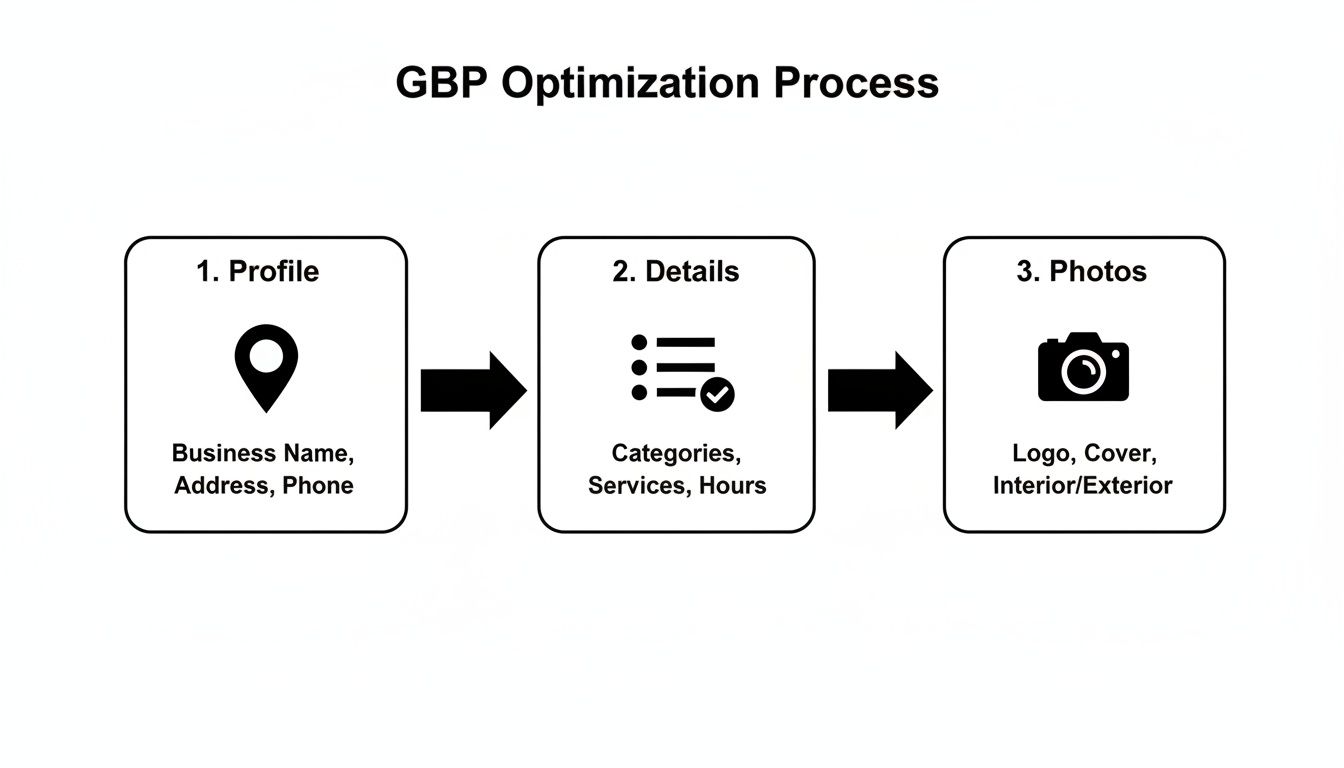
It's a constant loop: manage your details, add fresh photos, and keep your profile active.
🔑 Key Takeaway: An incomplete profile looks untrustworthy to Google. A complete profile gives Google the confidence to recommend your business.
To help you get started, here's a quick checklist of where to focus your energy.
Your GBP Optimization Priority Checklist
Use this table to make sure you’re hitting the most important optimization points first.
| Action Item | Impact Level | Why It Matters to Google |
|---|---|---|
| Select the Correct Primary Category | High | This is the #1 signal telling Google what your business is. Getting it wrong confuses the algorithm. |
| Complete All Core Information | High | A complete profile shows Google you're a legitimate, active business worthy of ranking. |
| Add High-Quality, Geotagged Photos | Medium | Visuals prove you're real. Geotags add a powerful, hyper-local signal. |
| Actively Solicit & Respond to Reviews | Medium | Reviews are a huge trust signal. Responding shows you're engaged and care about customers. |
| Use Google Posts Weekly | Low | Shows your business is active and provides fresh content directly on your search listing. |
| Answer & Seed the Q&A Section | Low | Proactively answers customer questions and helps you control the narrative. |
Tackling these items in order will give you the best results as you work on improving your local visibility.
Bring Your Profile to Life with Visuals and Updates
A static profile is boring. You need to turn it into a living storefront with photos and posts.
Get in the habit of uploading high-quality pictures of your team, completed jobs, and service vehicles. Before you upload them, geotag your photos—it’s an easy win that adds local relevance.
Also, use Google Posts. This feature is perfect for sharing updates, special offers, or news. These posts show up in your search listing and signal to Google that you're an active business. The Q&A section is another goldmine. Answer common questions yourself to provide helpful info upfront.
Putting work into your Google Business Profile is one of the highest-impact things you can do for local SEO. For a more detailed breakdown, learn more about how to rank higher on Google Maps.
Aligning Your Website for Local Search
With your Google Business Profile optimized, it's time for your website. The goal is to send clear signals to Google that you are the authority for your services in your area.
You need to make it easy for search engines to connect what you do with where you do it. When Google makes that connection easily, your local rankings improve. This means optimizing key on-page elements to highlight your local focus.

Weave Local Keywords into Your Core Pages
Let's start with the basics. Your homepage, about page, and contact page are prime real estate for sending local signals. You need to work location-based keywords into these pages naturally.
- Title Tags: Instead of "Best Plumbing Services," use "Best Plumbing Services in South Austin."
- Meta Descriptions: Mention your location in your meta description to get local clicks from search results.
- Headers (H1, H2): Use headings to state who you are and where you work, like "Your Trusted Electrician in Scottsdale."
This isn't about keyword stuffing. It's about being direct. A well-placed local keyword tells both customers and Google that you're the right choice.
🔑 Key Takeaway: Make your location a core part of your website's identity, not an afterthought. Every key page should reinforce where you operate.
To get ahead, it helps to understand the bigger picture of SEO vs. GEO vs. AEO and how geographic optimization plays a role in search.
Create Hyper-Local Service Pages
Here’s a game-changing tactic: stop using a single, generic "Services" page. Instead, build dedicated pages for each service you offer in each location you target.
For example, a roofer who covers a city and its suburbs could create pages like:
yourwebsite.com/roof-repair-downtown-houstonyourwebsite.com/roof-repair-the-woodlandsyourwebsite.com/roof-repair-sugar-land
Each page becomes a hyper-relevant landing spot for someone searching for that exact service in that neighborhood. This strategy helps you dominate specific, long-tail local keywords. For more on creating pages that convert, review these landing page design best practices.
Reinforce Trust with On-Page Local Signals
Keywords are just one piece of the puzzle. Your site needs other elements to prove its local legitimacy to Google.
First, your Name, Address, and Phone number (NAP) needs to be easy to find, ideally in the footer of every page. This information must be an exact match to what’s on your Google Business Profile. Any difference, like "St." vs. "Street," can confuse search engines and hurt your rankings.
Second, embed a Google Map on your contact page. This is a powerful signal that visually confirms your physical location. It adds trust and makes it easy for customers to find you.
What Is Local Business Schema?
Local business schema is like a digital name tag for your business that you add to your website's code. This structured data speaks directly to search engines. The code tells them your business name, address, phone number, and hours. By adding it, you make it easier for Google to show your correct info in local search results.
How Do I Add My Business to Google Local Search?
The first step is to create and optimize your Google Business Profile (GBP). This free listing is the foundation of your local search presence. You need to fill out every section—from business categories to photos and hours. Once your GBP is live, focus on getting customer reviews and ensuring your website's NAP information is a perfect match.
How Can I Improve My Local SEO for Free?
You can make a huge impact without spending money. The number one thing is to completely fill out and update your Google Business Profile. Next, ask happy customers to leave reviews. Then, make sure your business name, address, and phone number are listed consistently everywhere online. You can also create locally-focused blog posts, like a write-up of a recent local job. These are all powerful, free strategies.
Building Local Trust: Reviews and Citations
For local SEO, trust is everything. Google recommends businesses that are legitimate, consistent, and liked by the community. Two of the most powerful tools to prove this are customer reviews and online business listings, also known as citations.
Citations are mentions of your business's Name, Address, and Phone number (NAP) on sites like Yelp, Angi, and local directories. When Google sees your NAP listed consistently across many reputable sites, it confirms you're a real business.
Getting Your Citations in Order
Inconsistency hurts local SEO. If one directory lists you on "Main St." while another has you on "Main Street," it can confuse search engines and lower your authority. Start with a quick audit.
Google your business name and see what pops up. Are old addresses or phone numbers still out there? Those need to be fixed.
- Go on a scavenger hunt: Start with big sites like Yelp, Yellow Pages, and Bing Places, then look for industry-specific directories.
- Fix every error: Claim any listings you find and update them with your correct NAP. It must be a 100% perfect match to your Google Business Profile.
- Build new ones: Look for high-quality local or industry directories where you don't have a listing. Every new citation is another trust signal.
If you want a more systematic way to find citation opportunities, you can learn how to scrape local directories.
The Real Story Behind Customer Reviews
Reviews are the lifeblood of your local reputation. It's not just about getting a few five-star ratings. Google watches the velocity, recency, and quality of your reviews. A steady stream of new, positive reviews tells Google that you're an active company that people are happy with right now.
In Short: A steady flow of recent reviews can boost your rankings faster than almost anything else.
Keeping a steady pace of new reviews coming in can rocket your local rankings. When customers leave detailed comments mentioning specific services, it’s a game-changer for getting into the map pack.
How Do I Actually Get More Local Reviews?
Asking happy customers for feedback doesn't have to be awkward. The key is to make it easy for them.
- Timing is everything. The best time to ask is right after you've finished the job and the customer is happy.
- Remove all friction. Give them a direct link to your Google review page. You can text it, email it, or put a QR code on the invoice.
- Change your language. Instead of "Please leave us a review," try "We'd love your feedback on how we did today." It feels more like a conversation.
Why You Need to Respond to Every Single Review
This is non-negotiable. Replying to reviews is a powerful and free marketing activity. When you thank someone for a good review, you show all future customers that you appreciate your clients.
When you get a negative review, responding professionally shows you're accountable. It tells potential customers that even if something goes wrong, you’ll be there to fix it. This engagement sends a signal to Google that you're an active, attentive business owner, which is essential for climbing local rankings and owning the Google 3-Pack.
Create Content That Connects with Your Community
Content marketing isn't just for big national brands. For a local business, creating content that speaks to your community is a powerful way to build authority and trust. Stop thinking about generic blog posts and start creating resources your neighbors will use.
The goal is to become the go-to expert in your town. When you consistently publish helpful, locally-focused content, Google starts to see you as a prominent player in your area. This directly impacts your rankings.
Brainstorming Hyper-Local Content Ideas
The secret is to think small and specific. Your mission is to connect with people who live down the street.
Here are a few ideas to get you started:
- Spotlight Your Projects. Finished a job in a specific neighborhood? Write a case study about it. Post before-and-after photos and talk about the challenges you solved. This shows off your skills and targets people searching for services in that area.
- Create Neighborhood-Specific Guides. Solve a local problem. A nursery in San Diego could write a post like, "The Top 5 Drought-Resistant Plants for San Diego Gardens." A roofer in Chicago could write, "Is Your Roof Ready for a Chicago Winter?"
- Talk About Local Events. Sponsoring a local team or event? Blog about it. This shows you're invested in the community and builds a positive brand association.
🔑 Key Takeaway: Your content doesn't always have to be about selling. Becoming a trusted local resource builds brand loyalty that pays off for years.
Build Links by Building Community
Local link building is about genuine community involvement that has SEO benefits. When other local organizations link to your website, it sends a strong signal to Google that you're a trusted part of the local business scene.
These are legitimate, powerful SEO strategies that work.
How to Earn Powerful Local Links
Getting started is simpler than you think. It's about building real-world relationships that translate into online authority.
Here are some practical ways to earn valuable links:
- Sponsor a Local Team or Event. This is a classic for a reason. Sponsorships for kids' teams, charity runs, or local festivals almost always get you a link from the organization's website. You support your community and get a high-quality local backlink.
- Join Your Local Chamber of Commerce. Most chambers have an online directory where they list members with a link. This is often one of the easiest and most authoritative local links a business can get.
- Host a Free Workshop. A landscaper could host a "Fall Gardening Prep" workshop. Promote it through local community calendars and blogs, and you'll naturally pick up mentions and links.
- Partner Up with Other Local Businesses. Team up with a non-competing business for a joint promotion. A home cleaning service could partner with a real estate agent. You can cross-promote each other on your websites, leading to relevant links.
These actions don’t just get you backlinks that improve your local SEO rankings—they weave your business into the fabric of your community.
Getting the Technical Details Right
"Technical SEO" can sound scary, but you don't need to be a web developer. However, if your website has technical problems, your SEO efforts will fail.
A slow, confusing, or broken site will hurt your rankings, no matter how great your marketing is. Getting these basics right ensures that both customers and Google can access and understand your site easily.
Is Your Website Mobile-Friendly?
This is a deal-breaker. Most local searches, like "emergency plumber near me," happen on a smartphone. If your website is a mess on a small screen, you are telling Google you aren't the right answer for those searchers.
Google uses mobile-first indexing, meaning it primarily looks at the mobile version of your site for ranking. If your site isn't built for mobile, it’s almost invisible in local search.
A good mobile experience means your site has:
- A responsive design that fits any screen.
- Readable text without pinching or zooming.
- Large, tap-friendly buttons and links.
- Quick load times, even on a weak mobile connection.
Not sure if your site is mobile-friendly? Use Google's free Mobile-Friendly Test tool. It will give you a yes or no answer in seconds.
How Fast Is Your Site?
We've all clicked a link to a page that takes forever to load. What do you do? You hit the back button. Your customers are no different.
Site speed is a Google ranking factor and a huge conversion factor. A Google study found that the chance of a user bouncing increases by 32% as page load time goes from 1 to 3 seconds. If your site is slow, you’re losing business.
Slow sites often have large images, clunky code, or cheap hosting. Diagnose the problem with a tool like Google's PageSpeed Insights. It gives you a performance score and a checklist of things to fix.
What Is Local Business Schema?
This sounds technical, but the idea is simple. LocalBusiness schema is a bit of code you add to your website that acts like a detailed business card for search engines.
It speaks directly to Google, telling it:
- Your official business name
- Your exact street address
- Your primary phone number
- Your current hours of operation
- The type of business you run (e.g., "Plumber")
Adding this code makes it easy for Google to verify your business information. This builds trust and can help you show up in more prominent search results.
In Short: Schema markup spoon-feeds Google the exact details about your business, removing any confusion.
You don't need to be a coder. Tools like Google's Structured Data Markup Helper can generate the code for you. It’s a small technical step with a big impact on how to improve local seo rankings.
How to Measure Your Local SEO Success
You’ve put in the work. Your Google Business Profile is polished, your website is optimized, and reviews are coming in. But is it working?
You don't need complicated software. The answers are in two free tools: Google Business Profile (GBP) Insights and Google Analytics. Let's look at what really matters for a local service business.
Your Most Important Local SEO Metrics
Forget about vanity metrics that don't lead to business. For a service business, success means the phone is ringing and contact forms are being submitted.
Focus on these key performance indicators (KPIs):
- Local Search Visibility: How often do people see your business on Google and Maps?
- GBP User Actions: Are people calling you, visiting your website, or asking for directions from your profile?
- Organic Website Traffic: Are more local customers finding your website through search?
- Local Keyword Rankings: Where do you show up when someone searches "plumber in [your city]"?
These four areas give you a complete picture of your local SEO performance.
Using Google Business Profile Insights
Your GBP dashboard is a goldmine. It’s the most direct feedback on how customers find and interact with your business in search results.
Log in to your Google Business Profile and click on "Performance." Here's what to look for:
Queries: This report shows the exact search terms people used to find you. It’s like reading your customers' minds. This insight is huge for refining your content and keyword strategy.
Interactions: This section tracks how many people took action after finding your profile. You’ll see a breakdown of calls, website clicks, and requests for driving directions.
🔑 Key Takeaway: A steady increase in calls and website clicks from your GBP dashboard is the clearest proof that your local SEO is working. These are high-intent leads looking for your help.
Tracking Local Performance in Google Analytics
While GBP Insights covers what happens on Google, Google Analytics tells you what happens on your website.
A powerful move is to set up a filter to see traffic just from your service area. This confirms your on-page SEO is attracting the right people. You want to see an increase in organic traffic from users in the cities and towns you serve.
If website visits from your target locations are going up, it’s a strong signal that your locally-focused content is working.
Key Local SEO Metrics You Should Actually Track
This table focuses on the numbers that signal real business growth.
| Metric | What It Tells You | Where to Find It |
|---|---|---|
| Search Queries | The exact keywords customers are using to find your business on Google. | Google Business Profile Insights |
| GBP Interactions | How many people call, click your website link, or ask for directions. | Google Business Profile Insights |
| Local Pack Rankings | Your visibility in the top 3 map results for your most important services. | Manual Searches or a Rank Tracker Tool |
| Organic Traffic by Location | Whether your website is successfully attracting visitors from your service area. | Google Analytics |
Checking these core metrics once a month gives you a clear, data-backed view of what's working. This lets you stop guessing and make smart decisions to keep your local rankings climbing.
Answering Your Local SEO Questions
How Long Does It Take to See Results from Local SEO?
It depends. There's no single answer, but you can often see quick wins.
Optimizing your Google Business Profile can show results in just a few weeks. But building sustainable authority from reviews, content, and citations is more of a 3 to 6-month journey.
It really comes down to how competitive your market is and how consistent you are. Think of it like pushing a boulder; it starts slow but builds unstoppable momentum.
What Are the Most Important Ranking Factors for the Google Map Pack?
Google's Map Pack is based on three core ideas: Relevance, Distance, and Prominence.
- Relevance: How well does your business profile match the search query?
- Distance: How close are you to the person searching?
- Prominence: How well-known is your business online? This is built through reviews, links from other local websites, and consistent business listings (citations).
Your Google Business Profile is your most powerful tool because it directly influences all three.
Can I Do Local SEO Myself or Should I Hire Someone?
You can absolutely get started on your own.
Handling the fundamentals is a great first step. That means claiming and filling out your Google Business Profile, asking customers for reviews, and ensuring your website's contact info is correct.
It gets trickier with more time-consuming tasks like building citations and handling technical SEO. A good agency can speed up the process and let you get back to running your business.
Ready to stop guessing and start getting real results? The experts at Clicks Geek build customized strategies to improve your local SEO rankings and get your phone ringing. Learn how we can help your business grow.